Simple dashboard (/user)
/user is a single, phone-sized page for the people who live with the battery. It shows
the essentials and, for the user role, lets them start a charge or discharge.
- Accounts with the
userorviewerrole always land here. They cannot open the main UI. - Admins can open it to see what household members see. Its user menu has an Admin view link back to the main UI.
- It always uses the dark theme.
- It refreshes on its own and needs no setup.
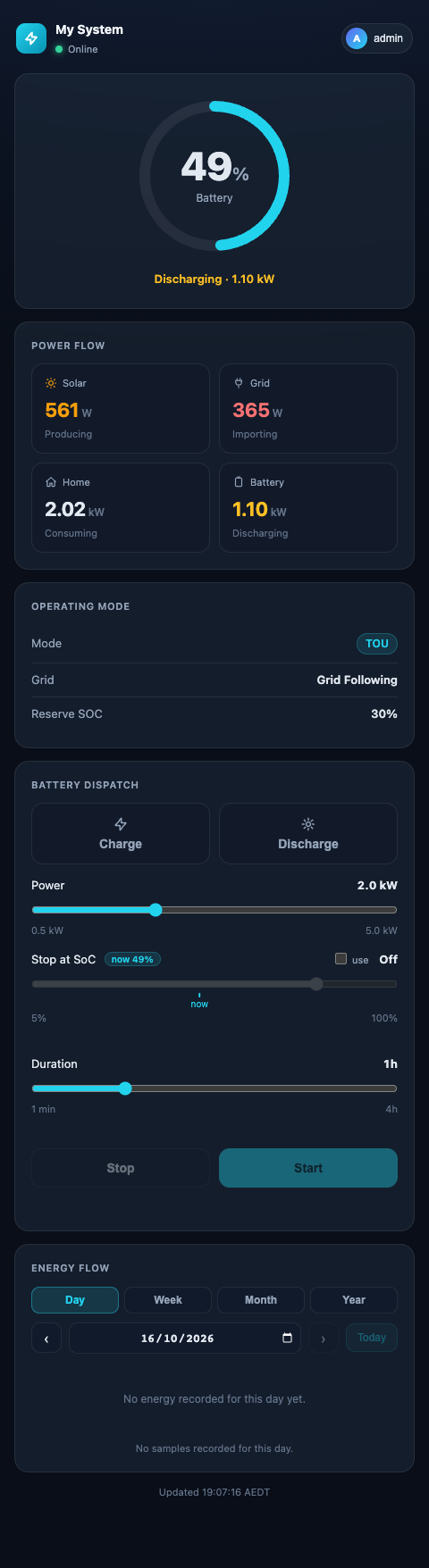
Cards
| Card | Shows |
|---|---|
| Top bar | The site name (from Energy & Automation → Site Name), Online / Offline, and the user menu (Sign out). |
| Battery ring | SoC, and whether the battery is charging or discharging and at what power. |
| Power Flow | Solar, Grid, Home and Battery in kW, each with its state (Producing, Importing, Exporting, Consuming, Charging, Discharging, Idle). Below 25 W counts as idle. |
| Operating Mode | The aGate's mode, the grid state, and the reserve SoC of the active mode. |
| Battery Dispatch | Only for roles that may send commands (user, admin). See below. |
| Energy Flow | The same Sankey diagram as the Dashboard, with Day / Week / Month / Year and a date picker. |
| Today | Solar produced, grid imported and exported, battery charged and discharged, for the chosen day. |
| Lifetime | The aGate's lifetime counters for the same five figures. |
The footer gives the update time in the bridge's timezone.
Battery Dispatch
- Pick Charge or Discharge (click again to unselect).
- Set Power: 0.5 kW up to the gateway's trusted battery rating.
- Optionally tick use next to Stop at SoC and set a target (5–100 %). The current SoC is marked on the slider. If the battery is already past the target in that direction, a warning says the target won't stop it.
- Set Duration: 1 minute to 4 hours. With a target set, duration is the backstop: whichever comes first ends the dispatch.
- Press Start. Stop releases it and hands control back to the aGate.
Needs a battery rating
Start stays disabled while the gateway has no usable battery power rating (the aGate reported none, or the battery ran well above it). The card then says "Battery power not calibrated yet — ask the bridge admin to calibrate it". The admin does this in Settings → Site & Gateways → Battery power rating.
Primary gateway only
Battery Dispatch always commands the primary gateway (ID default). On a bridge where
the primary aGate is not set up (for example, demo only), the page can show readings
from another gateway while its controls have nothing to command.
A viewer sees everything except Battery Dispatch.