Actions
The action is what an entry does when it fires. Each entry has exactly one battery action (or No battery action) plus any number of Home Assistant actions.
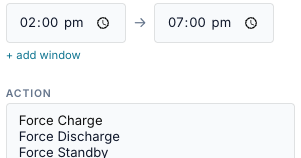
Summary
| Action (UI) | API action |
Parameters | Kind | What the bridge writes |
|---|---|---|---|---|
| Force Charge | force_charge |
Power (W) | sustained | a WSet charge setpoint (Model 704) and the revert timer |
| Force Discharge | force_discharge |
Power (W) | sustained | a WSet discharge setpoint and the revert timer |
| Force Standby | force_standby |
— | sustained | a 0 W setpoint: the battery neither charges nor discharges |
| Release | release |
— | one-shot | clears the setpoint and the revert timer: the gateway returns to its own mode |
| Self Reserve % | reserve_self |
Reserve % (pct) |
one-shot | Self-Consumption reserve (register 15508) |
| TOU Reserve % | reserve_tou |
Reserve % (pct) |
one-shot | TOU reserve (register 15509) |
| Operating Mode | mode |
Mode (mode) |
one-shot | operating mode (register 15507) |
| No battery action (HA only) | none |
— | none | nothing; only the entry's HA actions run |
- Sustained actions hold the battery for the length of the run. The bridge supervises them and releases them when the run ends. See Exit and release.
- One-shot actions are sent once each time the entry becomes active, and not again until the next window. Nothing is undone when the window ends.
The API checks the action when you save: an unknown action, a mode without params.mode
or a reserve without params.pct is refused.
Battery actions: Force Charge and Force Discharge

Power and sizing
| Power field | Result |
|---|---|
| a number, in watts | that power, capped at the gateway's trusted battery rating for that direction |
| empty | the gateway's full trusted rating for that direction |
-
Power is in watts or % (the form's W / % choice). A % is that share of the gateway's trusted battery rating, sent in watts: 50 % of 5000 W is 2500 W. Like watts, it needs a trusted rating, and the overshoot guard applies. (Up to 0.2.40 a % was sent as WSetPct unchanged; franklinwh-modbus 0.10.1 sends watts only, and firmware V12 refuses WSetPct above 10 %.) Percentages were removed in 0.2.8 and restored in 0.2.31.
-
params.power_pctmust be 1–100, and an entry can't set bothpower_wandpower_pct. -
A PATCH that changes only
paramsis not checked, so a value outside those rules can still be set on an existing entry through the API. -
An entry saved with a percentage opens in the form with % selected.
- A power above the gateway's Model 702 nameplate limit is first cut to that limit, even when the trusted (calibrated) rating is higher.
Force commands are refused until the battery rating is trusted
The bridge sizes every force command against a battery power rating. A rating is trusted only when it is backed by evidence:
- calibrated: you ran a full-rate dispatch from the FranklinWH app and the bridge recorded the peak, or
- m702_confirmed: the aGate's Model 702 rating, and the battery has been seen running at 80–115 % of it.
Mock gateways are always trusted. A rating stops being trusted when the battery is seen running well above it, until you calibrate again. Each direction is judged on its own. Force Standby is never refused: it asks for 0 W.
What a refusal looks like (since 0.2.9). The scheduler records the refused send as failed — "dispatch failed: Refused Force Charge: … — attempt 1, retrying in 15s" — and retries after 15 s, 30 s, then every 60 s while the window is open. The first failure, and a final "window ended without a successful dispatch", go to the entry's notify targets. The control log records command_refused. Before 0.2.9 a refusal could be logged ok.
What is written
- Staging, always, in this order: the time limit (
duration_s, 0 = none), the target SoC (0 = none), then the power (0 = full trusted rating). - The setpoint in Model 704: WSetMod = 1 (watts) and WSet in one write, then WSetEna = 1 if it isn't already on. The aGate enters remote-control (VPP) mode.
- The revert timer (WSetRvrtTms): the time limit in seconds, or 7200 s when there is none. It keeps the FranklinWH app from overriding the dispatch. The aGate does not release by itself when it counts down; the bridge does the releasing.
- A read-back. If WSetEna is not 1 afterwards, the send counts as failed.
Staging while a command runs re-sends that command
Staging a new power while a force command is active re-sends the active command at the new power before the entry's own command follows. When an entry overrides a manual Force Charge with a Force Discharge, the aGate briefly receives the Force Charge again. Re-sends by the scheduler (a lost setpoint, not effective) also write twice.
Parameters you can set only through the API
The form sets Power only. Through the REST API, params may also carry:
| Param | Effect |
|---|---|
duration_s |
a time limit, 0–7200 s, after which the gateway's command handler releases the command. Larger values are cut to 7200 s. |
target_soc |
0–100. Charge stops at or above it, discharge at or below it (checked every 5 s). A target already reached when the command starts is cleared. |
Fire-based entries already end at fire time + duration, so duration_s in params is
rarely needed. Editing the entry in the form removes both: the form replaces params
with Power only.
Battery actions: Force Standby
Holds the battery at 0 W. The house runs from solar and grid; the battery neither charges nor discharges. Useful to keep charge for later without changing the gateway's mode.
Battery actions: Release
Sends a release: the setpoint and the revert timer are cleared and the gateway returns to its own mode. It is a one-shot. It ignores If already controlled: it releases a manual command too.
Non-battery actions: Reserve and Operating Mode

| Param | Values |
|---|---|
Reserve % (pct) |
0–100 (larger or smaller values are clamped) |

| Param | Values |
|---|---|
Mode (mode) |
Self-Consumption, TOU, Emergency Backup (Time of Use is accepted as an alias for TOU) |
A failed mode or reserve write is logged ok
The scheduler checks the result of force commands only. A mode or reserve write that fails, or that the aGate acknowledges but ignores, still shows ok — dispatched in the Activity Log. Check Logs for the real result ("The aGate acknowledged the write but the register did not change"). On every real aGate tested, reserve writes are acknowledged but do not change, and some gateways also ignore mode writes. TOU reserve (15509) mirrors Self-Consumption reserve (15508). Prefer force commands where you can.
One-shot actions also ignore If already controlled: a mode or reserve is written even while a manual force command runs.
No battery action (HA only)
The entry sends nothing to the battery and only runs its HA actions. Such entries never compete with battery entries for a gateway, and the conflict policy, release policy and exit conditions do not apply.
The Run now button does nothing for these entries: the API answers unknown_action.
Home Assistant actions

HA actions are one-shot calls that run alongside the battery action. + add action appears once at least one controllable entity is exposed on the Home Assistant tab; otherwise the block says "No controllable HA entities exposed."
- Press + add action.
- Pick Entity or Notify.
- Pick the entity and service, or the notify target, title and message.
- Pick When: on fire, on exit, or entry & exit.
- Optional: + guard to run it only when a condition is true at that moment.
| Field | Values | Notes |
|---|---|---|
| Kind | Entity or Notify | |
| Entity | an exposed entity in a controllable domain | switch, input_boolean, light, select, input_select, number, input_number, button, scene, script |
| Service (Entity) | depends on the domain | switch / input_boolean / light: Turn On, Turn Off, Toggle. select / input_select: select_option + an option. number / input_number: set_value + a value. button: press. scene / script: turn_on. |
| Notify target | a notify.* service of an HA instance |
listed separately: it is a service, not an entity |
| Title, Message (Notify) | text, up to 200 / 1000 characters | Message is required |
| When | on fire, on exit, entry & exit | |
| Guard (+ guard) | sensor, operator, value | the action runs only if this condition is true at that moment |
When they run
| When | Runs |
|---|---|
| on fire | once when the entry fires, after the battery action is accepted. For an HA-only entry, when it becomes active and its gate passes (after any hold-for). |
| on exit | once when the activation ends: the window closes, an exit condition is met, the command ends in the window (time limit, target SoC, release elsewhere) or you press Stop. |
| entry & exit | both. |
- Each action runs once per activation, not every tick.
- If the battery action fails, fire-time HA actions wait for the successful retry.
- Run now and a late fire run no HA actions.
Guards
A guard is one condition, checked against the target gateway's snapshot at the moment the action is due. False: the action is skipped and logged gated.
Placeholders in notifications
Title and message can quote live values with %sensor.id%, using the same ids as
conditions:
- Numbers print without a trailing
.0(63.0 → 63). - An unknown sensor or a sensor without a value prints
?; the notification is still sent. - Only two-part ids work (
group.name). Ids with two dots, such asenergy.grid_import.today_kwh, andha:ids are left as typed. - Placeholders work in notifications only, not in an entity action's data.
Failure alerts
If a force command fails, is not effective, or recovers after failing, the bridge sends a message titled FranklinWH bridge to every notify target on that entry. An entry with no notify action gets no alert; the Activity Log records skipped — no notify target on this entry. The messages are listed in Outcomes and audit.
What is logged
Every HA action writes an Activity Log row: ha_action ([fire] switch.pool_pump →
turn_off, [exit] notify.mobile_app: …) on success, failed with the error, or gated
when its guard was false. With no Home Assistant configured at all, a single failed row
says the actions were skipped.
Dependencies by action
| Action | Needs |
|---|---|
| Force Charge / Discharge | a running aGate with a trusted rating in that direction. A MAC-1 collar has no battery; gateway.battery_capable reads false for one, so you can gate on it. |
| Force Standby, Release | a running gateway |
| Reserve %, Operating Mode | a running gateway; the aGate must accept extension-register writes (many do not) |
| HA actions | a Home Assistant instance and the entity exposed on the Home Assistant tab; for notifications a notify.* service |
| None | nothing |