Battery dispatch via the UI or Scheduler: best practice
How to run your battery with the bridge without fighting the aGate or the FranklinWH app.
| Do | Why |
|---|---|
| Leave the aGate in its default mode: Self-Consumption or Emergency Backup. | That is what the aGate does whenever the bridge isn't commanding it. |
| Use the bridge's Scheduler instead of the app's Time-of-Use (TOU). | One planner for the battery. TOU in the app and schedules in the bridge would both try to drive it. |
| Expect "VPP Mode" in the FranklinWH app while the bridge is in control. | It's normal: the bridge holds the battery through the aGate's remote-control (VPP) setpoint. |
| Release from the bridge when you want control back. | The app can't override the bridge while it holds the battery. |
1. Leave the aGate in its default mode
Pick Self-Consumption (use solar and battery for the house first) or Emergency Backup (keep the battery full for outages), in the FranklinWH app or on the bridge's Operating Mode & Reserve card, and leave it there.
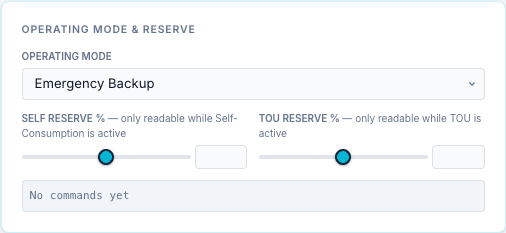
A force command from the bridge (Force Charge, Force Discharge, Force Standby) overrides whatever mode is set while it runs. When the command ends, the aGate goes back to that mode by itself. With a stable default mode underneath, "between commands" is always predictable.
2. Use the Scheduler instead of Time-of-Use
The FranklinWH app's Time-of-Use mode is the aGate's own timetable. Don't combine it with bridge schedules: the aGate's TOU plan and the bridge's commands would both act on the same battery, and what happens between the bridge's windows would depend on the TOU plan rather than on your schedules.
Do your time-of-use planning in the bridge's Scheduler instead. It does what TOU does and more:
| TOU in the app | Bridge Scheduler |
|---|---|
| Fixed charge and discharge periods | Windows, daily / weekly / monthly / cron triggers |
| Clock only | Conditions on SoC, spot and tariff prices, solar forecast, weather, Home Assistant entities |
| — | Exit conditions, a time limit and a target SoC per run |
| — | Verification that the battery actually moved, retries, and failure alerts to your phone |
Worked examples: Scheduler → Examples.
3. "VPP Mode" in the FranklinWH app is normal
When the bridge sends a force command it writes the aGate's remote-control power setpoint (SunSpec WSet). The aGate treats that as a virtual power plant (VPP) dispatch, so the FranklinWH app shows "VPP Mode" for as long as the setpoint holds.
- This is expected. It doesn't mean the aGate has joined a VPP programme.
- While it holds you can't override it from the app. Changing the mode in the app doesn't end it.
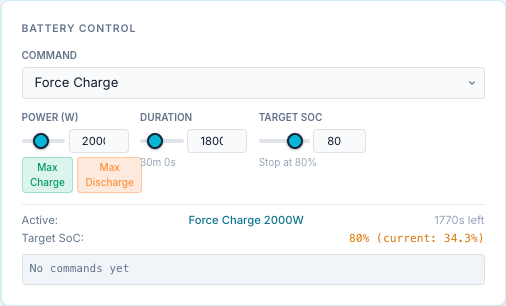
- The bridge shows the same state: the Release button in the top bar has a red dot, and the Battery Control card shows the active command.

4. Release control from the bridge
Any of these hands the battery back to the aGate's own mode. The app leaves VPP Mode once the aGate has dropped the setpoint.
| Where | How |
|---|---|
| Top bar → Release | Click Release (red dot = active control). The Battery Control State dialog shows the aGate's control registers and the bridge's command. Click Force Release. |
| Dashboard → Battery Control | Set Command to Release (or Not Active). It is sent at once. |
| Schedule | On an active entry, ■ Stop ends that run. |
Simple dashboard (/user) |
Stop. |
| Home Assistant | Set the bridge's Battery Command select to Release. |
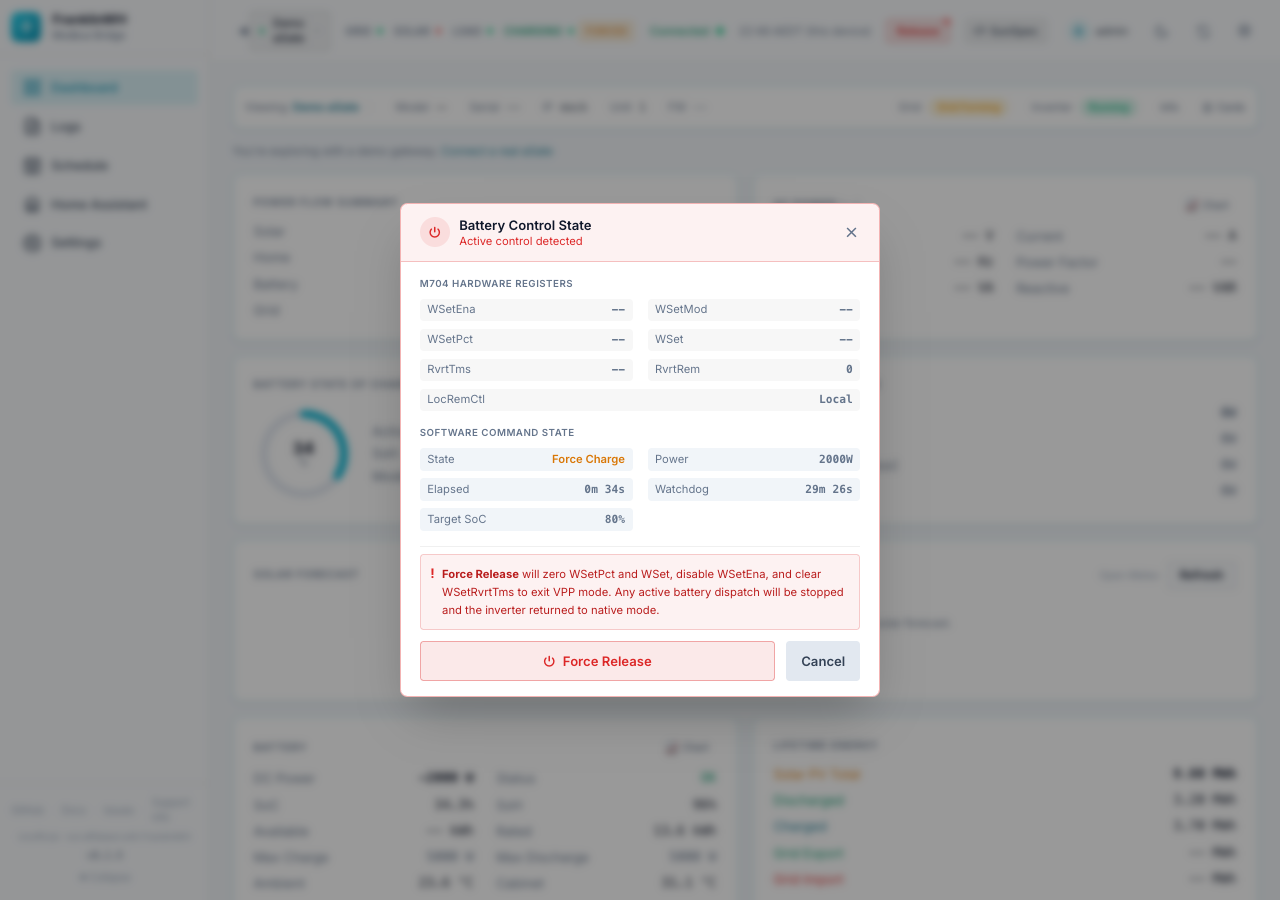
The dialog says what Force Release does: it zeroes WSetPct and WSet, disables WSetEna and clears WSetRvrtTms to exit VPP mode. Any active battery dispatch stops and the inverter returns to its own mode. When it worked, a toast says Control released — battery returned to native mode, and the dialog shows No Active Control.
Releasing a scheduled run ends it for the rest of that window: the entry doesn't re-fire until its next window. Disable the entry to stop it for good.
Keep commands bounded
- Give manual commands a Duration or a Target SoC on the Battery Control card. With both at 0, a command runs until something releases it.
- Give scheduled force commands a window end or a duration. An exit condition can only end a run earlier, never later.
- A graceful bridge restart releases active commands, and a bridge that starts up releases a command it finds still active. After a crash or power cut the setpoint stays on the aGate until the bridge is back. See Restarts and the clock.
- Don't run an Always evaluate battery entry on a gateway that has other battery entries: a run is released at its window end only when no other battery entry on that gateway is active. See Exit and release.
- Let one thing own the battery: the bridge's schedules, or a Home Assistant automation, or the app. Not two at once.
Who can send commands: admin, user and api accounts; a viewer can't. See
Battery controls.