Outcomes and audit
How you find out what an entry did: the Activity Log, the control log, the dispatch record and notifications. Also the two buttons that act outside the schedule: Run now and Stop.
Where to look
| Where | What |
|---|---|
| Schedule → Activity Log | every decision the scheduler makes, newest first, and every config change |
| Logs → control log | every command the gateway's command handler sent, refused or released, with who asked (— by schedule:<entry id>), the hardware state before and after, and the release reason |
Dispatch record (GET /api/gateways/{gw}/dispatch-outcomes) |
one row per force command sent to the gateway and how it ended |
| Notifications | failure, not effective and recovery alerts to the entry's notify targets |
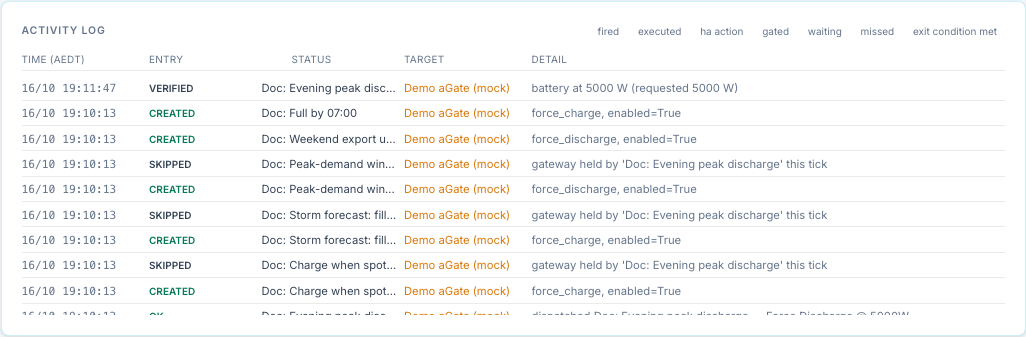
Activity Log results
| Result | Meaning |
|---|---|
| created, updated, enabled, disabled, deleted | a config change; the detail lists the changed fields |
| ok | a dispatch ("dispatched |
| gated | entry conditions failed (the detail lists up to four failing rows with live values); also an HA action whose guard failed, and Run now blocked by conditions |
| waiting | conditions met, hold-for timer running |
| skipped | another entry holds the gateway; or a failure alert with no notify target |
| deferred | the gateway is under manual control and the conflict policy is defer or wait |
| exit_condition_met | exit conditions ended the run |
| expired | the command ended inside the window (time limit, target SoC, external release, overshoot) |
| stopped | you pressed Stop |
| executed | Run now |
| missed, late_fired | catch-up after an outage or restart |
| verified, unverifiable, not_effective, reasserted | dispatch supervision |
| failed | a send failed or was refused, an HA action failed, or supervision gave up |
| ha_action | an HA action or notification succeeded |
The filter buttons above the log are fired, executed, ha action, gated, waiting, missed and exit condition met. The engine records dispatches as ok, so the fired filter never shows anything; clear the filter to see dispatches. The page shows the latest 40 rows.
Retries
A force command that fails, or is refused, is not owned. The entry tries again after
15 s, 30 s, then every 60 s while its window is open and it still wins the gateway. Each
attempt logs failed — "dispatch failed:
| Event | Activity Log | Notification |
|---|---|---|
| First failure in the window | failed | FAILED: <entry> — <reason>. Retrying. |
| Later failures | failed | none |
| A retry succeeds | ok — "… recovered after N failed attempt(s)" | Recovered: <entry> dispatched after N failed attempt(s) |
| The window closes with no success | failed — "window ended without a successful dispatch (N attempt(s); last: …)" | FAILED: <entry> — window ended without a successful dispatch … |
Supervision of a running command
While an entry owns a running force command, every tick checks it against the gateway's latest poll. It uses only good polls no older than 45 seconds; with no fresh poll it skips the check.
| Check | When | If it fails |
|---|---|---|
| Setpoint still enabled (WSetEna = 1) | every tick | The command is sent again and logged reasserted (up to 3 times per run). After that: failed — "setpoint lost 3 times — not re-sending again this window", plus a notification. |
| Battery is moving | 90 s after the send | It must run in the commanded direction at at least max(100 W, 20 % of the request); Standby must be within 200 W of zero. Pass: verified — "battery at 2950 W (requested 3000 W)". Fail: not_effective and one re-send; if it still fails 90 s later, not_effective "even after a re-send" plus a notification. |
| At a SoC limit | at the 90 s check | Charging at 98 % SoC or more, or discharging within 3 % of the active reserve, is not judged: unverifiable. |
The dispatch record
Each force command sent to a gateway gets one row, with the requester, the requested power and a state:
| State | Meaning |
|---|---|
sent |
accepted, and WSetEna read back as 1 |
failed |
the write failed, or WSetEna did not read back as 1 |
verified |
the battery was seen moving the commanded way |
not_effective |
accepted, but the battery did not move |
reasserted |
the aGate dropped the setpoint and it was sent again |
released / release_unverified |
released; unverified when WSetEna still read 1 afterwards |
superseded |
replaced by a newer command, or stopped by a failed send |
A refused command (untrusted rating) or an unknown command is not sent, so it gets no row here. The scheduler still sees it as a failed send (since 0.2.9) and logs it failed; the control log has command_refused.
Read it with GET /api/gateways/{gw}/dispatch-outcomes?limit=100.
Overshoot guard
The command handler watches each force command. If, 20 s or more after the start, the battery runs at more than 1.25 × the request + 500 W, the rating it was sized against must be wrong. The bridge then releases the command (reason overshoot), marks that direction's rating as contradicted, and refuses further force commands in that direction until you calibrate again. For the scheduler this shows as expired.
Notifications
Sent only for force entries, and only to the notify targets on that entry, with the title FranklinWH bridge:
| Message starts with | When |
|---|---|
FAILED: <entry> — <reason>. Retrying. |
the first failed attempt in a window, including a refused command |
FAILED: <entry> — window ended without a successful dispatch |
the window closed and no attempt succeeded |
FAILED: <entry> — setpoint lost 3 times |
the aGate kept dropping the setpoint |
NOT EFFECTIVE: <entry> — battery at … W |
the battery was not moving the commanded way, even after a re-send |
Recovered: <entry> dispatched after N failed attempt(s) |
a retry succeeded |
An entry with no Notify action gets none; the Activity Log records skipped — no notify target on this entry. Set one up in Home Assistant setup.
Run now and Stop
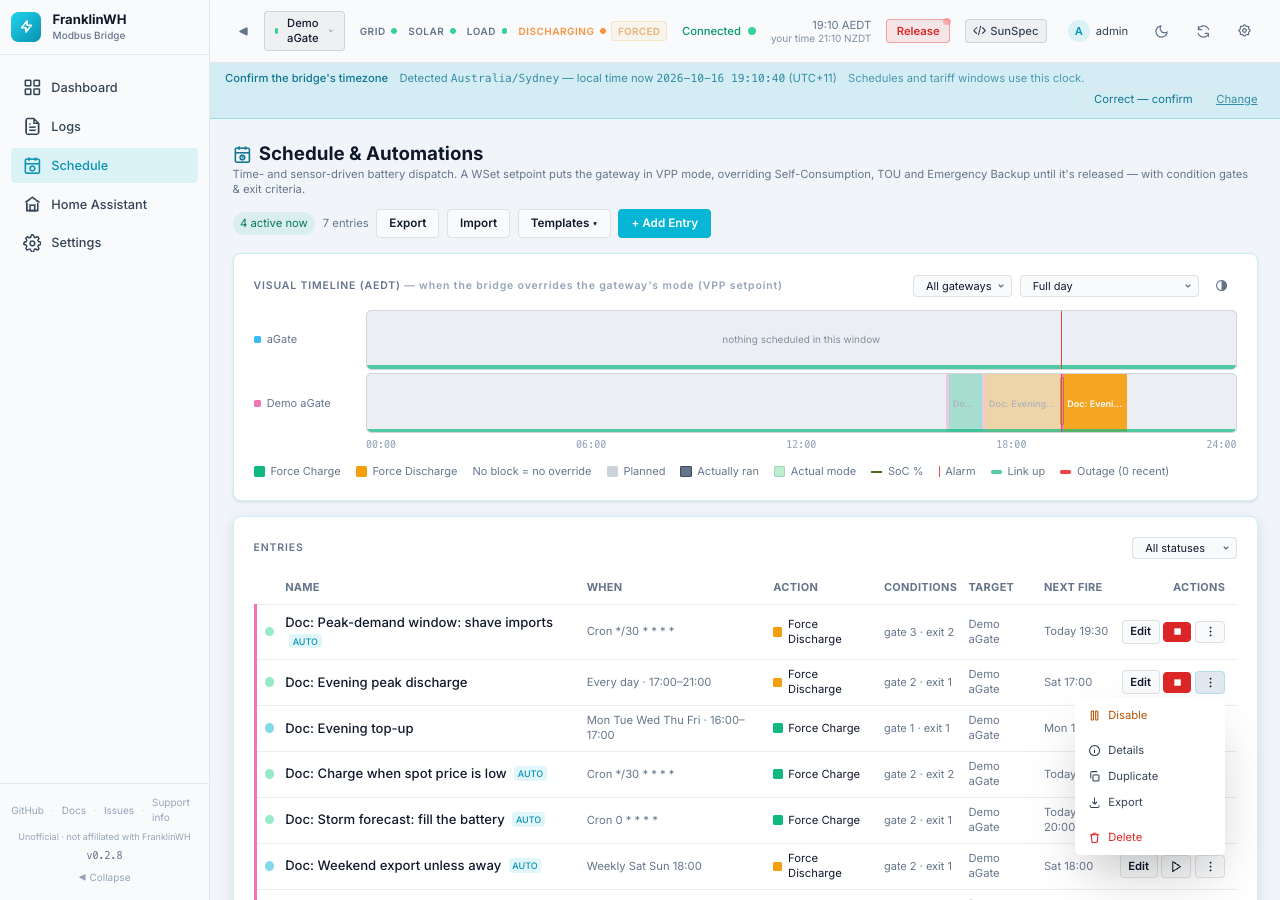
| Button | Shown | What it does |
|---|---|---|
| ▶ Run now | while the entry is not active | Sends the action now, whatever the time. |
| ■ Stop | while the entry is active (its window is open, even if it is gated) | Ends this run and blocks the entry for the rest of the window. |
Run now
- Press ▶ and confirm Fire.
- The bridge checks the entry conditions on each target gateway (the REST API can skip this
with
?force=true). - It sends the action to each gateway that passes, logs executed (or gated), and shows Fired or Skipped — entry conditions not met.
A Run now command is not owned by the scheduler:
-
it uses the entry's Duration (min) as its time limit; a window entry usually has none, so a force command then runs until you release it;
-
no exit conditions, verification, release policy or HA actions;
-
it ignores If already controlled and replaces a manual command;
-
Stop does not see it (Nothing active to stop); release it from the top bar or the Controls tab;
- on the next ticks, entries for that gateway (including this one, if its window opens) treat it as manual control.
Through the API, Run now works while the entry is active too, and on an entry that already finished its window.
Stop
- Press ■ and confirm Stop now.
- The bridge releases every gateway this entry owns (with its release policy), runs the exit-time HA actions and logs stopped — "stopped by user — released; won't re-fire until the next window".
- The entry stays enabled and fires again at its next window. Disable it to stop it for good.
Stop on an entry with nothing running answers Nothing active to stop, but still blocks the rest of the current window: a gated entry will not start later in that window.