How the Web UI uses the API
The Web UI has no back end of its own. Its pages are static HTML plus JavaScript, and every
value they show and every change they make goes through the same /api/... routes listed
in the API reference. If the UI can do it, a script can too.
The stack
| Layer | What it is | Where |
|---|---|---|
| Page shell | Jinja2 templates rendered by FastAPI: index.html (admin UI), user.html (simple dashboard), login.html, api_only.html |
src/franklinwh_bridge/templates/, served by api/ui.py |
| Tabs | One template per tab, included into index.html, all mounted at once and shown with x-show="$store.app.activeTab === '…'" |
templates/tabs/*.html, templates/partials/*.html |
| Behaviour | Alpine.js 3.14.1. Each tab is an x-data component (dashboardTab(), scheduleTab(), settingsTab(), haEntitiesTab() …) defined in its own file |
static/js/*_tab.js |
| Shared state | One Alpine store, Alpine.store('app'): the live points, the active gateway, the user, toasts, the release dialog. It refreshes every 10 s |
static/js/app.js |
| HTTP | fetchJSON(url, options): fetch with a timeout, JSON in and out, errors thrown with the API's detail |
static/js/app.js |
| Styling | Tailwind CSS 3.4, compiled (not the browser JIT), plus design-system.css |
static/css/, rebuilt by python tools/build_css.py |
| Charts | Chart.js 4.4.7 and a small Sankey renderer | static/js/ |
| Simple dashboard | /user is plain JavaScript (user_app.js), no Alpine, for phones and the user / viewer roles |
static/js/user_app.js |
Every library is vendored under static/js/, so the UI works with no internet access.
Script URLs carry ?v=<cache_bust> so a new release isn't hidden by the browser cache.
Relative URLs and ingress
Under Home Assistant ingress the UI lives at a path such as
/api/hassio_ingress/<token>/, not at /. The UI handles this once, in the page head:
base_path is the X-Ingress-Path header the Supervisor's proxy sends (empty otherwise,
api/ui.py:_base_path). Every script, stylesheet and API call is then written relative,
with no leading slash:
fetchJSON('api/points')                       // → /api/points, or /api/hassio_ingress/<token>/api/points
fetchJSON(`api/gateways/${gw}/command`, …)
A leading slash would escape the ingress path and hit Home Assistant instead. New UI code
must keep URLs relative. (Redirects built on the server, such as the one to the login page,
prefix base_path themselves.)
Errors, sign-out and outages
fetchJSON turns every failure into something the page can show:
| What happened | What the UI does |
|---|---|
HTTP error with a detail |
Throws Error(detail); the caller shows it as a red toast or inline. |
| 401 | Opens the logged out dialog with the server's reason_text (for example, the login was revoked). |
| No answer (refused, DNS, timeout) | Counts a connection failure and shows the can't reach the bridge banner; the 10 s refresh is the retry. When the bridge answers again the page reports the outage to POST /api/ui/connection-outage, so it lands in the bridge log. |
Example 1: a Battery Control command, end to end
Changing Command on the Dashboard's Battery Control card to Force Charge:
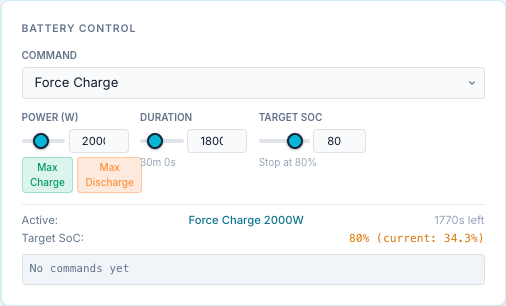
| Step | Code |
|---|---|
1. The <select> is bound to the component and sends on change |
templates/tabs/dashboard.html: <select x-model="command" @change="sendCommand('battery_command', command)"> inside x-data="controlsTab()" |
2. The component posts {slug, value} to the viewed gateway |
static/js/controls_tab.js, sendCommand(): fetchJSON(Alpine.store('app').commandUrl, {method: 'POST', body: JSON.stringify({slug, value: String(value)})}) |
| 3. The URL follows the gateway picker | static/js/app.js, commandUrl: api/gateways/<id>/command for a chosen gateway, api/command for the default |
4. The route checks the control capability and the slug, finds the gateway |
api/gateways_api.py, send_gateway_command() with Depends(require_capability("control")) |
| 5. The gateway's command handler applies it | publish/command_handler.py, handle_command() → _handle_battery_command(): checks the trusted rating, then writes through the franklinwh-modbus library |
| 6. The reply is this call's outcome | {"ok": true, "result": "…"}; the card logs ✓ or ✗ and shows a toast |
| 7. The page re-reads state | setTimeout(() => Alpine.store('app').refresh(), 500) → GET api/gateways/<id>/points |
The same handler serves the MQTT command topics, the scheduler and the simple dashboard, so a command behaves the same whichever way it arrives.
The Release button in the top bar is the same route with value: "Release"
(app.js, forceRelease()).
Example 2: saving a schedule entry
Saving an entry in the Schedule form (Save Changes when editing):
| Step | Code |
|---|---|
| 1. The form is an Alpine object; Save builds the request body from it | static/js/schedule_tab.js, saveEntry(): trigger, conditions, action, HA actions |
2. New entry → POST api/schedules; existing → PATCH api/schedules/<id> |
fetchJSON('api/schedules', {method: 'POST', body: …}) |
3. FastAPI validates the body against ScheduleCreate (pydantic v2) |
api/schedules_api.py; a bad field answers 422 before any code runs |
| 4. The route validates the action and trigger, stores the entry and audits it | add_schedule() → create_schedule() (SQLite) → _audit_crud() (Activity Log created) |
| 5. The engine reloads, so the entry takes part in the next 15 s tick | _reload_engine(request) |
| 6. The page reloads the list and the timeline | GET api/schedules, GET api/schedules/timeline?day=<0-6> |
The pickers in that form are API reads too: the condition sensors come from
GET api/sensors, the notify targets from GET api/ha/notify-targets, and
Test Verification posts the condition tree to POST api/scheduler/evaluate.
Watching it in the browser
Open the browser's developer tools on the Network tab, filter on api/, and use the page:
each request and its JSON reply is the API call you'd make from a script. The 10-second
refresh shows as points, health and stats requests.
Changing the UI
- Add the route first, with a pydantic model for its body, then call it from the page.
- Keep URLs relative (see above) and go through
fetchJSON. - After any HTML or JavaScript change, run the console gate against a running bridge:
python tools/console_gate.py. It fails on any console error, uncaught exception or failed request. - Tailwind classes are compiled: after adding new classes, run
python tools/build_css.py.