Settings → Data & Backup¶
?tab=settings§ion=data — how long history is kept, what extra history is recorded,
how big the database is, and backups.
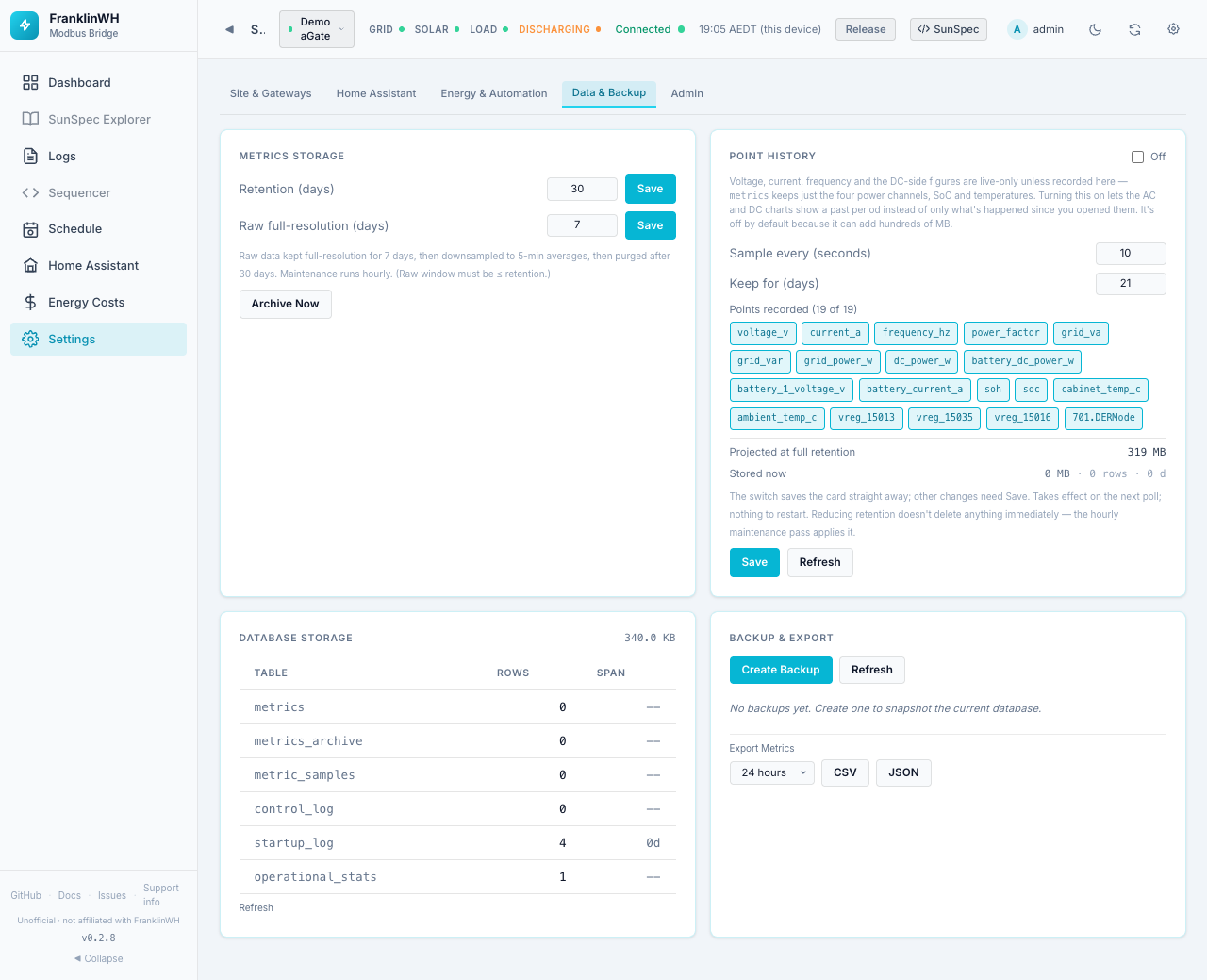
Cards on this page:
Metrics Storage¶
Metrics are the power samples behind Power History, Energy Flow and the solar "actual so far": battery, grid, solar and home power, SoC and temperatures, recorded every poll.
| Field | Default | Range | Meaning |
|---|---|---|---|
| Retention (days) | 30 | 1–365 | After this, samples are deleted. |
| Raw full-resolution (days) | 7 | 1 to the retention | Samples are kept at full resolution this long, then averaged into 5-minute buckets. |
Each field has its own Save. The raw window must be no longer than the retention. Maintenance (downsampling and deleting) runs every hour. Archive Now runs it straight away.
Note
Mock and demo gateways do not store metrics.
Point History¶
Extra electrical readings, recorded for the History mode of the AC and DC charts. Without it, voltage, current, frequency and the DC-side figures are live only.
| Field | Default | Range |
|---|---|---|
| Recording switch (top right) | Off | Off / Recording |
| Sample every (seconds) | 10 | 5–3600 |
| Keep for (days) | 21 | 1–365 |
| Points recorded | all 19 | Click a point to include or leave it out |
The 19 points: voltage_v, current_a, frequency_hz, power_factor, grid_va,
grid_var, grid_power_w, dc_power_w, battery_dc_power_w, battery_1_voltage_v,
battery_current_a, soh, soc, cabinet_temp_c, ambient_temp_c, three raw vendor
registers (vreg_15013, vreg_15035, vreg_15016) and 701.DERMode. Per-phase values
are never recorded.
Disk space
Point History is off by default because it can add hundreds of MB. Projected at full retention shows the size your choices will reach before you save: about 319 MB for the defaults. Stored now shows its current size, rows and days. Keep this in mind on an add-on running from an SD card. Fewer points, a longer interval or fewer days all shrink it.
- The switch saves straight away. Other changes need Save; Unsaved changes reminds you.
- Changes take effect on the next poll. Nothing to restart.
- Lowering Keep for does not delete anything at once: the hourly maintenance does.
- Refresh reloads the card.
Database Storage¶
The database size, and per table its row count and the days of data it spans
(for example metrics, metrics_archive, metric_samples, control_log,
startup_log). Refresh reloads it. Read-only.
Backup & Export¶
Create Backup takes a snapshot of the whole database (settings, gateways, schedules, users, history). Refresh reloads the list.
Each backup shows its file name, size, the bridge version that made it and how long ago, with:
- Download — saves the backup file.
- Restore — replaces the current database with this backup, after a confirmation. A pre-restore snapshot is taken automatically. Restart the bridge after a restore so it reloads its state.
Warning
A restore replaces everything, including users and passwords, with what was in the backup.
Export Metrics downloads power samples as CSV or JSON for 1 hour, 6 hours, 24 hours (default), 7 days or 30 days.
Downloads under Home Assistant ingress
In 0.2.8 the Download, CSV and JSON links use absolute paths (/api/…).
When the bridge is opened through the Home Assistant sidebar (ingress) they may not
reach the bridge. If a download fails there, open the bridge on its own port instead.