Conditions
Conditions let an entry react to the battery, the grid, prices, the weather, Home Assistant and more. This is how you schedule by sensor or by event: a trigger opens the window, the conditions decide whether to act inside it.
Each entry has two condition blocks:
| Block | Checked | Effect |
|---|---|---|
| Entry conditions (the gate) | each tick while the entry is active and not yet running | The action is sent only when they hold. |
| Exit conditions | each tick while a force command from this entry is running | The first time they hold, the run ends. See Exit and release. |
A condition row (an item) has a sensor, an operator and a right-hand side: a Value you type or a Lookup of another sensor.
Rules for every condition
-
No value means false. If a sensor has no value (gateway offline, feature not set up, Home Assistant entity
unavailable), every operator returns false, including!=andnot in. A rule never acts on missing data. -
An unknown sensor or operator is false too. The bridge does not check sensor ids or operators when you save through the API; such a row just never passes. Import warns about unknown sensors.
-
Values come from one snapshot per gateway per tick, built from the gateway's last poll and the other sources below. Conditions never cause a Modbus read.
-
On/off sensors: compare with 1 or 0. For Grid Connected, PV Generating or a Home Assistant switch, use
==1(on) or0(off). Typingtrueis sent as text and never equals the sensor.
Operators
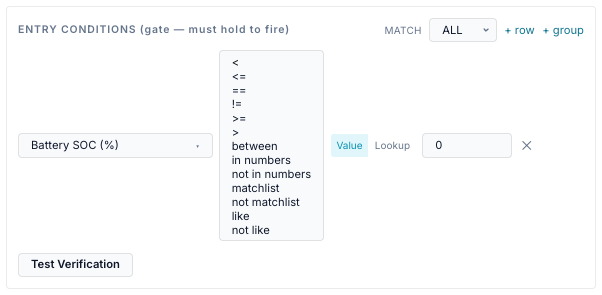
| Operator (UI) | Stored as | Right-hand side | True when | Example |
|---|---|---|---|---|
< <= >= > |
same | a number (or a Lookup) | the numeric comparison holds | battery.soc_pct < 80 |
== |
== |
a number, text, or a Lookup | equal. Numbers compare as numbers; text compares exactly | mode.name == TOU |
!= |
!= |
as == |
not equal (still false with no value) | inverter.status != Running |
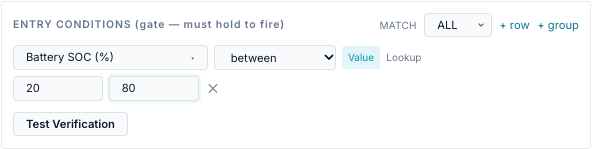
| between | between |
two numbers | inclusive; the order of the two numbers does not matter | time.hour between 16 and 20 |
| in numbers | in |
list of numbers and ranges | the value is one of them or inside a range | battery.soc_pct in 10,20,42-49 |
| not in numbers | not_in |
as above | not in the list (an empty list → true) | time.dow not in 5-6 |
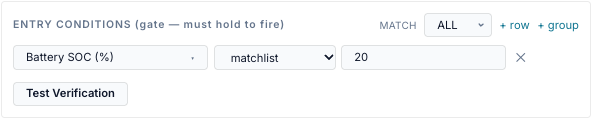
| matchlist | matchlist |
list of text values | equals one of them, ignoring case | mode.name matchlist TOU, Self-Consumption |
| not matchlist | not_matchlist |
as above | equals none of them | |
| like | like |
a pattern | matches, ignoring case | weather.condition like *rain* |
| not like | not_like |
a pattern | does not match |
Details:
- Ordering operators (
<,<=,>=,>, between) need numbers on both sides. Text that looks like a number counts as a number. - in / not in numbers take a comma-separated list. Semicolons and new lines also work,
and surrounding brackets are ignored:
(10, 20, 30).42-49or49-42is an inclusive range. Write negative ranges with..:-5000..-1000. An ambiguous member such as1-2-3and any text member are ignored. - matchlist compares whole text values, so
Self-Consumptionis a name, not a range. - like wildcards:
*or%for any run of characters,?or_for one. A pattern with no wildcard means contains:like rainmatches "Light rain". -
matchlist and like on a number or a yes/no sensor compare its text:
True,False,63.0. Sogrid.connected matchlist truepasses when connected. -
intests membership, not crossing. A fast-moving value can step over a listed number between polls; use a range member for robustness.
Value and Lookup
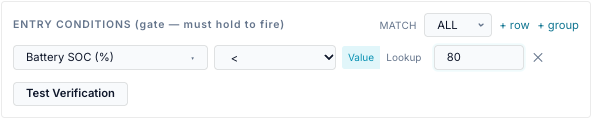
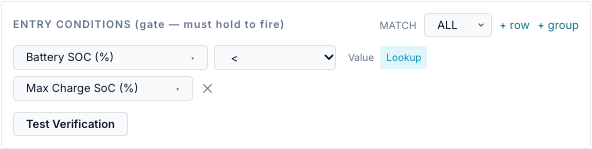
The Value / Lookup switch sits after the operator.
- Value compares with what you type. The form sends anything that looks like a number as a number.
- Lookup compares with another sensor's live value, for example
battery.soc_pct <= const.min_discharge_socordemand.interval_kw >= demand.peak_kw. If the Lookup sensor has no value the row is false.
The switch is hidden for the list and pattern operators: their right-hand side is always
text. between needs Value (two numbers).
The Details panel of an entry prints a Lookup row as … < undefined: it shows the
typed value, not the Lookup sensor. The rule itself is stored and evaluated correctly.
Groups and items: ALL / ANY
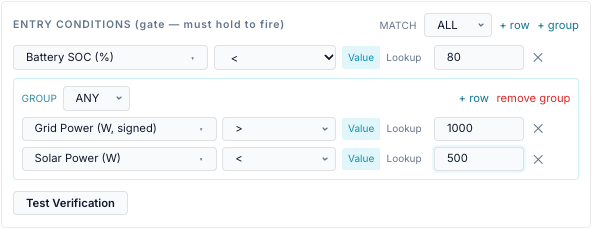
A block is a group: a match mode (ALL or ANY) and a list of items. An item is either a condition row or another group.
| Group setting | True when | Empty group |
|---|---|---|
| match ALL | every item is true | true |
| match ANY | at least one item is true | false |
How the items relate:
-
Order does not matter. Every item is evaluated every time (no short-circuit), so Test Verification and the Activity Log can show each row's live value.
-
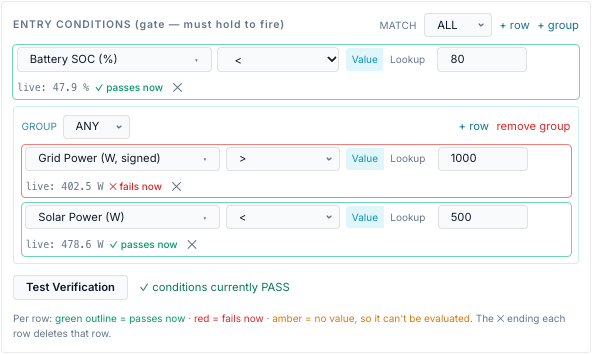
A group is one item of the block it sits in. SoC above 40 % AND (grid import above 1 kW OR solar below 500 W) is a
match ALLblock with one row and oneANYgroup of two rows. - The editor nests one level: a block holds rows and groups, a group holds rows. A deeper tree sent through the API is evaluated, but the editor cannot show it.
-
Empty groups are dropped when you save. A block with no rows at all is saved as none: no gate, or no exit criteria.
-
An empty tree sent through the API is not the same as none. An empty
ALLexit block is true, so it ends a run on the first tick after the command is sent; an emptyANYexit block never ends one.
Scope: which gateway's values
Conditions are evaluated per gateway. For a Site or Service target, each member gateway is checked against its own snapshot, and may pass while another fails.
| Sensors | Scope |
|---|---|
battery.*, solar.*, pv.*, grid.*, load.*, mode.*, inverter.*, gateway.*, energy.*.total_kwh, energy.*.today/this_week/this_month/ytd_kwh, dispatch.* |
the gateway being evaluated |
demand.*, bonus.*, tariff.export_charge_* (not the window flag), energy.period_import_kwh, energy.import_cost, energy.export_credit, energy.unpriced_* |
the gateway with id default, whichever gateway is evaluated |
tariff.* windows and rates, service.*, fixed.* |
the first utility service that defines each feature, the same for every gateway |
const.*, weather.*, solar_forecast.*, tariff.spot_price, tariff.feed_in_price, time.*, ha:* |
the same for every gateway |
Hold for (dwell)

Duration (HH:MM:SS) below the entry conditions is a hold-for time:
- The entry fires only after it has been eligible (window active and entry conditions true) continuously for this long.
-
If the gate fails even once the timer starts again.
-
When the window ends the timer starts again.
-
It is checked on each 15-second tick, so the real wait is the set time rounded up to the next tick. 0 = fire immediately. Maximum 24 h.
-
While waiting, the Activity Log shows waiting once ("conditions met — holding 300s before firing").
- The timer lives in memory. After a bridge restart it starts again, so it never fires early.
- A retry after a failed send does not wait for the hold-for time again.
Use it to ride through a brief price spike or a cloud passing over. It applies to every action, including HA-only entries.
When conditions are evaluated
| What | When |
|---|---|
| Entry conditions | each tick while the entry is active and not running; on Run now (unless forced); before a late fire |
| Hold-for timer | each tick |
| Exit conditions | each tick while this entry owns a running force command (not for Release, mode, reserve or HA-only entries) |
| HA action guard | when that HA action is about to run |
| After you save | at once: saving reloads the engine and runs a tick |
-
The gate is a gate, not a leash. Once a force command runs, the entry conditions are not checked again: a gate that turns false does not stop the run. Use exit conditions.
-
A failing gate is logged once per window as gated, with up to four failing rows and their live values, for example
entry gated: battery.soc_pct < 80 (live=86.0).
The values themselves refresh at the rate in the Refreshes column below. A condition on a 15-minute forecast cannot change faster than the forecast does.
Test Verification
Test Verification under each block evaluates the block now, against one gateway: the
selected gateway for a Gateway target, the gateway default for a Site or Service target.
| Row outline | Meaning |
|---|---|
| green, ✓ passes now | true now |
| red, ✕ fails now | false now |
| amber, ✕ no value | the sensor has no value, so the row is false |
Each row also shows live: with the current value and unit. For the entry block the
summary reads conditions currently PASS/FAIL; for the exit block exit WOULD fire now /
exit would NOT fire.
Test Verification is close to, not the same as, the engine's view
- It does not include the
dispatch.*values: they read not overriding even while a schedule runs. - It does not include the gateway type, so
gateway.battery_capablereads 1 andgateway.device_typereadsagate, even for a MAC-1 collar. - It needs an admin account, like every other change on the Schedule page.
Home Assistant entities
Entities from a connected Home Assistant instance appear in the picker under HA · instance name, after the bridge's own groups.
- Needs: a Home Assistant instance on the Home Assistant tab, and the entity exposed there. Only exposed entities are offered and evaluated.
- Id:
ha:<instance id>:<entity_id>, for exampleha:home:input_boolean.away_mode. -
Value: the entity state. Numbers become numbers.
on,true,home,openandlockedbecome true (compare with1);off,false,away,closedandunlockedbecome false (compare with0). Anything else stays text, so compare it with==or matchlist.unavailable,unknown,noneand empty states become no value. -
Refresh: live over the Home Assistant WebSocket; REST polling every 30 s while the WebSocket is down.
- If the instance is removed, the condition has no value. Import warns about
ha:sensors whose instance is missing.
Every sensor in the picker
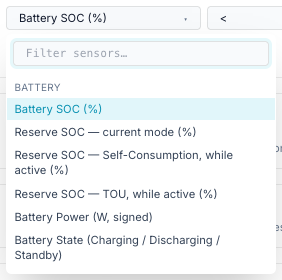
The picker groups sensors as below and has a filter box that matches the label, the id or the group.
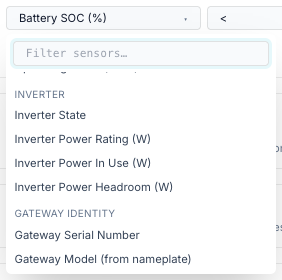
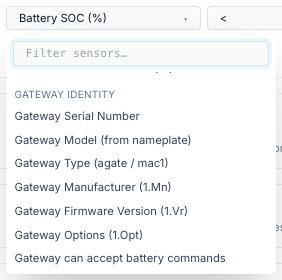
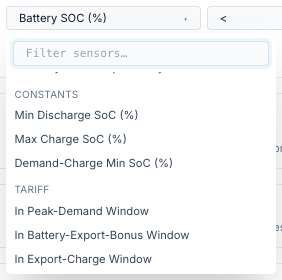
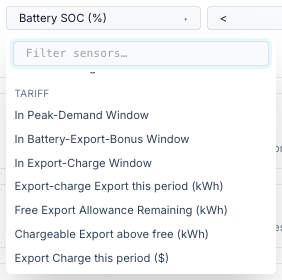
Picker screenshots, one per group
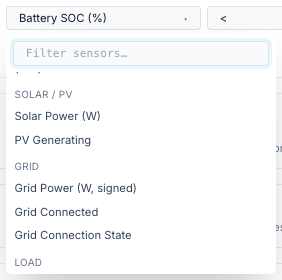
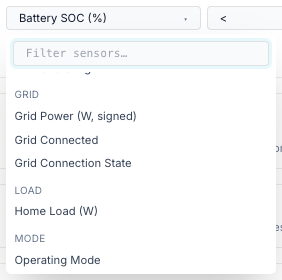
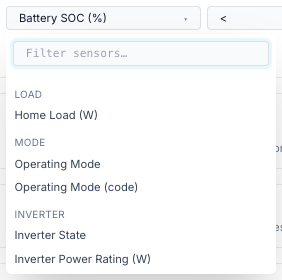
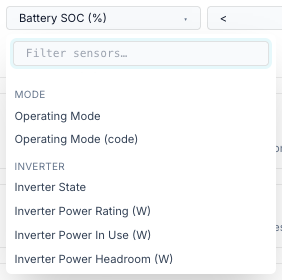
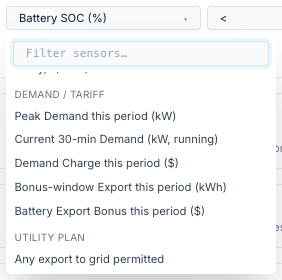
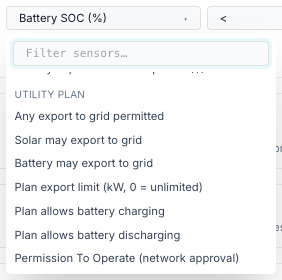
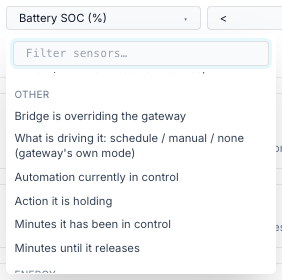
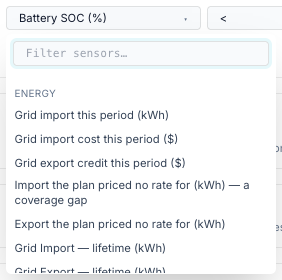
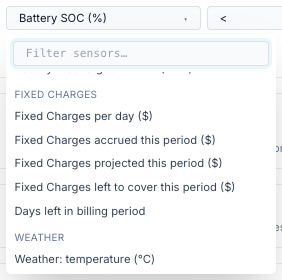
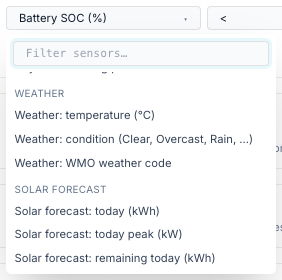
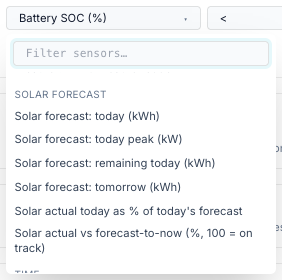
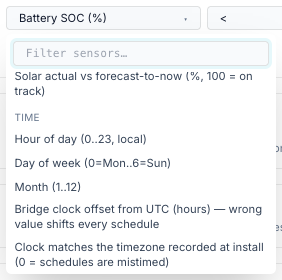
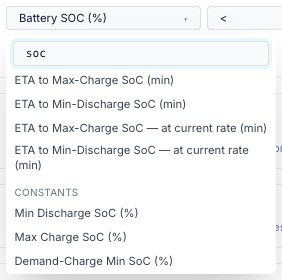
How to read the tables:
- Type: number, bool (yes/no — compare with 1 or 0) or enum (text — use
==,!=, matchlist or like). - Needs: what must be set up for the sensor to have a meaningful value. Where a settings page is named, that is where you configure it.
- Without it: what the sensor reads when that is missing. None means no value, so every condition on it is false. A sensor that reads
0orFalseinstead does take part in conditions:tariff.demand_window_active == 0is true on an install with no tariff configured. - Refreshes: how often the underlying value changes. The scheduler re-reads it every tick.
- Gateway polling depends on the gateway's poll interval (Settings → Site & Gateways → Modbus Poller, default 10 s). An offline gateway's values go stale, and a dispatch is not judged on values older than 45 s.
- Default gateway: the demand, bonus, export-charge and billing-period energy figures measure the gateway with id
defaultonly. - The Other group holds the
dispatch.*sensors, which say why the battery is doing what it is doing.
Generated table
The tables below were generated from the code by _gen_sensors.py. Run python docs/user/scheduler/_gen_sensors.py from the repository root to refresh them.
Battery
| Picker label | Sensor id | Unit | Type | Needs | Without it | Refreshes |
|---|---|---|---|---|---|---|
| Battery SOC (%) | battery.soc_pct |
% | number | Gateway polling | None | every poll (default 10 s) |
| Reserve SOC — current mode (%) | battery.reserve_pct |
% | number | Gateway polling (15508 / 15509) | None | every poll (default 10 s) |
| Reserve SOC — Self-Consumption, while active (%) | battery.reserve_self_pct |
% | number | Self-Consumption must be the active mode | None in any other mode | every poll (default 10 s) |
| Reserve SOC — TOU, while active (%) | battery.reserve_tou_pct |
% | number | TOU must be the active mode | None in any other mode | every poll (default 10 s) |
| Battery Power (W, signed) | battery.power_w |
W | number | Gateway polling. + = discharging, − = charging | None | every poll (default 10 s) |
| Battery State (Charging / Discharging / Standby) | battery.status |
— | enum | Gateway polling | None | every poll (default 10 s) |
| Battery Capacity (kWh) | battery.capacity_kwh |
kWh | number | Battery nameplate 713.WHRtg | None | every poll (default 10 s) |
| Battery Stored Energy (kWh) | battery.stored_kwh |
kWh | number | Capacity + SoC | None | every poll (default 10 s) |
| Battery Headroom to Full (kWh) | battery.remaining_kwh |
kWh | number | Capacity + SoC | None | every poll (default 10 s) |
| ETA to Max-Charge SoC (min) | battery.time_to_charge_min |
min | number | Capacity, SoC, const Max Charge SoC, 702 max charge rate | None | every poll (default 10 s) |
| ETA to Min-Discharge SoC (min) | battery.time_to_discharge_min |
min | number | Capacity, SoC, const Min Discharge SoC, 702 max discharge rate | None | every poll (default 10 s) |
| ETA to Max-Charge SoC — at current rate (min) | battery.time_to_charge_now_min |
min | number | As above, plus the battery must be charging now | None when idle or discharging | every poll (default 10 s) |
| ETA to Min-Discharge SoC — at current rate (min) | battery.time_to_discharge_now_min |
min | number | As above, plus the battery must be discharging now | None when idle or charging | every poll (default 10 s) |
Solar / PV
| Picker label | Sensor id | Unit | Type | Needs | Without it | Refreshes |
|---|---|---|---|---|---|---|
| Solar Power (W) | solar.power_w |
W | number | Gateway polling | None | every poll (default 10 s) |
| PV Generating | pv.is_generating |
— | bool | Gateway polling. True above 50 W of solar | None | every poll (default 10 s) |
Grid
| Picker label | Sensor id | Unit | Type | Needs | Without it | Refreshes |
|---|---|---|---|---|---|---|
| Grid Power (W, signed) | grid.power_w |
W | number | Gateway polling. + = importing, − = exporting | None | every poll (default 10 s) |
| Grid Connected | grid.connected |
— | bool | Gateway polling (connection state, else grid mode) | None | every poll (default 10 s) |
| Grid Connection State | grid.status |
— | enum | Gateway polling | None | every poll (default 10 s) |
Load
| Picker label | Sensor id | Unit | Type | Needs | Without it | Refreshes |
|---|---|---|---|---|---|---|
| Home Load (W) | load.power_w |
W | number | Gateway polling | None | every poll (default 10 s) |
Mode
| Picker label | Sensor id | Unit | Type | Needs | Without it | Refreshes |
|---|---|---|---|---|---|---|
| Operating Mode | mode.name |
— | enum | Gateway polling | None | every poll (default 10 s) |
| Operating Mode (code) | mode.raw |
— | number | Gateway polling | None | every poll (default 10 s) |
Inverter
| Picker label | Sensor id | Unit | Type | Needs | Without it | Refreshes |
|---|---|---|---|---|---|---|
| Inverter State | inverter.status |
— | enum | Gateway polling | None | every poll (default 10 s) |
| Inverter Power Rating (W) | inverter.power_rating_w |
W | number | Model 702 nameplate rating (not the trusted battery rating) | None | every poll (default 10 s) |
| Inverter Power In Use (W) | inverter.utilised_w |
W | number | Battery power | None | every poll (default 10 s) |
| Inverter Power Headroom (W) | inverter.unutilised_w |
W | number | 702 nameplate rating + battery power | None | every poll (default 10 s) |
Gateway identity
| Picker label | Sensor id | Unit | Type | Needs | Without it | Refreshes |
|---|---|---|---|---|---|---|
| Gateway Serial Number | gateway.serial |
— | enum | Nameplate (SunSpec Model 1) read by the poller | None | every poll (default 10 s) |
| Gateway Model (from nameplate) | gateway.model |
— | enum | Nameplate (SunSpec Model 1) read by the poller | None | every poll (default 10 s) |
| Gateway Type (agate / mac1) | gateway.device_type |
— | enum | Gateway config (not polled) | "agate" | on config change |
| Gateway Manufacturer (1.Mn) | gateway.manufacturer |
— | enum | Nameplate (SunSpec Model 1) read by the poller | None | every poll (default 10 s) |
| Gateway Firmware Version (1.Vr) | gateway.version |
— | enum | Nameplate (SunSpec Model 1) read by the poller | None | every poll (default 10 s) |
| Gateway Options (1.Opt) | gateway.options |
— | enum | Nameplate (SunSpec Model 1) read by the poller | None | every poll (default 10 s) |
| Gateway can accept battery commands | gateway.battery_capable |
— | bool | Gateway config: False for a MAC-1 collar | True | on config change |
Constants
| Picker label | Sensor id | Unit | Type | Needs | Without it | Refreshes |
|---|---|---|---|---|---|---|
| Min Discharge SoC (%) | const.min_discharge_soc |
% | number | Settings → Energy & Automation → Automation Constants | Never missing: defaults 20 / 100 / 30 % | on save |
| Max Charge SoC (%) | const.max_charge_soc |
% | number | Settings → Energy & Automation → Automation Constants | Never missing: defaults 20 / 100 / 30 % | on save |
| Demand-Charge Min SoC (%) | const.demand_charge_min_soc |
% | number | Settings → Energy & Automation → Automation Constants | Never missing: defaults 20 / 100 / 30 % | on save |
Tariff
| Picker label | Sensor id | Unit | Type | Needs | Without it | Refreshes |
|---|---|---|---|---|---|---|
| In Peak-Demand Window | tariff.demand_window_active |
— | bool | A peak-demand window on a service (Settings → Energy & Automation → Electricity Utility Service(s)) | False | every tick (15 s) |
| In Battery-Export-Bonus Window | tariff.bonus_window_active |
— | bool | An export-bonus window on a service (Settings → Energy & Automation → Electricity Utility Service(s)) | False | every tick (15 s) |
| In Export-Charge Window | tariff.export_charge_window_active |
— | bool | An export-charge window on a service (Settings → Energy & Automation → Electricity Utility Service(s)) | False | every tick (15 s) |
| Export-charge Export this period (kWh) | tariff.export_charge_kwh |
kWh | number | Export charge on a service (Settings → Energy & Automation → Electricity Utility Service(s)); counts the default gateway | 0 | every poll (default 10 s) |
| Free Export Allowance Remaining (kWh) | tariff.export_charge_free_remaining |
kWh | number | Export charge on a service (Settings → Energy & Automation → Electricity Utility Service(s)); counts the default gateway | 0 | every poll (default 10 s) |
| Chargeable Export above free (kWh) | tariff.export_charge_net_kwh |
kWh | number | Export charge on a service (Settings → Energy & Automation → Electricity Utility Service(s)); counts the default gateway | 0 | every poll (default 10 s) |
| Export Charge this period ($) | tariff.export_charge_cost |
$ | number | Export charge on a service (Settings → Energy & Automation → Electricity Utility Service(s)); counts the default gateway | 0 | every poll (default 10 s) |
| In a declared grid-import window | tariff.import_window_active |
— | bool | Import windows on a service (Settings → Energy & Automation → Electricity Utility Service(s)) | False | every tick (15 s) |
| Grid import is billable right now (0 = free window) | tariff.import_billable |
— | bool | Energy rates or import windows (Settings → Energy & Automation → Electricity Utility Service(s)) | None | every tick (15 s) |
| Rate tier in force (1 = first block) | tariff.tier |
— | number | Energy rates with tiers (Settings → Energy & Automation → Electricity Utility Service(s)) | None | every tick (15 s) |
| Tariff season in force | tariff.season |
— | enum | Energy rates with seasons (Settings → Energy & Automation → Electricity Utility Service(s)) | None | every tick (15 s) |
| Time period in force (Off-Peak, Mid-Peak, …) | tariff.time_period |
— | enum | Energy rates (Settings → Energy & Automation → Electricity Utility Service(s)) | None | every tick (15 s) |
| Grid import price now ($/kWh) | tariff.buy_rate |
$/kWh | number | Energy rates, or a dynamic plan (Settings → Energy & Automation → Electricity Utility Service(s)) | None | every tick (15 s) |
| Grid export price now ($/kWh) | tariff.sell_rate |
$/kWh | number | Energy rates, or a dynamic plan (Settings → Energy & Automation → Electricity Utility Service(s)) | None | every tick (15 s) |
| Wholesale spot price (AEMO NEM or HA entity, c/kWh) | tariff.spot_price |
c/kWh | number | A NEM region or an HA price entity (Settings → Site & Gateways → Wholesale spot price), or a dynamic plan | None (also None when the last price is over 30 min old) | every 240 s |
| Dynamic feed-in price (AEMO NEM or HA entity, c/kWh) | tariff.feed_in_price |
c/kWh | number | A NEM region or an HA feed-in entity (Settings → Site & Gateways → Wholesale spot price), or a dynamic plan | None (also None when the last price is over 30 min old) | every 240 s |
Demand / Tariff
| Picker label | Sensor id | Unit | Type | Needs | Without it | Refreshes |
|---|---|---|---|---|---|---|
| Peak Demand this period (kW) | demand.peak_kw |
kW | number | Peak demand on a service (Settings → Energy & Automation → Electricity Utility Service(s)); measures the default gateway | 0 | every poll (default 10 s) |
| Current 30-min Demand (kW, running) | demand.interval_kw |
kW | number | Peak demand on a service (Settings → Energy & Automation → Electricity Utility Service(s)); measures the default gateway | 0 | every poll (default 10 s) |
| Demand Charge this period ($) | demand.period_charge |
$ | number | Peak demand on a service (Settings → Energy & Automation → Electricity Utility Service(s)); measures the default gateway | 0 | every poll (default 10 s) |
| Bonus-window Export this period (kWh) | bonus.export_kwh |
kWh | number | Export bonus on a service (Settings → Energy & Automation → Electricity Utility Service(s)); measures the default gateway | 0 | every poll (default 10 s) |
| Battery Export Bonus this period ($) | bonus.period_credit |
$ | number | Export bonus on a service (Settings → Energy & Automation → Electricity Utility Service(s)); measures the default gateway | 0 | every poll (default 10 s) |
Utility Plan
| Picker label | Sensor id | Unit | Type | Needs | Without it | Refreshes |
|---|---|---|---|---|---|---|
| Any export to grid permitted | service.export_allowed |
— | bool | Plan terms on the service (Settings → Energy & Automation → Electricity Utility Service(s)) | True (permissive) | on save |
| Solar may export to grid | service.solar_export_allowed |
— | bool | Plan terms on the service (Settings → Energy & Automation → Electricity Utility Service(s)) | True (permissive) | on save |
| Battery may export to grid | service.battery_export_allowed |
— | bool | Plan terms on the service (Settings → Energy & Automation → Electricity Utility Service(s)) | True (permissive) | on save |
| Plan export limit (kW, 0 = unlimited) | service.export_limit_kw |
kW | number | Plan terms on the service (Settings → Energy & Automation → Electricity Utility Service(s)) | 0 (unlimited) | on save |
| Plan allows battery charging | service.charging_allowed |
— | bool | Plan terms on the service (Settings → Energy & Automation → Electricity Utility Service(s)) | True (permissive) | on save |
| Plan allows battery discharging | service.discharging_allowed |
— | bool | Plan terms on the service (Settings → Energy & Automation → Electricity Utility Service(s)) | True (permissive) | on save |
| Permission To Operate (network approval) | service.pto_status |
— | enum | PTO status on the service (Settings → Energy & Automation → Electricity Utility Service(s)) | "unknown" | on save |
| Network has approved export for this connection | service.pto_approved |
— | bool | PTO status on the service (Settings → Energy & Automation → Electricity Utility Service(s)) | None | on save |
| Service country (ISO code) | service.country |
— | enum | Country on the service (Settings → Energy & Automation → Electricity Utility Service(s)) | None | on save |
| Timezone the plan's TOU windows are written in | service.timezone |
— | enum | Timezone on the service (Settings → Energy & Automation → Electricity Utility Service(s)) | None | on save |
| Plan timezone matches the clock schedules run on (0 = TOU windows mistimed) | service.tz_matches_clock |
— | bool | Timezone on the service (Settings → Energy & Automation → Electricity Utility Service(s)) | None | every tick (15 s) |
Other
| Picker label | Sensor id | Unit | Type | Needs | Without it | Refreshes |
|---|---|---|---|---|---|---|
| Bridge is overriding the gateway | dispatch.active |
— | bool | Schedule engine (or a live WSet from manual control) | False | every tick (15 s) |
| What is driving it: schedule / manual / none (gateway's own mode) | dispatch.source |
— | enum | Schedule engine | "none" | every tick (15 s) |
| Automation currently in control | dispatch.entry |
— | enum | A schedule entry owning the gateway | None | every tick (15 s) |
| Action it is holding | dispatch.action |
— | enum | A schedule entry owning the gateway | None | every tick (15 s) |
| Minutes it has been in control | dispatch.since_min |
min | number | A schedule entry owning the gateway | None | every tick (15 s) |
| Minutes until it releases | dispatch.expires_min |
min | number | A schedule entry owning the gateway | None | every tick (15 s) |
Energy
| Picker label | Sensor id | Unit | Type | Needs | Without it | Refreshes |
|---|---|---|---|---|---|---|
| Grid import this period (kWh) | energy.period_import_kwh |
kWh | number | Billing period of the service; measures the default gateway | 0 | every poll (default 10 s) |
| Grid import cost this period ($) | energy.import_cost |
$ | number | Energy rates (Settings → Energy & Automation → Electricity Utility Service(s)); default gateway | 0 | every poll (default 10 s) |
| Grid export credit this period ($) | energy.export_credit |
$ | number | Energy rates (Settings → Energy & Automation → Electricity Utility Service(s)); default gateway | 0 | every poll (default 10 s) |
| Import the plan priced no rate for (kWh) — a coverage gap | energy.unpriced_import_kwh |
kWh | number | Energy rates (Settings → Energy & Automation → Electricity Utility Service(s)); default gateway | 0 | every poll (default 10 s) |
| Export the plan priced no rate for (kWh) | energy.unpriced_export_kwh |
kWh | number | Energy rates (Settings → Energy & Automation → Electricity Utility Service(s)); default gateway | 0 | every poll (default 10 s) |
| Grid Import — lifetime (kWh) | energy.grid_import.total_kwh |
kWh | number | Gateway's lifetime energy counters (Modbus) | None until counters are read | every poll (default 10 s) |
| Grid Export — lifetime (kWh) | energy.grid_export.total_kwh |
kWh | number | Gateway's lifetime energy counters (Modbus) | None until counters are read | every poll (default 10 s) |
| Solar — lifetime (kWh) | energy.solar.total_kwh |
kWh | number | Gateway's lifetime energy counters (Modbus) | None until counters are read | every poll (default 10 s) |
| Battery Charged — lifetime (kWh) | energy.battery_charge.total_kwh |
kWh | number | Gateway's lifetime energy counters (Modbus) | None until counters are read | every poll (default 10 s) |
| Battery Discharged — lifetime (kWh) | energy.battery_discharge.total_kwh |
kWh | number | Gateway's lifetime energy counters (Modbus) | None until counters are read | every poll (default 10 s) |
| Grid Import — today (kWh) | energy.grid_import.today_kwh |
kWh | number | Energy totals from the gateway's counters (per gateway) | None until the first counter delta | every poll (default 10 s) |
| Grid Import — this week (kWh) | energy.grid_import.this_week_kwh |
kWh | number | Energy totals from the gateway's counters (per gateway) | None until the first counter delta | every poll (default 10 s) |
| Grid Import — this month (kWh) | energy.grid_import.this_month_kwh |
kWh | number | Energy totals from the gateway's counters (per gateway) | None until the first counter delta | every poll (default 10 s) |
| Grid Import — YTD (kWh) | energy.grid_import.ytd_kwh |
kWh | number | Energy totals from the gateway's counters (per gateway) | None until the first counter delta | every poll (default 10 s) |
| Grid Export — today (kWh) | energy.grid_export.today_kwh |
kWh | number | Energy totals from the gateway's counters (per gateway) | None until the first counter delta | every poll (default 10 s) |
| Grid Export — this week (kWh) | energy.grid_export.this_week_kwh |
kWh | number | Energy totals from the gateway's counters (per gateway) | None until the first counter delta | every poll (default 10 s) |
| Grid Export — this month (kWh) | energy.grid_export.this_month_kwh |
kWh | number | Energy totals from the gateway's counters (per gateway) | None until the first counter delta | every poll (default 10 s) |
| Grid Export — YTD (kWh) | energy.grid_export.ytd_kwh |
kWh | number | Energy totals from the gateway's counters (per gateway) | None until the first counter delta | every poll (default 10 s) |
| Solar — today (kWh) | energy.solar.today_kwh |
kWh | number | Energy totals from the gateway's counters (per gateway) | None until the first counter delta | every poll (default 10 s) |
| Solar — this week (kWh) | energy.solar.this_week_kwh |
kWh | number | Energy totals from the gateway's counters (per gateway) | None until the first counter delta | every poll (default 10 s) |
| Solar — this month (kWh) | energy.solar.this_month_kwh |
kWh | number | Energy totals from the gateway's counters (per gateway) | None until the first counter delta | every poll (default 10 s) |
| Solar — YTD (kWh) | energy.solar.ytd_kwh |
kWh | number | Energy totals from the gateway's counters (per gateway) | None until the first counter delta | every poll (default 10 s) |
| Battery Charged — today (kWh) | energy.battery_charge.today_kwh |
kWh | number | Energy totals from the gateway's counters (per gateway) | None until the first counter delta | every poll (default 10 s) |
| Battery Charged — this week (kWh) | energy.battery_charge.this_week_kwh |
kWh | number | Energy totals from the gateway's counters (per gateway) | None until the first counter delta | every poll (default 10 s) |
| Battery Charged — this month (kWh) | energy.battery_charge.this_month_kwh |
kWh | number | Energy totals from the gateway's counters (per gateway) | None until the first counter delta | every poll (default 10 s) |
| Battery Charged — YTD (kWh) | energy.battery_charge.ytd_kwh |
kWh | number | Energy totals from the gateway's counters (per gateway) | None until the first counter delta | every poll (default 10 s) |
| Battery Discharged — today (kWh) | energy.battery_discharge.today_kwh |
kWh | number | Energy totals from the gateway's counters (per gateway) | None until the first counter delta | every poll (default 10 s) |
| Battery Discharged — this week (kWh) | energy.battery_discharge.this_week_kwh |
kWh | number | Energy totals from the gateway's counters (per gateway) | None until the first counter delta | every poll (default 10 s) |
| Battery Discharged — this month (kWh) | energy.battery_discharge.this_month_kwh |
kWh | number | Energy totals from the gateway's counters (per gateway) | None until the first counter delta | every poll (default 10 s) |
| Battery Discharged — YTD (kWh) | energy.battery_discharge.ytd_kwh |
kWh | number | Energy totals from the gateway's counters (per gateway) | None until the first counter delta | every poll (default 10 s) |
Fixed Charges
| Picker label | Sensor id | Unit | Type | Needs | Without it | Refreshes |
|---|---|---|---|---|---|---|
| Fixed Charges per day ($) | fixed.daily_charge |
$ | number | Standing charges on a service (Settings → Energy & Automation → Electricity Utility Service(s)) | 0 | every tick (15 s) |
| Fixed Charges accrued this period ($) | fixed.accrued_period |
$ | number | Standing charges on a service (Settings → Energy & Automation → Electricity Utility Service(s)) | 0 | every tick (15 s) |
| Fixed Charges projected this period ($) | fixed.period_total |
$ | number | Standing charges on a service (Settings → Energy & Automation → Electricity Utility Service(s)) | 0 | every tick (15 s) |
| Fixed Charges left to cover this period ($) | fixed.remaining |
$ | number | Standing charges on a service (Settings → Energy & Automation → Electricity Utility Service(s)) | 0 | every tick (15 s) |
| Days left in billing period | fixed.days_remaining |
days | number | Standing charges on a service (Settings → Energy & Automation → Electricity Utility Service(s)) | 0 | every tick (15 s) |
Weather
| Picker label | Sensor id | Unit | Type | Needs | Without it | Refreshes |
|---|---|---|---|---|---|---|
| Weather: temperature (°C) | weather.temp_c |
°C | number | Latitude and longitude (Settings → Site & Gateways → Location & Solar) | None | every 15 min |
| Weather: condition (Clear, Overcast, Rain, …) | weather.condition |
— | enum | Latitude and longitude (Settings → Site & Gateways → Location & Solar) | None | every 15 min |
| Weather: WMO weather code | weather.code |
— | number | Latitude and longitude (Settings → Site & Gateways → Location & Solar) | None | every 15 min |
Solar Forecast
| Picker label | Sensor id | Unit | Type | Needs | Without it | Refreshes |
|---|---|---|---|---|---|---|
| Solar forecast: today (kWh) | solar_forecast.today_kwh |
kWh | number | Location; array kWp, tilt, azimuth (Settings → Site & Gateways → Location & Solar) | None | every 15 min |
| Solar forecast: today peak (kW) | solar_forecast.today_peak_kw |
kW | number | Location; array kWp, tilt, azimuth (Settings → Site & Gateways → Location & Solar) | None | every 15 min |
| Solar forecast: remaining today (kWh) | solar_forecast.remaining_kwh |
kWh | number | Location; array kWp, tilt, azimuth (Settings → Site & Gateways → Location & Solar) | None | every 15 min |
| Solar forecast: tomorrow (kWh) | solar_forecast.tomorrow_kwh |
kWh | number | Location; array kWp, tilt, azimuth (Settings → Site & Gateways → Location & Solar) | None | every 15 min |
| Solar actual today as % of today's forecast | solar_forecast.day_pct |
% | number | Location (Settings → Site & Gateways → Location & Solar) + today's solar energy total | None | every 15 min |
| Solar actual vs forecast-to-now (%, 100 = on track) | solar_forecast.vs_expected_pct |
% | number | Location (Settings → Site & Gateways → Location & Solar) + today's solar energy total | None | every 15 min |
Time
| Picker label | Sensor id | Unit | Type | Needs | Without it | Refreshes |
|---|---|---|---|---|---|---|
| Hour of day (0..23, local) | time.hour |
— | number | Bridge clock | Never missing | every tick (15 s) |
| Day of week (0=Mon..6=Sun) | time.dow |
— | number | Bridge clock | Never missing | every tick (15 s) |
| Month (1..12) | time.month |
— | number | Bridge clock | Never missing | every tick (15 s) |
| Bridge clock offset from UTC (hours) — wrong value shifts every schedule | time.utc_offset_h |
h | number | Bridge clock | Never missing | every tick (15 s) |
| Clock matches the timezone recorded at install (0 = schedules are mistimed) | time.tz_ok |
— | bool | Startup timezone check | None until the first check | at startup |
Notes on some sensors
time.* use the bridge's clock. time.dow is 0 = Monday … 6 = Sunday (cron counts
from Sunday). time.utc_offset_h is the clock's current offset; time.tz_ok is 0 when
the clock no longer matches the timezone recorded at install, and has no value until the
first start-up check has run. See Restarts and the clock.
Battery, grid, solar, load, mode. Read from the gateway's last poll. battery.power_w
is + discharging, − charging; grid.power_w is + importing. grid.connected comes from
the connection state, else the grid mode. pv.is_generating is true above 50 W of solar.
Reserves. battery.reserve_pct is the reserve in force now, whatever the mode. The
aGate exposes only the active mode's reserve, so battery.reserve_self_pct has a value
only while Self-Consumption is active and battery.reserve_tou_pct only while TOU is
active.
ETA and headroom. battery.time_to_charge_min is the best-case minutes to reach the Max
Charge SoC constant at the gateway's Model 702 nameplate charge rate;
battery.time_to_discharge_min the same down to Min Discharge SoC. The _now variants use
the current battery power and have no value when the battery is idle or moving the other
way. They read 0 when already at or past the target. They do not use the trusted battery
rating that force commands use, and they ignore any Power you set on the entry.
battery.remaining_kwh is the headroom to full; inverter.unutilised_w the inverter
headroom against the 702 nameplate.
Constants are three numbers you set once and reuse: Min Discharge SoC (default 20 %), Max Charge SoC (default 100 %) and Demand-Charge Min SoC (default 30 %). Set them at Settings → Energy & Automation → Automation Constants. They always have a value.
Tariff windows and calculators come from the first utility service that has each
feature (peak demand, export bonus, export charge, energy rates). They are not per gateway.
Without a configured service, window sensors read False and calculators read 0, so a
condition such as tariff.demand_window_active == 0 is true on an install with no
tariff.
tariff.import_billable is true unless a declared free (non-billable) import window is
active now, or the rate model prices the current time at zero. With nothing configured it
has no value.
tariff.buy_rate / tariff.sell_rate are $/kWh from your rate model (or the live price
on a dynamic plan). tariff.spot_price / tariff.feed_in_price are c/kWh: the AEMO NEM
5-minute price for the chosen region (feed-in = spot), with a configured Home Assistant
price entity overriding its side. A price older than 30 minutes is dropped, so the
sensor has no value.
service.* permissions default to allowed when the plan terms are not set.
service.tz_matches_clock is 0 when the service's timezone differs from the bridge clock.
Weather and solar forecast come from Open-Meteo (free, no key). They need a latitude and longitude at Settings → Site & Gateways → Location & Solar; the PV size, tilt and azimuth shape the solar forecast. Weather codes follow the WMO table (for example 61–65 rain, 95–99 thunderstorm). "Today" is the site's local date. On a failed fetch the last good forecast is kept.
gateway.*. gateway.device_type and gateway.battery_capable come from the
gateway's configuration, not from a poll: battery_capable is false for a MAC-1 collar.
The other gateway.* come from the nameplate.
dispatch.* tell you what is driving the gateway: dispatch.source is schedule,
manual (a live setpoint the scheduler did not send, such as the Controls tab, MQTT or the
app) or none (the gateway runs its own mode). dispatch.entry, dispatch.action,
dispatch.since_min and dispatch.expires_min describe the scheduler's current run;
expires_min has a value only for entries with a duration.
An HA-only entry shows up as dispatch.source = schedule
While an entry with No battery action is active and has fired, the engine reports
it in the dispatch.* sensors as if it were driving the battery (dispatch.active 1,
dispatch.source schedule, dispatch.action none). Gate on dispatch.action as
well as dispatch.source if you rely on these.
Energy totals. energy.*.total_kwh are the gateway's lifetime counters;
energy.*.today/this_week/this_month/ytd_kwh are per gateway, from the counters, and have
no value until the first counter change.