Examples
Each recipe lists the fields to set, shows the finished form and explains how it behaves. The screenshots come from a demo (mock) gateway; on your bridge pick your own gateway as the target.
Before you start
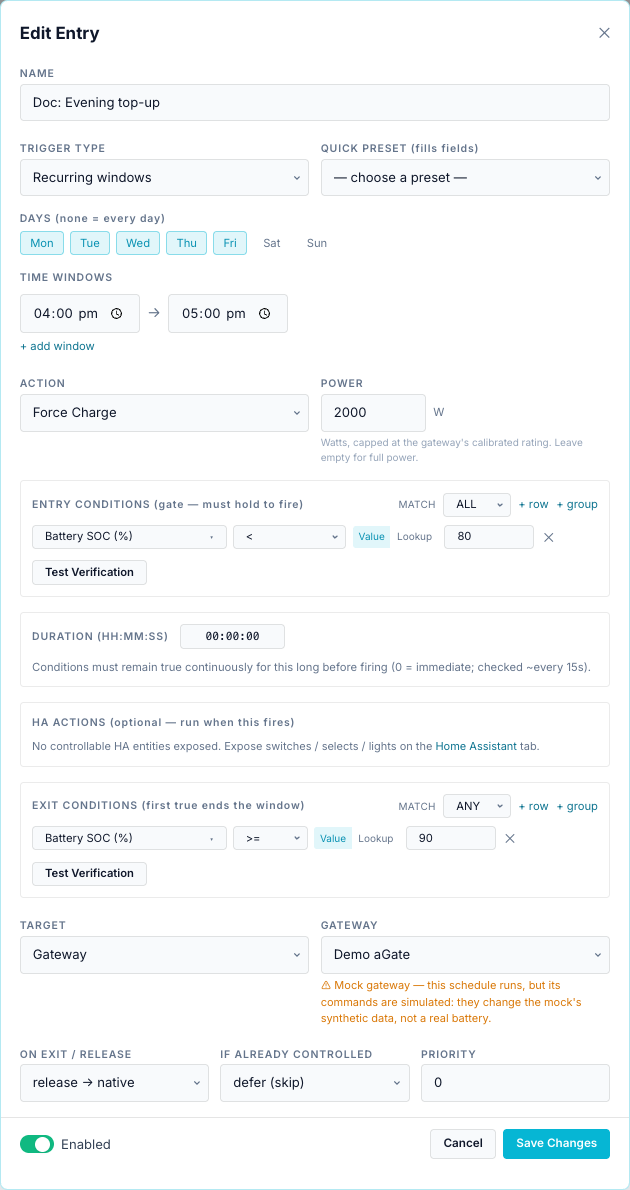
1. Evening top-up
The walkthrough on the Scheduler overview: Force Charge at 2000 W on weekdays 16:00–17:00 if SoC is below 80 %, until 90 %.
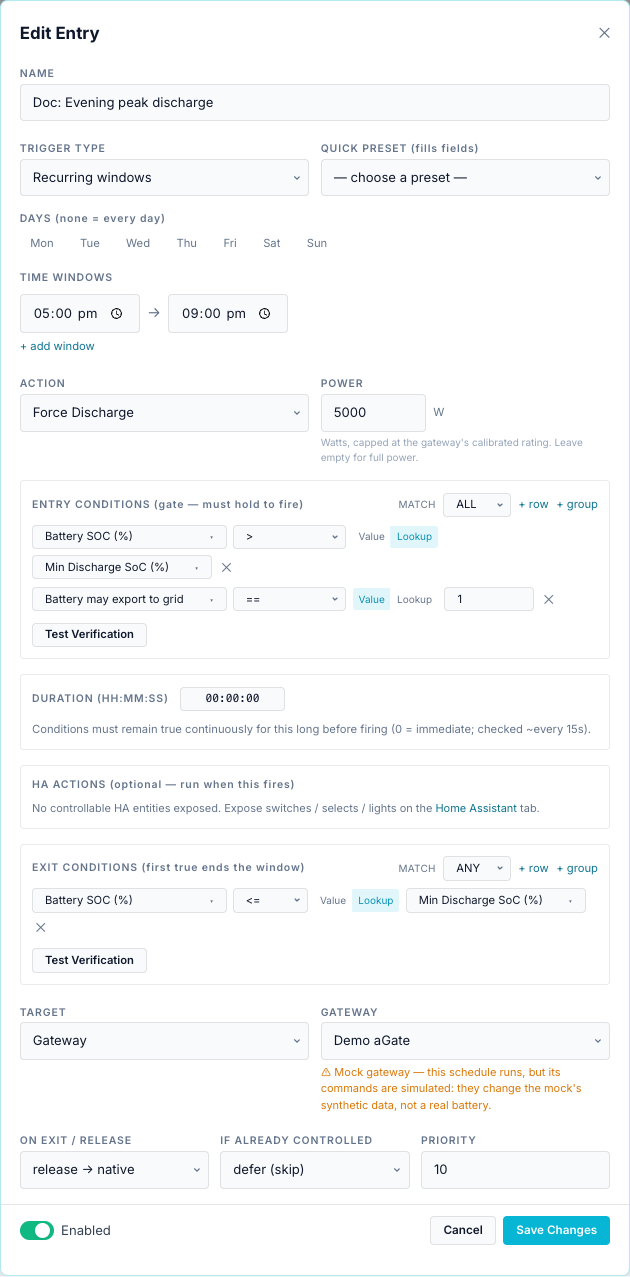
2. Evening peak discharge until the minimum SoC
Discharge through the evening peak, stop at your floor, and never export the battery if your plan forbids it.
| Field | Value |
|---|---|
| Trigger Type | Recurring windows, no days ticked (every day), 17:00 → 21:00 |
| Action | Force Discharge, Power 5000 |
| Entry conditions (ALL) | Battery SOC (%) > Lookup Min Discharge SoC (%) |
Battery may export to grid == 1 |
|
| Exit conditions (ANY) | Battery SOC (%) <= Lookup Min Discharge SoC (%) |
| Priority | 10 |
How it behaves:
- At 17:00 the bridge discharges at 5 kW (capped at the trusted rating) if SoC is above the constant.
- When SoC reaches the constant, the exit releases the battery and the entry rests until tomorrow's window.
- At 21:00 the window closes and the battery is released if still running.
- If SoC is below the floor at 17:00, the entry is gated and keeps checking until 21:00.
- The aGate's own reserve still applies: it will not discharge below its reserve, whatever the entry says.
3. Charge from the grid when the NEM spot price is low
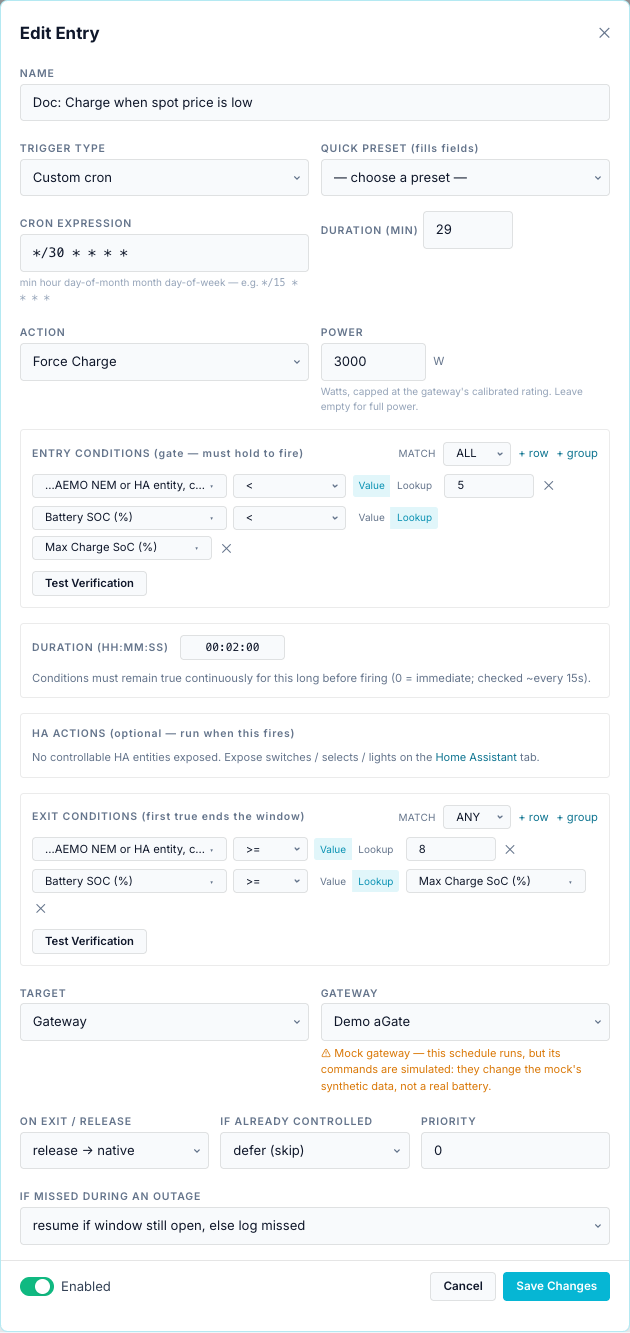
Charge when the AEMO wholesale price drops below 5 c/kWh; stop when it rises to 8 c/kWh or the battery is full.
Needs: a NEM region (or HA price entity) at Settings → Site & Gateways → Wholesale spot price.
| Field | Value |
|---|---|
| Trigger Type | Custom cron */30 * * * *, Duration (min) 29 |
| Action | Force Charge, Power 3000 |
| Entry conditions (ALL) | Wholesale spot price < 5 |
Battery SOC (%) < Lookup Max Charge SoC (%) |
|
| Duration (HH:MM:SS) | 00:02:00 |
| Exit conditions (ANY) | Wholesale spot price >= 8 |
Battery SOC (%) >= Lookup Max Charge SoC (%) |
How it behaves:
- Every half hour the entry opens for 29 minutes. Within that, it charges once the price has been below 5 c/kWh for 2 minutes in a row.
- The 1-minute gap each half hour re-arms the entry after an exit, so it can charge again the next time the price is low.
- 5 and 8 c/kWh are two thresholds on purpose: one threshold would start and stop on every small price move.
- Without a price (region not set, or the last price is over 30 minutes old) the gate fails and nothing happens.
Why not Always evaluate?
An Always entry would stop for good after its first exit until the bridge restarts. See Triggers.
4. Storm forecast: fill the battery
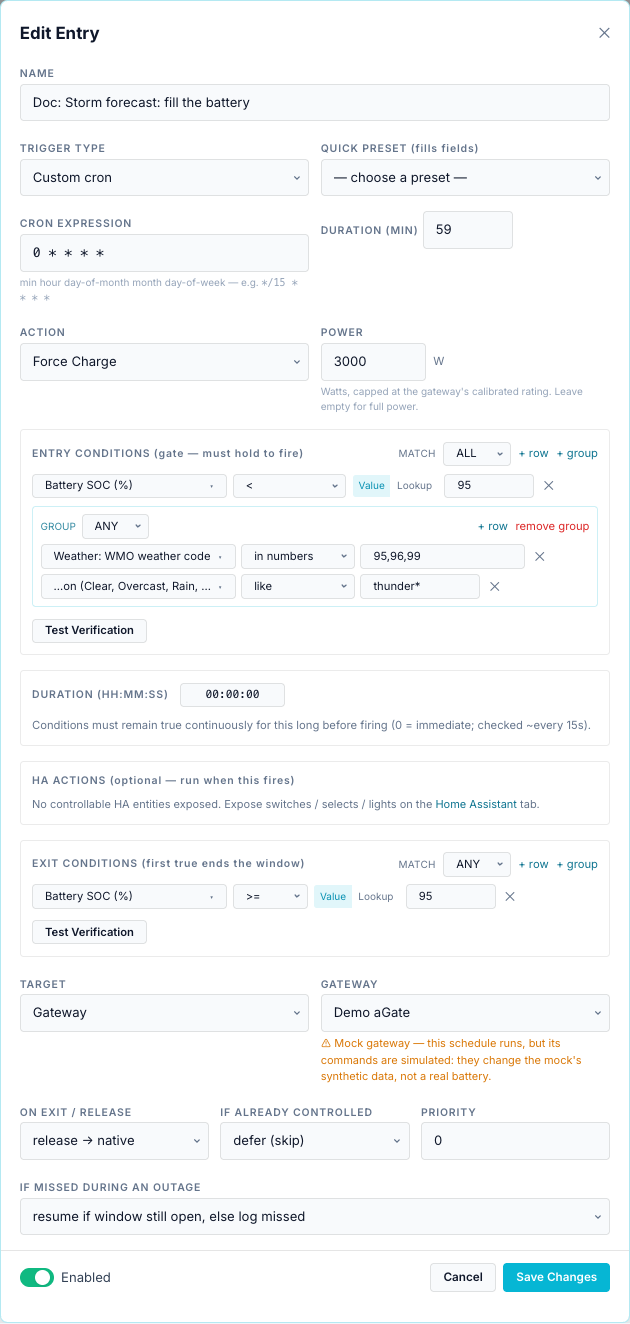
Top the battery up when Open-Meteo reports a thunderstorm, so you have backup if the grid goes down.
Needs: a location at Settings → Site & Gateways → Location & Solar.
| Field | Value |
|---|---|
| Trigger Type | Custom cron 0 * * * *, Duration (min) 59 |
| Action | Force Charge, Power 3000 |
| Entry conditions (ALL) | Battery SOC (%) < 95 |
group (ANY): Weather: WMO weather code in numbers 95,96,99 |
|
group (ANY): Weather: condition like thunder* |
|
| Exit conditions (ANY) | Battery SOC (%) >= 95 |
How it behaves:
- Each hour the entry is active for 59 minutes. If a thunderstorm is current and SoC is below 95 %, it charges until 95 %.
weather.codeandweather.conditiondescribe the current weather, refreshed every 15 minutes.- To hold the charge afterwards, add a second entry with Force Standby and the same weather gate. Raising the reserve with Self Reserve % is often ignored by the aGate (see Actions).
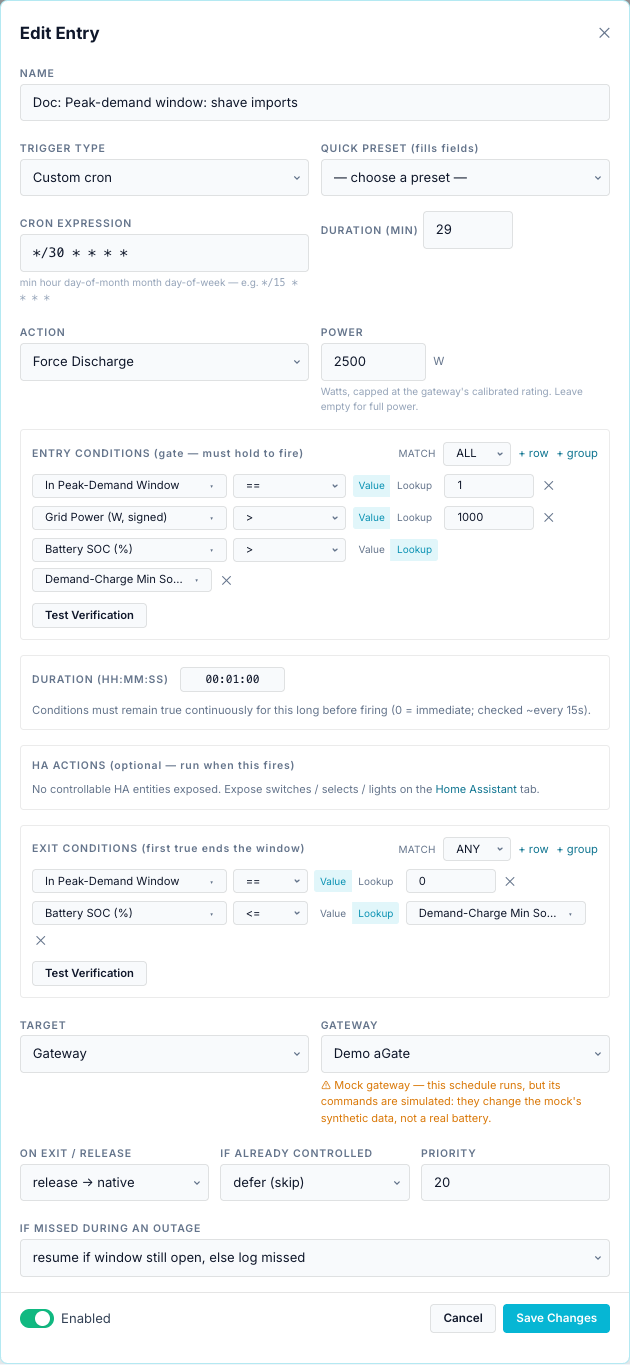
5. Peak-demand window: shave imports using the Demand-Charge Min SoC
During your network's peak-demand window, discharge when the house is importing more than 1 kW, but keep the battery above the Demand-Charge Min SoC.
Needs: a utility service with peak demand and its window at Settings → Energy & Automation → Electricity Utility Service(s); the Demand-Charge Min SoC constant.
| Field | Value |
|---|---|
| Trigger Type | Custom cron */30 * * * *, Duration (min) 29 |
| Action | Force Discharge, Power 2500 |
| Entry conditions (ALL) | In Peak-Demand Window == 1 |
Grid Power (W, signed) > 1000 |
|
Battery SOC (%) > Lookup Demand-Charge Min SoC (%) |
|
| Duration (HH:MM:SS) | 00:01:00 |
| Exit conditions (ANY) | In Peak-Demand Window == 0 |
Battery SOC (%) <= Lookup Demand-Charge Min SoC (%) |
|
| Priority | 20 |
How it behaves:
- The hold-for of one minute ignores short load spikes.
- Priority 20 beats the evening discharge (10) when both are waiting for the gateway. If the evening entry is already running, it keeps the gateway: priority does not interrupt a run (see Priorities).
- With both recipes on one gateway, read the window-end warning: when this entry's half-hour window ends while the evening entry is active but gated, the discharge is not released.
grid.power_wis positive when importing. Once the battery discharges, grid import drops, but the run continues: the gate is not re-checked while running. It ends at the exit, at the end of the half-hour window, or when the next half hour re-checks the gate.- Without a configured service, In Peak-Demand Window reads 0, so the gate fails and the entry does nothing.
The Templates ▾ → Peak-demand shaving template is a variant that compares the running 30-minute demand with the period peak (demand.interval_kw >= demand.peak_kw, a Lookup). It uses Always evaluate, so it fires once per bridge run; switch it to a cron trigger as here.
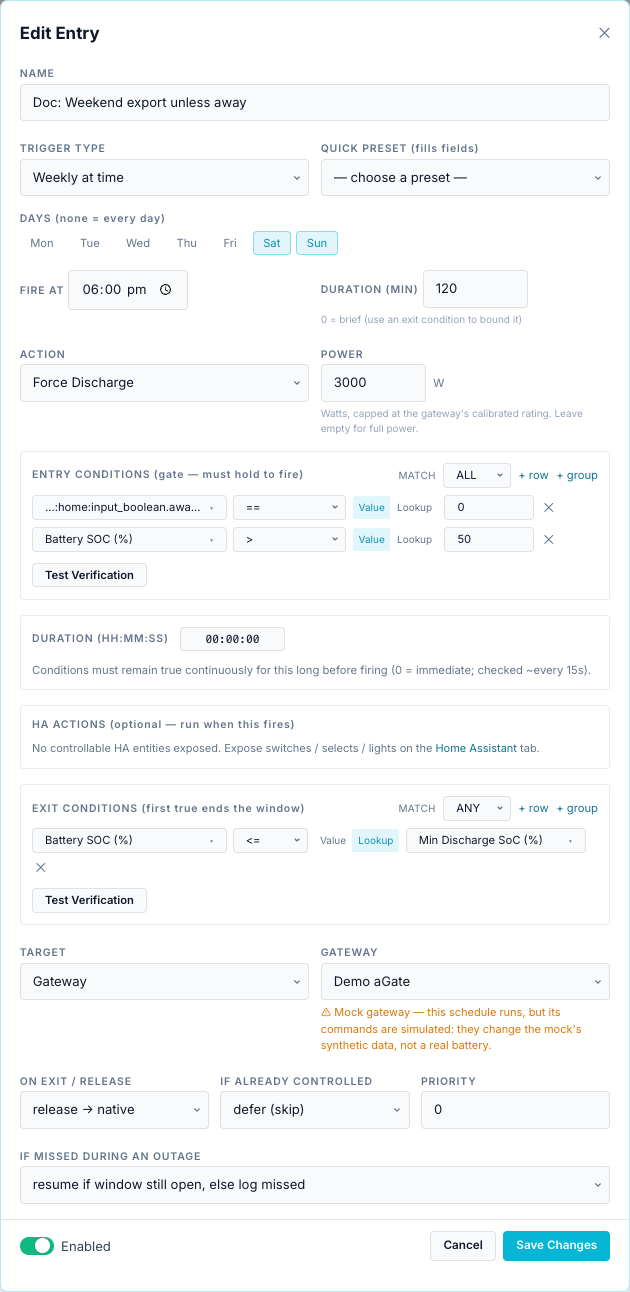
6. Weekend export, unless Home Assistant says you are away
Export the battery on Saturday and Sunday evenings, except when your HA away mode helper is on.
Needs: a Home Assistant instance on the Home Assistant tab, with input_boolean.away_mode exposed.
| Field | Value |
|---|---|
| Trigger Type | Weekly at time, Sat, Sun, Fire at 18:00, Duration (min) 120 |
| Action | Force Discharge, Power 3000 |
| Entry conditions (ALL) | HA instance: away mode == 0 |
Battery SOC (%) > 50 |
|
| Exit conditions (ANY) | Battery SOC (%) <= Lookup Min Discharge SoC (%) |
How it behaves:
away_modeis an on/off helper:onreads as 1,offas 0. Compare with0, notfalse.- If Home Assistant is unreachable, the entity has no value and the gate fails: no export. That is the safe direction.
- The screenshot was taken on a bridge with no Home Assistant connected, so the picker shows the raw id
ha:home:input_boolean.away_mode. On your bridge it reads HA name: Away mode. - To skip a whole entry while away, this gate is enough. To also notify yourself, add a Notify HA action with message
Weekend export started at %battery.soc_pct%%.
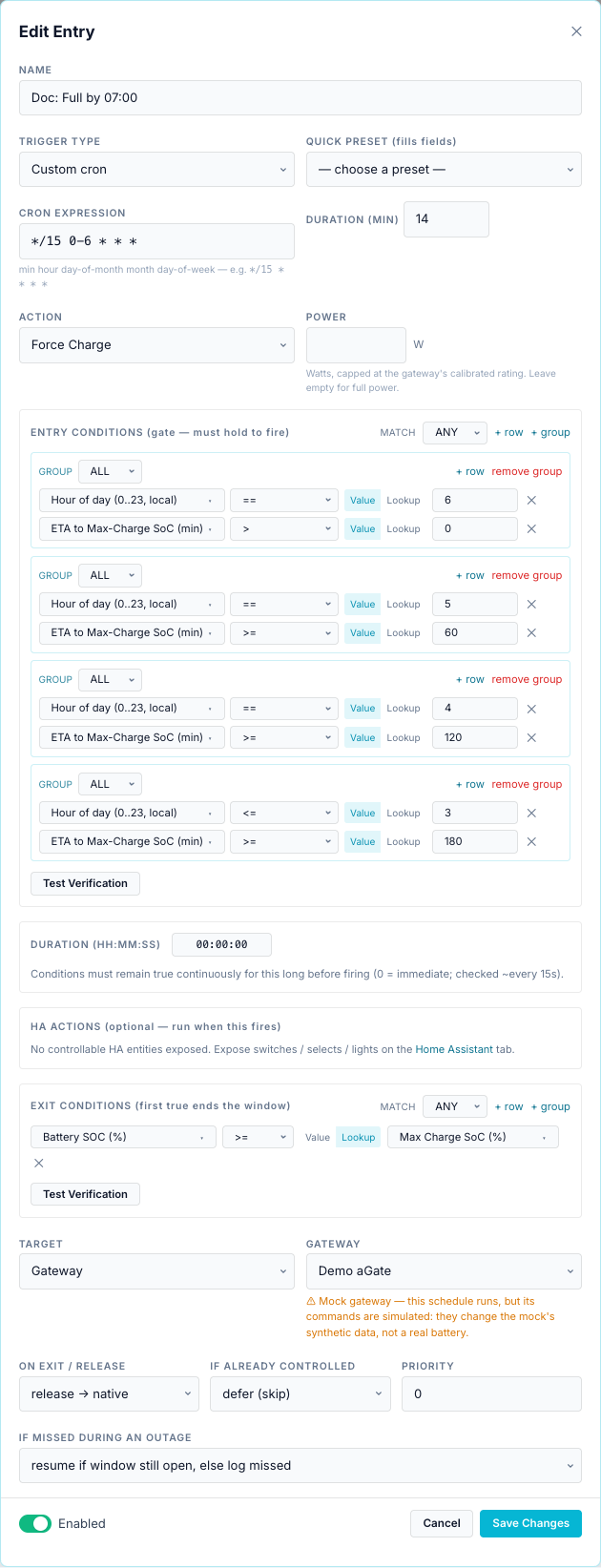
7. Full by 07:00, starting as late as possible
Charge overnight so the battery is full at 07:00, but start only when the remaining time is about the time needed. This uses the ETA sensor and the Max Charge SoC constant.
| Field | Value |
|---|---|
| Trigger Type | Custom cron */15 0-6 * * *, Duration (min) 14 |
| Action | Force Charge, Power empty (full trusted rating) |
| Entry conditions (ANY) | group (ALL): Hour of day == 6, ETA to Max-Charge SoC > 0 |
group (ALL): Hour of day == 5, ETA to Max-Charge SoC >= 60 |
|
group (ALL): Hour of day == 4, ETA to Max-Charge SoC >= 120 |
|
group (ALL): Hour of day <= 3, ETA to Max-Charge SoC >= 180 |
|
| Exit conditions (ANY) | Battery SOC (%) >= Lookup Max Charge SoC (%) |
How it behaves:
- Every 15 minutes from 00:00 to 06:45 the entry opens for 14 minutes and checks the ladder: at 04:xx it starts if charging needs two hours or more, at 05:xx if it needs one hour, and so on.
- Each 14-minute window ends with a release, and the next one re-checks the ladder a minute later. Because the ETA only shrinks as the battery charges, a rung that passed usually still passes, so charging resumes. The run ends at the exit (full) or at 06:59.
battery.time_to_charge_minassumes the gateway's nameplate charge rate (Model 702). If you set a lower Power, or your battery charges slower near full, add margin to each rung.- The rungs are coarse (one hour). Add more groups for a finer ladder.
More ideas
| Goal | Sketch |
|---|---|
| Solar sponge | Template Ausgrid — Solar sponge (10am–3pm): window 10:00–15:00, Force Charge, gate SoC < Max Charge SoC, exit SoC ≥ Max Charge SoC. |
| Export bonus | Template Battery export bonus: gate tariff.bonus_window_active == 1 and SoC > Min Discharge SoC. Change Always to a cron trigger. |
| Free-import window | Force Charge with gate tariff.import_billable == 0. |
| Alert on a timezone change | HA-only entry, cron 0 * * * *, gate time.tz_ok == 0, Notify action "Bridge clock changed: %time.utc_offset_h% h". |
| Do nothing on a collar | Add gateway.battery_capable == 1 to a Site entry's gate. |
| Respect the plan | Add service.battery_export_allowed == 1 to every discharge entry. |