REST API
The bridge's REST API is a FastAPI application. Everything the Web UI and the CLI do goes through it, so anything you can do on a page you can do from a script.
Where the API and its docs are
| URL | What | Login needed |
|---|---|---|
/api/... |
The API itself. | Yes, except /api/health, /api/health/connectivity, /api/status and /api/auth/login |
/docs |
Swagger UI: browse and try every route. | No to open it; the routes it calls still need a login |
/redoc |
ReDoc: the same schema as a long reference page. | No |
/openapi.json |
The OpenAPI 3.1 schema. | No |
| API reference | This site's copy, grouped by tag, with the access each route enforces. | — |
Where to reach them:
| Install | Base URL |
|---|---|
| Docker | http://<host>:8100 (the compose file maps 8100 → 8099) |
| Python / dev | http://<host>:8099, or the port you gave uvicorn |
| HA add-on | Through ingress the Web UI works, but /docs does not: see the note below. Publish the add-on's port 8099/tcp (add-on → Configuration → Network) and use http://<HA host>:8099. |
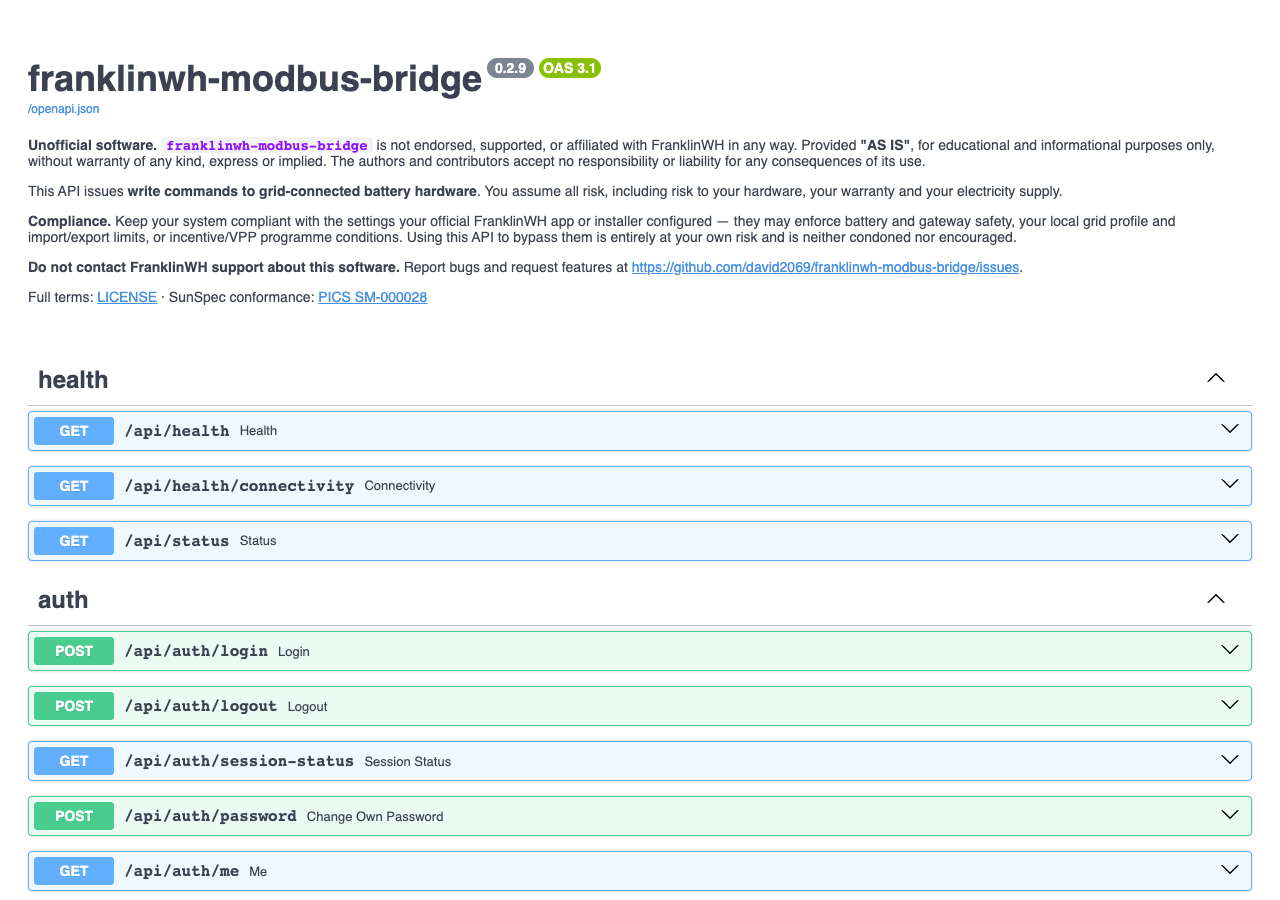
Swagger UI under ingress, and offline
FastAPI's Swagger and ReDoc pages fetch /openapi.json from the server root and load
their JavaScript from cdn.jsdelivr.net. Under Home Assistant ingress the root is
Home Assistant's, so the page loads with no operations. Without internet access the
page stays blank. Use the published port, or this site's
API reference and openapi.json.
The schema's info.description carries the project's legal notice, so a generated client
shows it too.
Authentication
The API uses the same session cookie as the Web UI. There are no API keys or bearer tokens. A client signs in once and sends the cookie on every request.
POST /api/auth/loginwith{"username": "...", "password": "..."}(JSON or a form).- The response sets a signed
sessioncookie and returns the user and its capabilities. - Send that cookie with every call.
POST /api/auth/logoutends the session.
| Situation | Response |
|---|---|
| No cookie, or the login was ended (logout, revoked, user disabled or expired) | 401 with detail.reason and detail.reason_text saying why |
| Signed in, but the role can't do this | 403 admin role required, insufficient role or 'control' capability required |
| Route belongs to a feature module that is switched off | 403 module '<id>' is disabled |
| 5 failed sign-ins for one name and address within 15 minutes | 429 with Retry-After for 60 s, before the password is checked |
Plain HTTP without ALLOW_INSECURE_AUTH=1 |
400 login requires HTTPS |
ALLOW_INSECURE_AUTH=1 is set by the shipped Docker compose file and by the add-on for its
port 8099, so sign-in works over plain HTTP on a LAN. Behind TLS, set
SESSION_COOKIE_SECURE=1 so the cookie is only sent over HTTPS.
Roles
Create users in Settings → Admin → Users. Give a script its own account.
| Role | Can read | Can write | Can command the battery | Web UI |
|---|---|---|---|---|
admin |
everything | everything | yes | full UI |
user |
everything a signed-in role can read | only routes that need control |
yes | simple dashboard (/user) |
viewer |
everything a signed-in role can read | nothing | no | simple dashboard (/user) |
api |
everything a signed-in role can read | only routes that need control |
yes | none: web pages answer This account is for the REST API only |
The rule in code (api/auth.py, main.py): reads (GET) need any signed-in role;
writes need admin unless the route declares its own gate. The battery command routes
declare the control capability, so user and api can use them. Creating, editing,
running or stopping schedules is admin-only, so a scheduler client needs an admin
account. The per-route access is listed in the API reference.
Home Assistant ingress
On the add-on, a request that arrives through Home Assistant's ingress proxy is already
authenticated by Home Assistant. The bridge then treats it as an admin named after the
Home Assistant user, with no second login. It trusts this only when all three hold: it is
running as the add-on, the TCP peer is the Supervisor's proxy (172.30.32.2), and the
request carries X-Ingress-Path. Anything else, including the published port 8099, signs
in with a bridge account.
Worked examples
These use curl with a cookie jar, against a bridge at http://192.0.2.10:8100 with a
demo gateway called demo. Replace the host, the account and the gateway id with yours.
Sign in
curl -s -c jar.txt -H 'Content-Type: application/json' \
  -d '{"username":"hass-client","password":"<password>"}' \
  $B/api/auth/login
{
  "user": {"id": "user_7804701d", "username": "hass-client", "role": "api", "enabled": true, "...": "..."},
  "capabilities": ["control", "view"],
  "session_id": "<session id>"
}
-c jar.txt saves the cookie; -b jar.txt sends it. Keep the jar private: it is a login.
Status and live values
curl -s $B/api/status          # open: version, MQTT, gateways, poll stats
curl -s -b jar.txt $B/api/gateways                 # every gateway and its health
curl -s -b jar.txt $B/api/gateways/demo/points     # one gateway's latest sample
{
  "gateway_id": "demo",
  "points": {"soc": 31.2, "battery_power_w": 513.6, "grid_power_w": 171.2,
             "battery_command_state": "Force Charge", "...": "..."},
  "ts": 1792150700.1,
  "quality": "ok"
}
GET /api/points is the same for the default gateway only. Use the per-gateway route
when you have more than one, or a demo.
Send a battery command
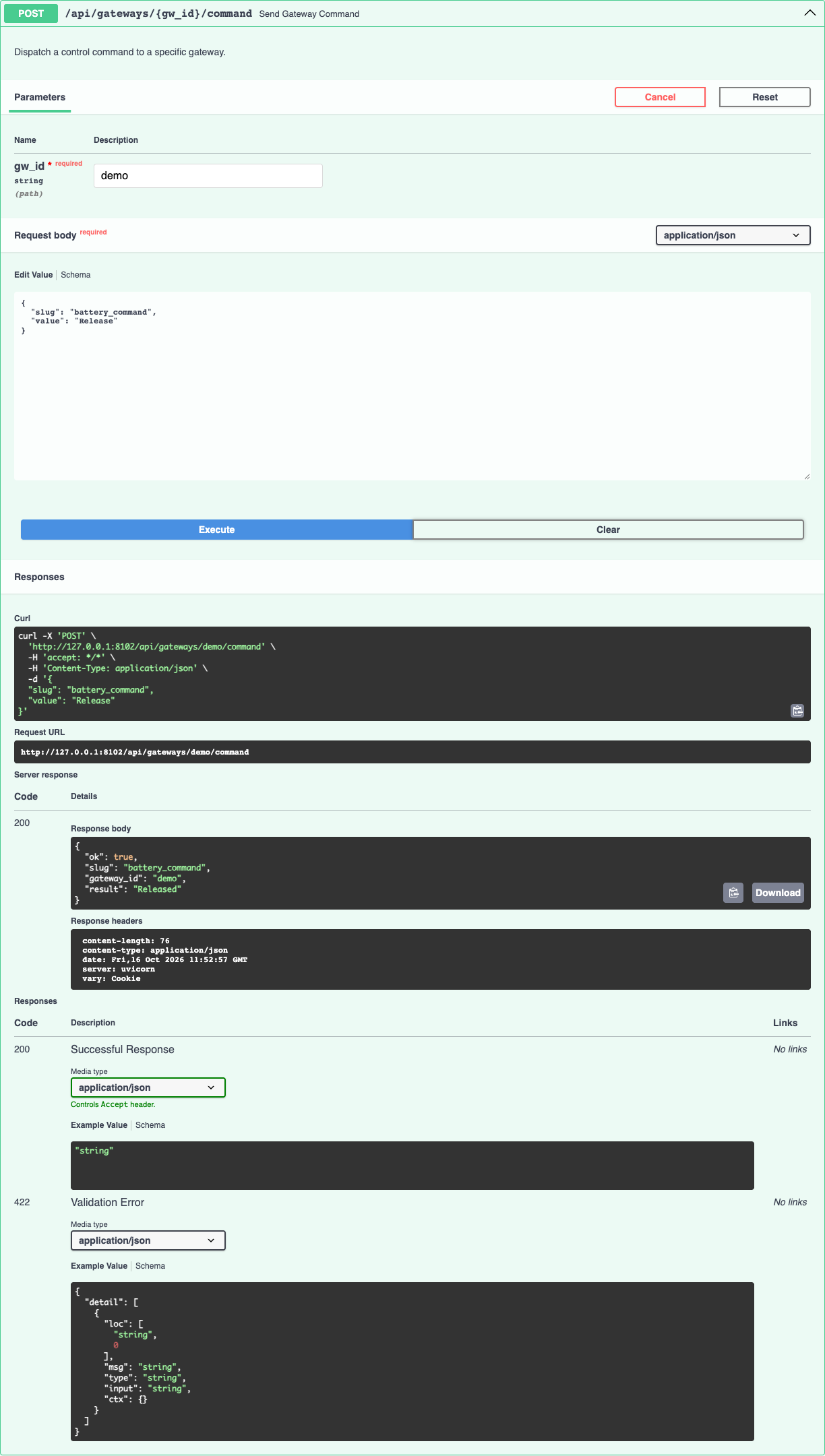
Commands are {slug, value} pairs posted to POST /api/gateways/{gw_id}/command. The
staging slugs only store a value for the next command; battery_command sends it.
cmd() { curl -s -b jar.txt -H 'Content-Type: application/json' \
          -d "{\"slug\":\"$1\",\"value\":\"$2\"}" $B/api/gateways/demo/command; echo; }

cmd battery_command_power 2000        # {"ok":true,...,"result":"Staged power 2000 W"}
cmd battery_command_duration 600      # {"ok":true,...,"result":"Staged duration 600 s"}
cmd battery_command "Force Charge"    # {"ok":true,...,"result":"Simulated charge 2000 W (mock gateway)"}
cmd battery_command Release           # {"ok":true,...,"result":"Released"}
Always check ok. A refused command answers HTTP 200 with "ok": false and the reason in
result, for example Refused Force Charge: … Calibrate it when the battery rating isn't
trusted. An unknown slug is refused, not ignored.
| Slug | Value | Effect |
|---|---|---|
battery_command |
Force Charge, Force Discharge, Force Standby, Release (also Not Active, Stop) |
Sends the command now. Release ends it. |
battery_command_power |
watts, 0 = the full trusted rating | Staged. Re-sends a running command at the new power. |
battery_command_duration |
seconds, 0–7200, 0 = no limit | Staged. |
battery_command_target_soc |
0–100 %, 0 = off | Staged. Ends the command at that SoC. |
operating_mode |
Emergency Backup, Self-Consumption, TOU (or Time of Use) |
Writes the aGate's mode now. |
self_reserve_pct, tou_reserve_pct |
0–100 | Writes that mode's reserve now. |
battery_command_power_pct |
— | Removed in 0.2.8: refused unless sent by a schedule saved before then. |
POST /api/command takes the same body and always targets the default gateway. It is
kept for older clients.
What the commands do to the aGate, and why to leave its mode alone, is in Battery dispatch: best practice.
Try it in Swagger UI
Sign in to the Web UI in the same browser first: Swagger UI's Try it out sends the
browser's session cookie. It also prints the equivalent curl command.
Regenerating the reference
The API reference and openapi.json are generated from the code, in-process, with no running bridge:
The script imports franklinwh_bridge.main:app, writes app.openapi() to
docs/dev/openapi.json, and renders docs/dev/api-reference.md: one section per OpenAPI
tag, a table per section, then each operation with its docstring, parameters and request
fields. The Access column is read from each route's dependencies, so it follows the
code. It needs no MkDocs plugin and no extra dependency. Run it after any route change and
commit both files.