Triggers
The trigger decides when an entry is active. Conditions and actions only matter while it is active. This page covers starting by time; starting by event or by sensor is a trigger plus entry conditions (see Concepts and Conditions).
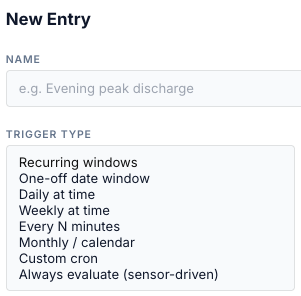
Summary
| Trigger Type (UI) | API | Fields | Active |
|---|---|---|---|
| Recurring windows | when_spec (no trigger_kind) |
Days, one or more time windows | inside any window, on the ticked days |
| One-off date window | when_spec.date |
Date, one or more time windows | inside any window, on that date only |
| Daily at time | trigger_kind: daily |
Fire at, Duration (min) | fire time → + duration, every day |
| Weekly at time | weekly |
Days, Fire at, Duration (min) | fire time → + duration, on the ticked days |
| Every N minutes | interval |
Every (min), Anchor, Duration (min) | each fire → + duration |
| Monthly / calendar | monthly |
Day of month, Fire at, Duration (min), Months | fire time → + duration |
| Custom cron | cron |
Cron expression, Duration (min) | each cron match → + duration |
| Always evaluate (sensor-driven) | always |
— | always |
| (API only) | oneoff |
fire_at (ISO date-time), duration_s |
fire time → + duration, once |
Window triggers are legacy entries unless they also have conditions; the others are v2. See Concepts.
Fire-based triggers: the active window
For Daily, Weekly, Every N minutes, Monthly, Cron and the API one-off, the bridge finds the most recent fire time at or before now. The entry is active from that fire time until fire time + Duration (min).
Duration (min) empty or 0 means one minute
With no duration the active window is 60 seconds. That is enough for a one-shot action (a mode, a reserve, a notification). A force command sent in that minute is released about a minute later at the window end. Set a duration for force commands: an exit condition can end a run earlier, never later.
Duration (min) is not the same as Duration (HH:MM:SS)
Duration (min) sits with the trigger and sets how long the entry stays active. Duration (HH:MM:SS) sits under the entry conditions and is the hold-for time.
All triggers work to the minute: seconds are dropped before fire times are compared, so a fire time equal to the current minute counts as now.
Recurring windows
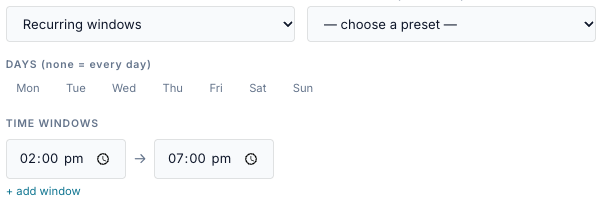
- Tick the Days. None ticked means every day.
- Type a start → end time. + add window adds another; ✕ removes one (one must stay).
| Field | Values | Notes |
|---|---|---|
| Days | Mon … Sun, any combination | None ticked = every day. |
| Time windows | start → end, HH:MM |
Any window matching makes the entry active. |
-
The entry is active from start up to, but not including, end.
-
None ticked = every day. A day not ticked is skipped.
-
Several windows on one entry: the entry is active inside any of them.
-
End earlier than start wraps past midnight.
22:00 → 06:00runs overnight; the form says wraps past midnight. -
The day check uses today's date, not the day the window opened. With only Mon ticked,
22:00 → 06:00is active Monday 00:00–06:00 and Monday 22:00–24:00, not Monday night into Tuesday. Tick both days if you want both halves. -
Start equal to end matches nothing.
24:00is midnight. An end of24:00is read as00:00, so18:00 → 24:00runs to midnight. The API acceptsH:MMorHH:MM; hours above 23 wrap.
One-off date window
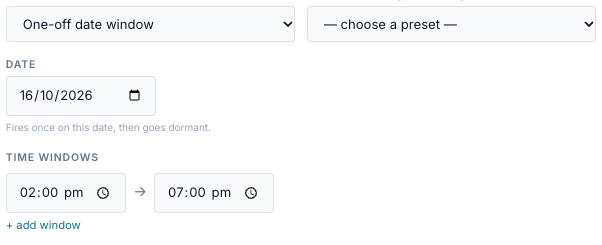
| Field | Values | Notes |
|---|---|---|
| Date | a calendar date | Defaults to the bridge's today. |
| Time windows | start → end | Same rules as recurring windows. |
-
The entry is active only on that date. The Days are ignored.
-
It never fires again. The list shows Once (passed) after the date.
-
An overnight window on a date covers only that date:
22:00 → 02:00on 20 October runs 00:00–02:00 and 22:00–24:00 on the 20th. Use two entries to cross midnight.
Daily at time
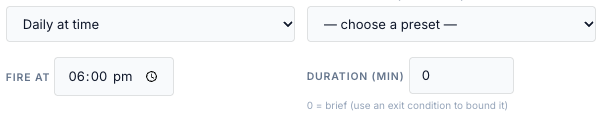
| Field | Values |
|---|---|
| Fire at | HH:MM |
| Duration (min) | 0 or more (0 = one minute) |
A duration longer than 24 hours makes the windows overlap, so the entry never becomes inactive (see Always for what that means after a run ends).
Weekly at time
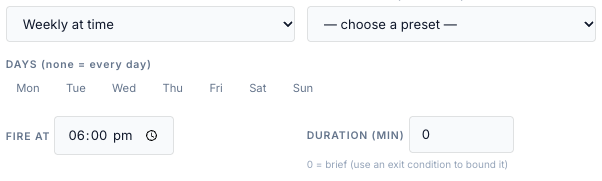
| Field | Values | Notes |
|---|---|---|
| Days | Mon … Sun | Tick at least one day. |
| Fire at | HH:MM |
|
| Duration (min) | 0 or more |
A weekly trigger with no days never fires. The bridge accepts it when you save; Next fire shows —.
Every N minutes
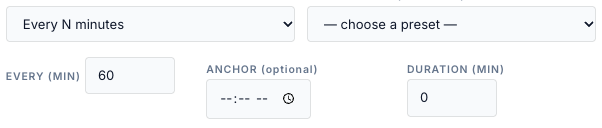
| Field | Values | Notes |
|---|---|---|
| Every (min) | 1 or more | Stored as seconds (every_seconds). The API takes any positive number of seconds. |
| Anchor | HH:MM, optional |
Fires are counted from this time. Empty = midnight. |
| Duration (min) | 0 or more |
-
Fires land on anchor + k × N, counted from today's anchor (or yesterday's, before the anchor time). With N = 30 and no anchor: 00:00, 00:30, 01:00 …
-
The count restarts at the anchor every day. If N does not divide 24 hours, the last gap of the day is shorter: every 7 hours from midnight fires 00:00, 07:00, 14:00, 21:00, then 00:00 again.
-
24 hours or more behaves like Daily at the anchor time.
-
An interval of 0 or less, or one that isn't a number, never fires. The form never sends one.
Monthly / calendar
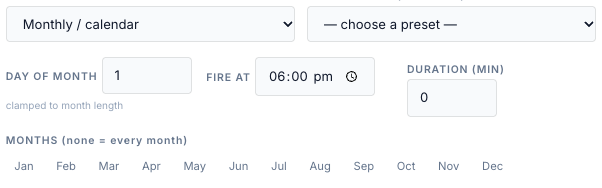
| Field | Values | Notes |
|---|---|---|
| Day of month | 1–31 | Clamped to the month's length: 31 fires on 30 April and 28/29 February. |
| Fire at | HH:MM |
Empty (API) = 00:00. |
| Duration (min) | 0 or more | |
| Months | Jan … Dec | None ticked = every month. |
The quick presets use this trigger: Every month (1st day), Quarterly (Jan, Apr, Jul, Oct), Six monthly (Jan, Jul) and Annually (Jan 1st).
Custom cron
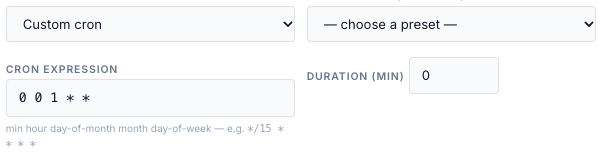
| Field | Values |
|---|---|
| Cron expression | five fields: minute, hour, day of month, month, day of week |
| Duration (min) | 0 or more |
| Expression | Fires |
|---|---|
*/15 * * * * |
every 15 minutes |
0 17 * * 1-5 |
17:00 Monday–Friday |
*/30 6-20 * * * |
every half hour from 06:00 to 20:30 |
0 0 1 * * |
midnight on the 1st of each month |
-
The bridge checks the expression when you save and refuses an invalid one.
-
Day of week counts from Sunday = 0 (Monday = 1) in cron, unlike the Weekly trigger and
time.dow, where Monday = 0. -
A cron match at the current minute counts as now.
-
Cron and monthly entries are not drawn on the visual timeline.
Always evaluate

The entry is active all the time; only its entry conditions decide whether it dispatches.
Always runs once, then waits for a restart
The form says an Always entry "releases when [its conditions] stop". The code does not do that:
- Once a force command runs, the entry conditions are not checked again. Only an exit condition, a time limit, a target SoC, Stop or a release elsewhere ends it.
- When a run ends, the entry is marked done for this window. An Always window never closes, so the entry does not fire again until the bridge restarts.
- An Always HA-only entry also fires its HA actions only once per bridge run.
- The done mark is held per gateway, not per entry. If another entry on the same target dispatches, the mark is cleared and the Always entry can fire again. Disabling and re-enabling the entry does not clear it when it is the only entry on its target.
For "whenever the price is low" rules use a repeating trigger with a gap, for example
Custom cron */30 * * * * with a 29-minute duration. The examples do this.
Quick presets
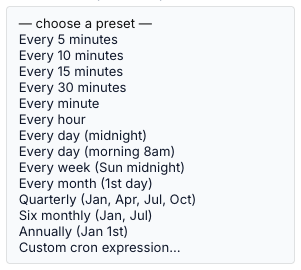
A preset fills the trigger fields; you can edit them afterwards.
| Preset | Sets |
|---|---|
| Every 5 / 10 / 15 / 30 minutes, Every minute, Every hour | Every N minutes, N = 5, 10, 15, 30, 1, 60 |
| Every day (midnight), Every day (morning 8am) | Daily at 00:00 / 08:00 |
| Every week (Sun midnight) | Weekly, Sunday, 00:00 |
| Every month (1st day), Quarterly, Six monthly, Annually | Monthly, day 1, months as named |
| Custom cron expression… | Custom cron |
Next fire
The Next fire column is worked out on the bridge, on the bridge's clock:
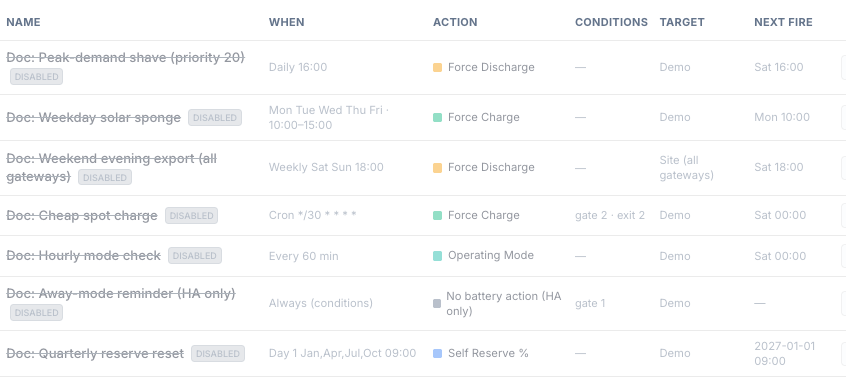
| Trigger | Next fire |
|---|---|
| Recurring windows | the next window start at or after now, looking up to 8 days ahead. While a window is open, that is the next one, not the current one. |
| One-off date window | the next window start on that date; — once it has passed |
| Fire-based | the next fire time at or after now |
| Always, or a trigger that can never fire | — |
Editing a trigger in the form
-
Switching a fire-based entry to a window type keeps the old Duration (min) in the database. A window ignores it for activity, but Run now still uses it as the time limit (see Run now).
-
An API one-off (
trigger_kind: oneoff) has no form type. Opening it in the editor and saving it drops itsfire_at, and the entry never fires again.
After an outage or a restart (catch-up)
The bridge treats a gateway as in an outage when no good poll has arrived for more than 60 seconds. When the gateway is back, the bridge runs catch-up for every enabled entry that targets it. It also runs at start-up when the bridge was down for more than 60 seconds, using the last good poll it saved (every 60 s) before stopping.
For each entry:
| Situation | What happens |
|---|---|
| Its window is open now | Nothing special: the next tick handles it as usual (gate permitting). |
| A window start or fire time fell inside the outage and has ended | Handled by If missed during an outage, below. Only the latest missed fire counts (for windows, the first window start after the outage began). |
| No fire during the outage | Nothing. |
| Always entries | Never missed: they have no fire time. |

| Option (UI) | API missed_policy |
Behaviour |
|---|---|---|
| resume if window still open, else log missed | late_fire_remaining (default) |
Logs missed. |
| skip (log missed only) | skip |
Logs missed. Behaves exactly like the default. |
| late-fire even if window passed | late_fire_always |
Checks the entry conditions now. If they pass, sends the action now and logs late_fired; otherwise logs missed with the failing values. |
A late fire is different from a normal run:
-
It is not owned by the scheduler: no exit conditions, no verification, no release at a window end. It ends at its time limit (the entry's duration) or when something releases it. An entry with no duration late-fires with no time limit.
-
It ignores If already controlled: it is sent even over a manual command.
-
It runs no HA actions. An HA-only (none) entry with this policy sends nothing and writes no Activity Log row; it is only listed as missed on the outage record.
-
Its Activity Log rows name the target as
gateway:<id>:<gateway>rather than the gateway's name.
The form shows the missed-policy selector only for fire-based triggers. Window entries are caught up with whatever policy is stored on them; the form saves its current value (normally the default).
The clock that all of this runs on is described in Restarts and the clock.