SunSpec Explorer¶
The SunSpec Explorer (?tab=explorer) lists every SunSpec model and register the aGate
exposes, with live values. It is a tool for checking a value, reporting a bug, or
learning the aGate's registers. It only reads, apart from PICS marks that it stores in the
bridge's database.
Off by default, and needs a real aGate
- On a new install the Explorer is switched off. Turn it on in Settings → Admin → Feature Modules.
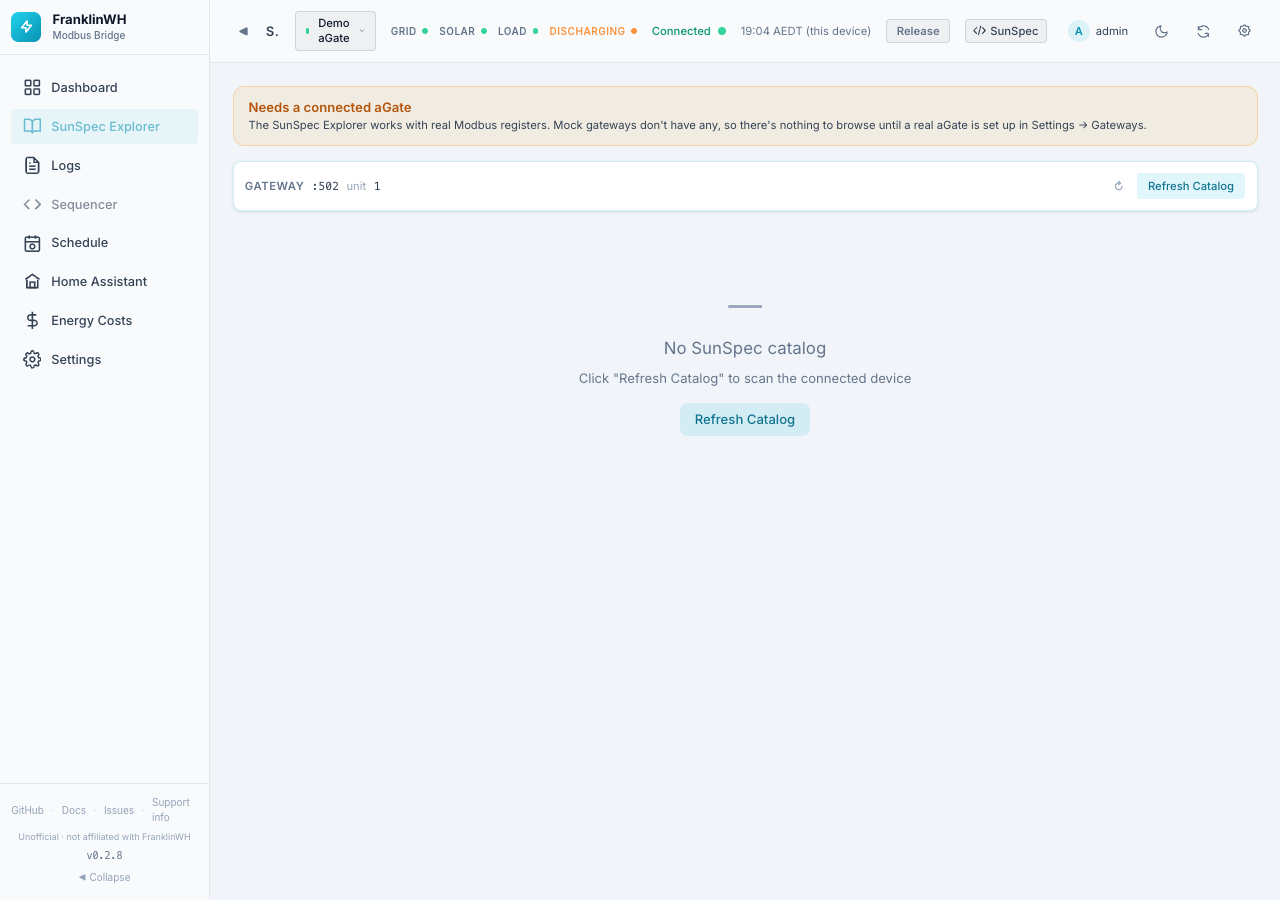
- It needs a connected, real aGate. With only a mock or demo gateway it shows Needs a connected aGate, because a mock has no Modbus registers.
Layout¶
Connection bar (top): the gateway's host, port and unit ID, how many models and points were found, and:
- ↻ resets the panel sizes.
- Refresh Catalog scans the aGate again for its SunSpec models. Use it after a firmware update. If no catalog exists yet the page offers this button in the middle.
Sub-tabs, under the connection bar. Each opens at full height, and the address bar remembers which one you are on:
| Tab | Address | Shows |
|---|---|---|
| Models | ?tab=explorer§ion=models |
The SunSpec model tree and the points of the model you pick (below). |
| FranklinWH extensions | ?tab=explorer§ion=extensions |
The extension registers (below). |
| Modbus reader | ?tab=explorer§ion=reader |
The reader (below). Admins only. |
Export… stays in the connection bar and works from any tab.
Model tree (left, on the Models tab):
- Filter models/points… searches model names and point names.
- Hide unpolled models (no live values) hides models the bridge does not poll.
- Each model shows its ID, name and number of points. Click one to open it.
Points detail (right), for the chosen model:
| Control | What it does |
|---|---|
| Addr: Base-0 / Base-1 / 4xxxx | Base-0 (the default) is the Modbus address you actually send: the aGate serves its SunSpec map starting at address 0, and FranklinWH's official SunSpec PICS lists addresses the same way. Base-1 is the Modbus register number: the same register counted from 1. 4xxxx is the legacy Modbus (Modicon) holding-register reference: 40001 = register 1 = PDU address 0. The leading 4 means holding register and is not part of the address; a tool that sends 40001 as the address gets exception 2 (illegal data address) from the aGate. These are Modbus terms; SunSpec only fixes where its map starts (the aGate's starts at PDU address 0). |
| Access | All, R (read-only) or RW (writable). |
| PICS | Filters by compliance mark (see below). |
| ↻ | Reads the model from the aGate now. |
If the model is not polled, a notice says Not actively polled — no live values with a ⚡ Read Now button.
Points table columns: Point, Label, Value (hover a coded value to see what each code means), Type, Unit, Addr, Access, PICS.
PICS marks¶
PICS is a compliance checklist. Click the PICS badge on a row to cycle it through:
| Mark | Meaning |
|---|---|
| U | Unimplemented (default when there is no value) |
| S | Supported (default when the point has a live value) |
| T | Tested |
| F | Failed |
| X | Not applicable |
Your marks are saved in the bridge's database, per model and point.
Exporting models¶
Export…, at the top of the page next to Refresh Catalog, opens a window to export the SunSpec map with its current values, for a GitHub issue, a Gist, or someone writing another integration.
| Option | Choices |
|---|---|
| Models | This model (the one open on the right, when one is), All models (the default), Displayed models (the ones the list on the left shows after its filter and Hide unpolled models), or Choose models (click model numbers to add or remove them). |
| Format | JSON (with the gateway's model and firmware) or CSV (one row per point). |
| Addresses | Every point carries its base-0 PDU address, its base-1 register number and its 4xxxx holding-register reference (address_base0 / address_base1 / holding_register_4x; three CSV columns), and the JSON has an addressing note explaining them. Extension registers carry only their listed address. |
| Include FranklinWH extensions | On by default. Adds the FranklinWH extension registers (15000–15039, 15500+, 16000+) as their own section: in JSON a franklinwh_extensions block whose note says they are not SunSpec (undocumented by FranklinWH, named by this bridge, some unconfirmed); in CSV, rows with Model ext. The file name gains _ext. |
| Redact serial number | On by default. Replaces the serial number with <serial>: in model 1's SN and anywhere else it appears, including its last 8 characters. Turn it off only if you want to share the serial. |
The preview shows exactly what you will get. The gateway's IP address and name are never included. Then:
- Copy copies it.
- Download saves it, named for example
sunspec_all_redacted.json. - Save as Gist copies it and opens GitHub's new Gist page. Paste it, give the file the
name shown under the preview, then choose:
- Create secret gist: unlisted, so only people with the link can find it. It is not private: anyone with the link can read it.
- Create public gist: listed on your profile and searchable.
The bridge sends nothing to GitHub itself, and needs no GitHub account or token.
The same export is available from the REST API: GET /api/models/export (see the
API reference).
Warning
Read the preview before you share it. You are responsible for what you post.
FranklinWH Extension Registers¶
The bottom panel lists the FranklinWH vendor registers (15000+, 15500+, 16000+) that are outside the SunSpec models. Click its header to show or hide it.
- Search registers… filters by name or description.
- All / Identified / Unknown shows every register, only the ones with a name (from
FranklinWH documentation, or from site notes marked unconfirmed), or only the unnamed
ones (
Reg15xxx, description Unknown). - Hide zeros hides registers that read 0.
- JSON / CSV download the list as filtered here. Export… at the top can also include them with the models (Include FranklinWH extensions).
Columns: Addr, Register, Description, Value, Hex, Type, Acc (access), Unit.
Warning
Extension registers are undocumented by FranklinWH and can change with firmware.
Panel sizes are draggable, and the layout is remembered in this browser.
Modbus reader¶
Modbus reader (admins only, its own tab) runs the franklinwh-modbus
reader against the gateway, the same tool as the library's modbus_sunspec2_reader.py.
It only reads.
| Option | What it does |
|---|---|
| Raw | A raw register read, start:count (base-0 PDU addresses, up to 125 registers). Buttons fill in the known blocks: 15000:40, 15500:14, 16000:3. Leave empty for no raw read. |
| Models | Scan only these SunSpec models, e.g. 1,701-704. |
| Point | Read one point, e.g. 714.DCW. |
| Detail | How much the model scan prints: minimal, basic, values, detailed, full. |
| Non-zero only | For a raw read, show only registers that aren't 0. |
| Match | Look for SunSpec points whose value equals each raw register's value, to help work out what an unknown register is. It scans the models first, so it takes longer. |
The output is the reader's own text; Copy copies it. A register the aGate doesn't answer shows the Modbus error rather than a blank.
While the reader runs, the bridge hands it the aGate's Modbus connection (the aGate takes one client at a time), so polling pauses for those few seconds. It doesn't run on a demo gateway.