Targets
The target says which gateway or gateways an entry acts on. One entry can drive one gateway, every gateway on a utility service, or every gateway on the site.

Pick a target
- In the entry form, open Target.
- Pick Gateway, Site (all gateways) or Service.
- For Gateway or Service, pick it in the list next to it.


| Target (UI) | API target_type / target_id |
Acts on |
|---|---|---|
| Gateway | gateway / the gateway id |
that gateway, once it has been started, even while it is not polling (for example during an outage) |
| Site (all gateways) | site / none |
every running (polling) gateway, mock gateways included |
| Service | service / the service id |
every running gateway linked to that utility service |
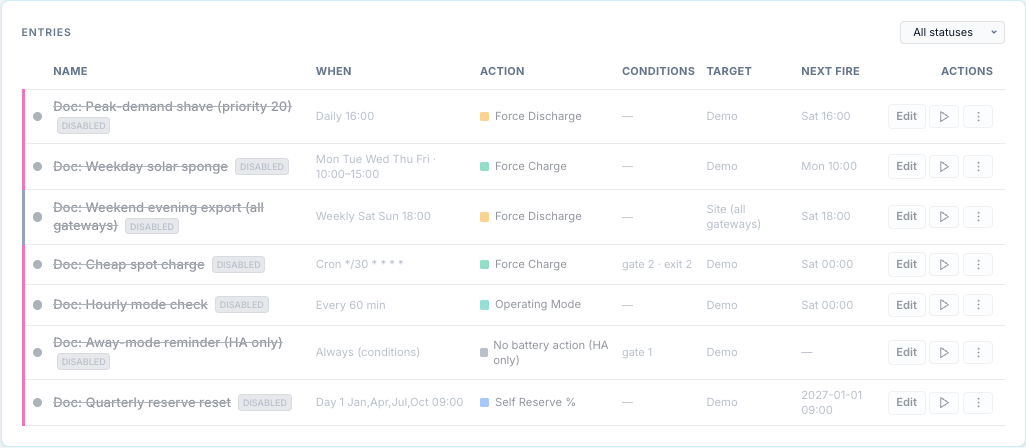
The list shows the target of each entry:
How a fan-out works
For Site and Service, each member gateway is handled on its own:
| Per gateway | Detail |
|---|---|
| Conditions | evaluated on that gateway's own values (see Conditions → Scope) |
| Ownership | one run per gateway; one gateway can be running while another is gated |
| Release | each gateway is released at its own exit |
| Activity Log | one row per gateway; the Target column names the gateway, with (mock) for a mock |
The member list is worked out again on every tick:
- A gateway that joins (starts, or is linked to the service) is picked up on the next tick.
- A gateway that leaves while the entry runs on it (unlinked from the service, or no longer polling for a Site target) is not released. The engine can no longer reach it through the target, drops its records, and the command keeps running on that gateway until something else releases it. Release it from the Controls tab or the top bar. When the gateway comes back (polling again), the entry no longer owns that command and treats it as manual control: with defer it logs deferred and never releases it.
- For Site and Service, a gateway that is not polling is skipped without an Activity Log row. A Gateway target is sent to even while its gateway is not polling: the send fails and is retried and reported like any failed dispatch. A gateway that is stopped, disabled or unknown is skipped silently.
Run now on a Site or Service entry sends the action to every member at once, each after its own condition check.
Entries with no target id
The form always saves a gateway id for a Gateway target. Through the API, a Gateway target
with no target_id (null or missing) acts on the gateway whose id is default. If no
gateway has that id, the entry does nothing.
default and no id are two different targets
An entry with no target_id and an entry with target_id: "default" act on the same
gateway, but the engine groups entries by the target as stored. They are not compared by
priority: each sees the other's command as manual control (see
Priorities and conflicts).
In the form
- Switching Target to Service keeps the gateway id that was selected until you pick a
service from the list. If you save without picking one, the entry is saved with that
gateway id (or
default) as its service id and matches no gateway. Pick the service explicitly. - A Site target is saved with no target id.
-
Picking a mock gateway shows a warning: its commands change simulated data only.
-
Test Verification for a Site or Service target checks the gateway
defaultonly. - Import points an entry whose gateway does not exist on this bridge at
default.
On the timeline
Gateway entries are drawn on their gateway's track; Site entries on every track; Service entries only when the timeline shows all gateways.