Triggers
Direct Connect Bridge. Mirrors the Modbus Bridge page Triggers section for section.
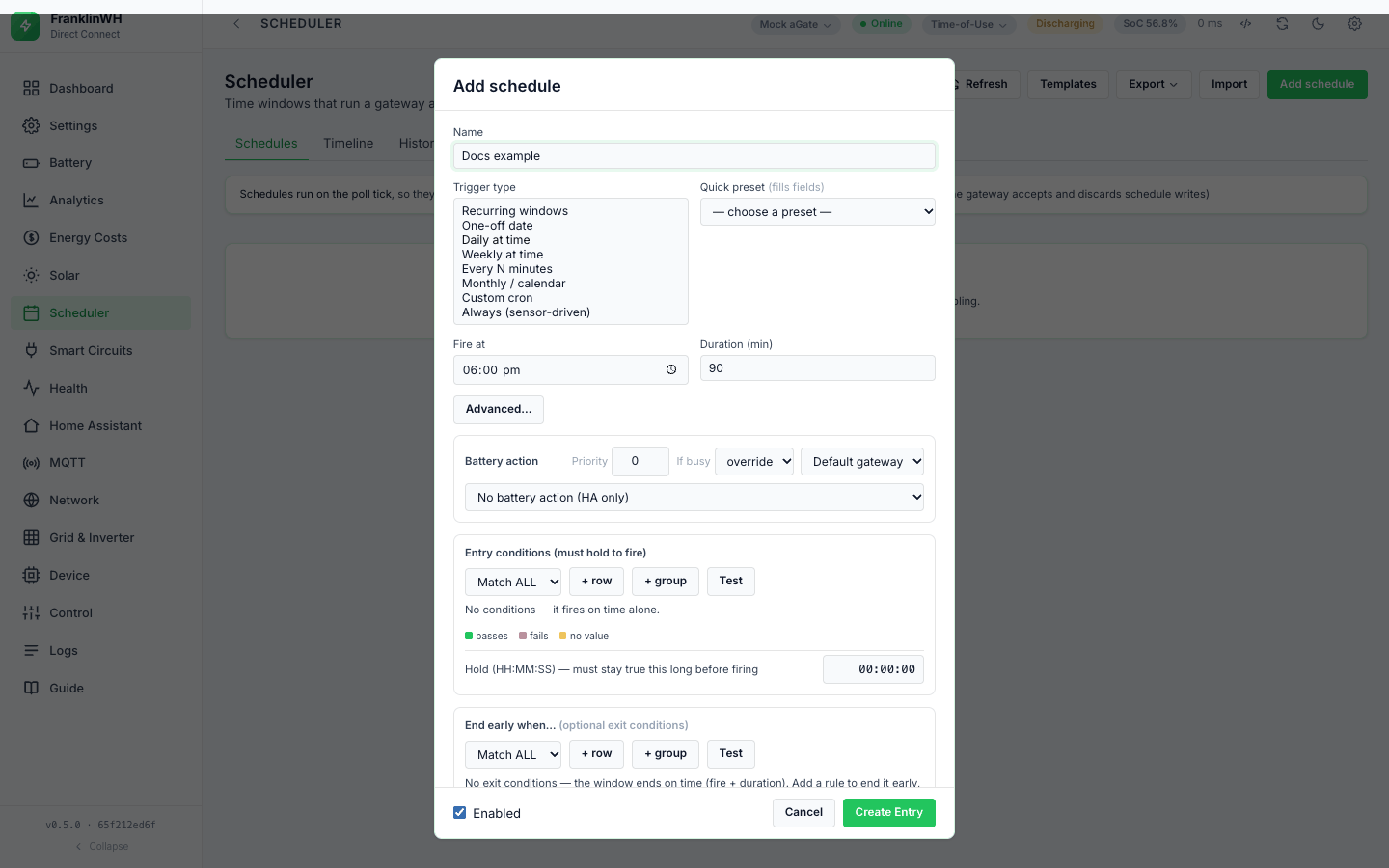
The trigger decides when a schedule's window is open. Conditions and actions only matter while it is open. This page covers starting by time; starting by event or by sensor is a trigger plus entry conditions (see Concepts and Conditions).
Summary
| Trigger type (UI) | API trigger_type |
Fields in the form | Window |
|---|---|---|---|
| Recurring windows | window |
Days, one or more time windows | inside any window, on the ticked days |
| One-off date | once |
Date, Fire at, Duration (min) (the form also shows Time windows; see the warning below) | Fire at → + duration, on that date |
| Daily at time | daily (the default) |
Fire at, Duration (min) | Fire at → + duration, every day |
| Weekly at time | weekly |
Days, Fire at, Duration (min) | Fire at → + duration, on the ticked days |
| Every N minutes | interval |
Every (min), Anchor, Duration (min) | each slot → + duration |
| Monthly / calendar | monthly |
Day of month, Months, Fire at, Duration (min) | Fire at → + duration, on that day |
| Custom cron | cron |
Cron expression, Duration (min) | each cron match → + duration |
| Always (sensor-driven) | always |
— | while the entry conditions hold |
Every trigger also honours the calendar restrictions Days, Months, Day of month, Start date and End date when they are set: each one is a restriction, and an empty one means "no restriction". The form shows only the ones that belong to the chosen type, plus a date range under Advanced….
Not in this bridge: the legacy / v2 distinction. Every schedule has a trigger_type
(daily when none is stored) and is evaluated the same way. See
Concepts.
Fire-based triggers: the active window
For Daily, Weekly, One-off and Monthly the window is Fire at → Fire at + Duration (min) on each allowed day. For Every N minutes it is each slot → slot + duration, and for Custom cron each match → match + duration.
Duration (min) 0 means one minute
With a duration of 0, a Daily, Weekly, One-off or Monthly window is open only during the Fire at minute; an Every N minutes or cron window is open for one minute. That is enough for a one-shot action (a mode, a notification). A force sent in that minute is started with no time limit (the force's own timer is the duration, 0 = none), and is released by the window's end edge on the next tick after the minute. Set a duration for force actions.
Duration (min) is not the same as Hold (HH:MM:SS)
Duration (min) sits with the trigger and sets how long the window stays open. Hold (HH:MM:SS) sits under the entry conditions and is the hold time.
All time triggers work to the minute: the engine compares hour × 60 + minute, so seconds
play no part.
Recurring windows
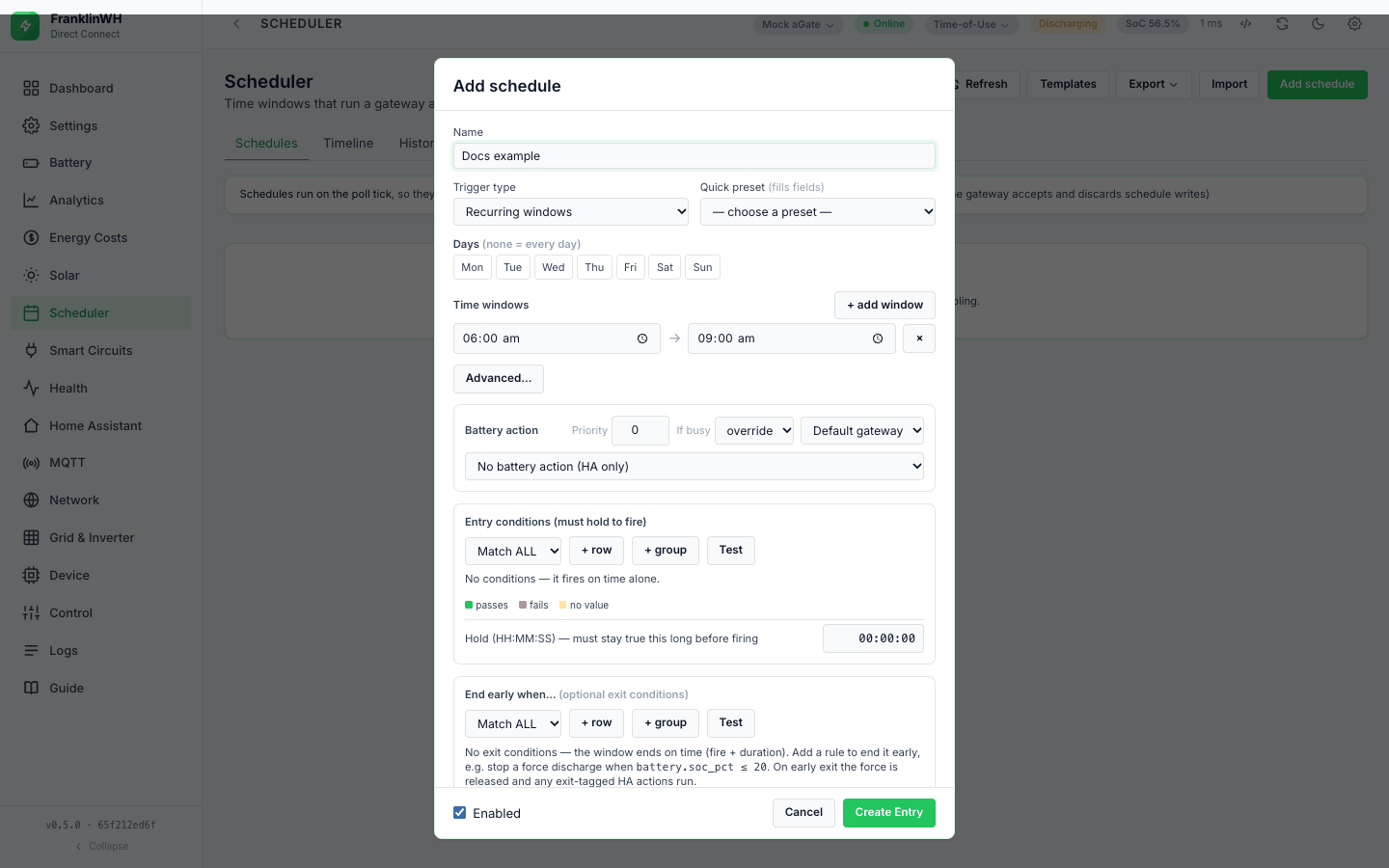
- Tick the Days ("none = every day").
- Type a start → end time. + add window adds another; × removes one.
| Field | Values | Notes |
|---|---|---|
| Days | Mon … Sun, any combination | None ticked = every day. |
| Time windows | start → end, HH:MM |
Any window matching opens the schedule. |
-
The window is open from start up to, but not including, end.
-
None ticked = every day. A day not ticked is skipped.
-
Several windows on one schedule: it is open inside any of them, and each window is its own occurrence, so a schedule with a morning and an evening window fires once in each.
-
End at or before start wraps past midnight.
22:00 → 06:00runs overnight. -
The day check uses the day the window opened. With only Wed ticked,
22:00 → 02:00runs Wednesday 22:00 to Thursday 02:00; the after-midnight part belongs to Wednesday. It does not run Wednesday 00:00–02:00. -
Start equal to end is a 24-hour window, not an empty one:
18:00 → 18:00is open all day. -
24:00is the end of the day.18:00 → 24:00runs to midnight. A time that does not parse drops that window; if no window parses, the schedule falls back to Fire at + Duration (min) (both hidden for this type in the form, default 18:00 and 90).
Direct Connect only. Advanced… restricts any recurring type to a Start date and an End date. A day outside the range is blocked with the reason "before start date …" or "after end date …", which Test against live shows.
One-off date window
| Field | Values | Notes |
|---|---|---|
| Date | a calendar date | Saving copies it to both Start date and End date. |
| Fire at, Duration (min) | HH:MM, minutes |
The window that runs on that date. |
-
The schedule runs only on that date. The form hides Days, but a Days list saved earlier on the schedule still applies.
-
It never fires after the date. Next: shows "—" afterwards; the card keeps saying "once on
". -
An overnight window covers both dates: Fire at
22:00, Duration240on 20 October runs 20 October 22:00 to 21 October 02:00, because the after-midnight part belongs to the day it opened.
One-off: the Time windows in the form are ignored, and no date means every day
For One-off date the form shows Time windows as well as Fire at and Duration (min). The engine uses only Fire at and Duration: windows are read for Recurring windows alone. And a One-off saved without a date has no date restriction, so it fires every day. Issue #198.
Daily at time
| Field | Values |
|---|---|
| Fire at | HH:MM |
| Duration (min) | 0 to 1440 in the form (0 = one minute) |
Fires once a day, on each day the calendar restrictions allow. A schedule that has already fired this occurrence does not fire again until the next one.
The form caps Duration (min) at 1440 for these types; the API does not cap it. Longer durations have not been tested.
Weekly at time
| Field | Values | Notes |
|---|---|---|
| Days | Mon … Sun | None ticked = every day. |
| Fire at | HH:MM |
|
| Duration (min) | 0 or more |
Weekly is Daily with a Days restriction. With no days ticked it runs every day.
Every N minutes
| Field | Values | Notes |
|---|---|---|
| Every (min) | 1 or more in the form | Stored as interval_min. |
| Anchor | HH:MM, optional |
Slots are counted from this time. Empty = midnight. |
| Duration (min) | 0 or more | 0 = one minute. |
-
Slots land on anchor + k × N, counted from today's anchor (or yesterday's, before the anchor time). With N = 30 and no anchor: 00:00, 00:30, 01:00 …
-
The count restarts at the anchor every day. If N does not divide 24 hours the last gap of the day is shorter: every 25 minutes from midnight has a slot at 23:45, then 00:00.
-
24 hours or more opens once a day at the anchor. Next: disagrees: it shows anchor + N rather than the next anchor.
-
An interval of 0 or less never opens. The API does not reject it; the form's field has a minimum of 1.
Monthly / calendar
| Field | Values | Notes |
|---|---|---|
| Day of month | 1–31 | Clamped to the month's length: 31 fires on 30 April and 28/29 February. |
| Months | Jan … Dec | None = every month. |
| Fire at | HH:MM |
Default 00:00 through the API. |
| Duration (min) | 0 or more |
-
The API does not check the day or the months. A day of
0or none means "no day restriction". -
A Monthly schedule with no Day of month runs every day at Fire at (in the listed months). Pick a day.
The quick presets use this trigger: Monthly (1st), Quarterly (1st) (Jan, Apr, Jul, Oct) and Annually (Jan 1).
Custom cron
| Field | Values |
|---|---|
| Cron expression | five fields: minute, hour, day of month, month, day of week |
| Duration (min) | 0 or more (0 = one minute) |
| Expression | Fires |
|---|---|
*/15 * * * * |
every 15 minutes |
0 17 * * 1-5 |
17:00 Monday–Friday |
0 3 * * * |
03:00 every day (the form's default) |
- Custom cron needs the
croniterpackage. Without it the option reads Custom cron — unavailable and cannot be picked. -
The expression is not checked when you save. An invalid or empty one never opens, and Next: shows "—".
-
Day of week counts from Sunday = 0 in cron (croniter), unlike Days and the weekday restriction, where Monday = 0.
-
Each match opens the window for Duration (min) from the match minute.
-
Cron, Every N minutes and Always schedules are not drawn on the Timeline.
Always evaluate
The form calls it Always (sensor-driven): "No time trigger — this dispatches whenever the entry conditions hold and releases when they stop." The window is open while the entry conditions hold. The schedule fires on the rising edge only, not on every tick.
When the conditions stop holding, the window closes: exit HA actions run and, for a force action, a Release is sent.
Always fires once, ever, and then only releases
The run of an Always schedule is stored as one occurrence with the fixed key always.
After the first successful run that occurrence is finished, so every later rising edge
sends nothing. Probe, 2026-10-17, against this release's code: SoC 95 → 50 → 95 → 95 →
50 → 95 gave Force Discharge, Release, nothing, nothing, Release, nothing.
- The falling edges still send Release, which ends whatever force is running on that gateway, even one this schedule did not start (see Exit and release).
- The mark is kept in the database. A restart, an edit, or turning it off and on does not clear it; nothing prunes old runs (the prune function exists but is never called). Deleting the schedule and creating it again does.
- An Always schedule with no battery action sends its HA actions once, ever, too.
For "whenever the price is low" rules use a repeating trigger with a gap, for example
Custom cron */30 * * * * with Duration (min) 29. Issue #190.
Quick presets
A Quick preset fills the trigger fields; you can edit them afterwards. It clears Days, Months, Day of month and Time windows first.
| Preset | Sets |
|---|---|
| Every 15 minutes, Every 30 minutes, Hourly | Every N minutes, N = 15, 30, 60 |
| Every day 08:00 | Daily at 08:00 |
| Weekdays 18:00 | Weekly, Mon–Fri, 18:00 |
| Weekly (Sun) 00:00 | Weekly, Sunday, 00:00 |
| Monthly (1st), Quarterly (1st), Annually (Jan 1) | Monthly, day 1, months as named, 00:00 |
| Nightly 03:00 (cron) | Custom cron 0 3 * * * |
Next fire
Next: on each card is worked out by the bridge (next_fire in GET /api/schedules):
| Trigger | Next fire |
|---|---|
| Recurring windows, Daily, Weekly, One-off, Monthly | the earliest window start from today, looking up to a year ahead. While today's window is open and has not fired, that is the current window ("in its window"). |
| Every N minutes | the next slot |
| Custom cron | the next match |
| Always, a disabled schedule, or one that can never fire | — (disabled when off) |
● active on a card means: enabled, inside its window and already fired this occurrence. It is never shown for Always schedules.
Next and ● active use the container's clock
GET /api/schedules computes next_fire and active_now with the bridge container's
clock, while the scheduler fires on the site's clock (see
Restarts and the clock). When the two zones differ,
Next:, ● active and therefore the Stop button are off by the difference. The
browser then formats the time in its zone. Issue #161.
Editing a trigger in the form
-
Switching a schedule to Recurring windows hides Duration (min) but keeps its value (a new schedule starts with 90). The window ignores it for timing, but a force action still uses it as its time limit, and so does Run now. Issue #160.
-
Not in this bridge: an API-only one-off type (
oneoffwith an ISOfire_at). Saving a One-off date schedule copies the date into Start date and End date. - Switching to Recurring windows with no window adds
06:00 → 09:00; switching to Every N minutes or Custom cron fills 30 minutes or0 3 * * *when empty.
After an outage or a restart (catch-up)
Not in this bridge. There is no outage record and no catch-up: a window that closes without a successful run is logged missed, and is never run late. There is no If missed during an outage setting (#162 lists catch-up as a possible feature).
What happens instead:
-
Stale data stops evaluation. A gateway whose stored values are older than three poll intervals (at least 90 seconds), or that has never polled, is not evaluated at all on that tick. Its windows can close without a run.
-
Missed. Every tick, runs that were claimed but not finished (pending, running, failed) whose window ended more than 120 seconds ago are closed as missed, logged with the number of attempts.
-
A window that opened and closed entirely while the gateway was stale, or while the bridge was down, was never claimed, so it leaves no missed row.
-
Coalesced. When a run is claimed while older runs of the same schedule on the same gateway are still open, the older ones are closed as skipped and logged coalesced: the backlog is done once, not replayed.
-
After a restart, a schedule that already fired in the current occurrence does not fire again (the occurrence is stored); one that has not fired is evaluated afresh. See Restarts and the clock.
The clock that all of this runs on is described in Restarts and the clock.