Conditions
Direct Connect Bridge. Mirrors the Modbus Bridge page Conditions section for section.
Conditions let a schedule react to the battery, the grid, prices, the weather, Home Assistant and more. This is how you schedule by sensor or by event: a trigger opens the window, the conditions decide whether to act inside it.
Each schedule has two condition blocks in the form:
| Block | Checked | Effect |
|---|---|---|
| Entry conditions (must hold to fire) (the gate) | each tick while the window is open and the schedule has not yet fired this occurrence | The actions run only when they hold. |
| End early when… (exit conditions) | each tick while the window is open, for every action kind, whether or not the schedule fired | The first time they hold, the window counts as closed. See Exit and release. |
A condition row has a sensor, an operator and a right-hand side: a Value you type or a Lookup of another sensor.
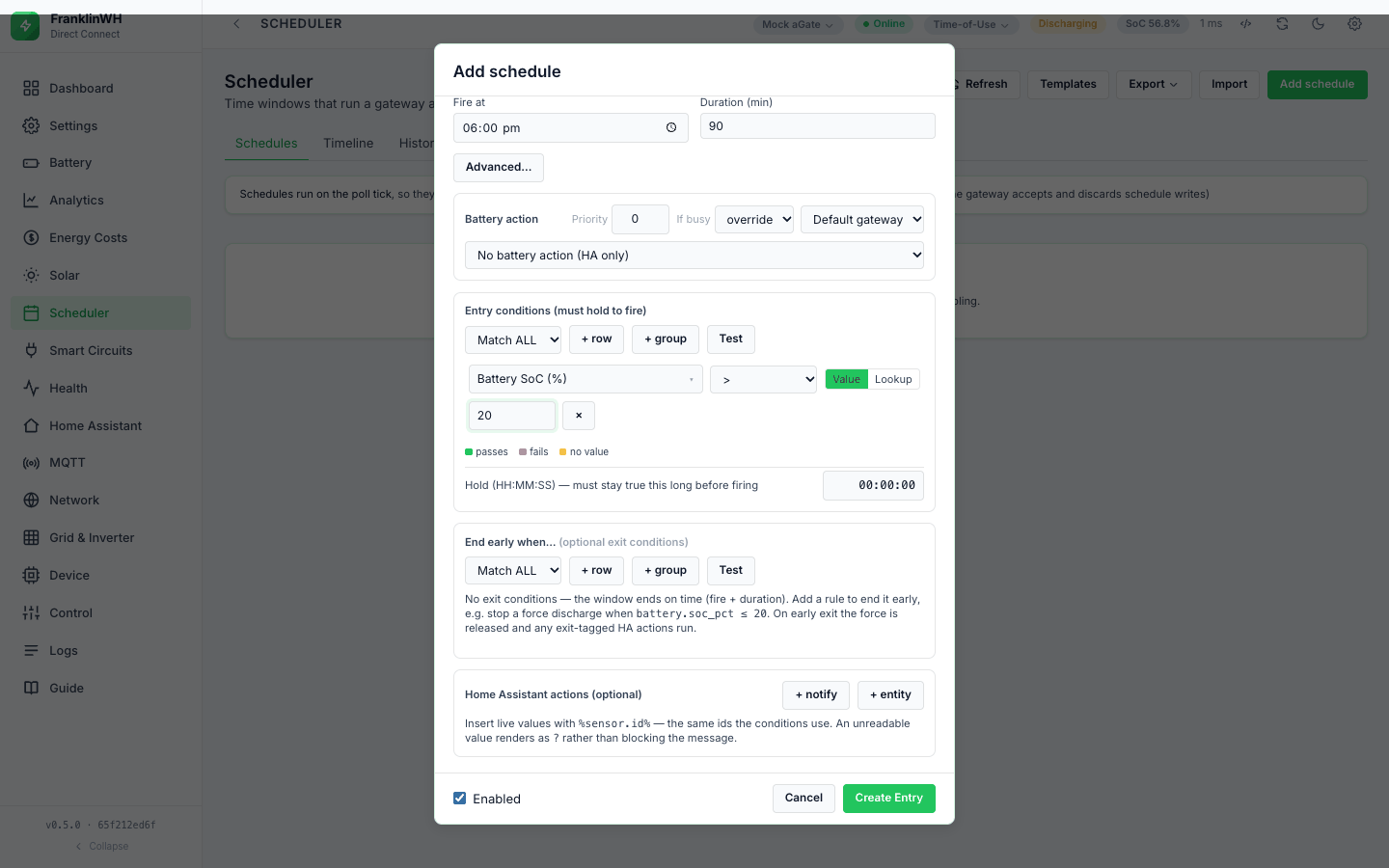
Rules for every condition
-
No value means false. If a sensor has no value, every operator returns false, including
!=,not_in,not_matchlistandnot_like. A rule never acts on data it does not have. -
An unknown sensor or operator is false too. The API does not check sensor ids or operators when you save; such a row just never passes. A typo in a sensor id is a row with no value. Import does not warn about unknown sensors here.
-
Values come from one snapshot per gateway per tick, built from that gateway's last poll plus the other sources listed below. Building it does not read the gateway. It does fetch every exposed Home Assistant instance's whole state list on every tick of every gateway, and the AEMO NEM price, the solar forecast and the Modbus client (this bridge) ratings from their caches.
-
On/off sensors: compare with 1 or 0.
grid.connected,status.vpp,status.off_grid,status.debug, the tariff window flags and the utility permissions are stored as1/0. A Home Assistanton/offbecomes1/0too. A real boolean on the left compares exactly:True == 1is true,True == "1"is not.
Operators
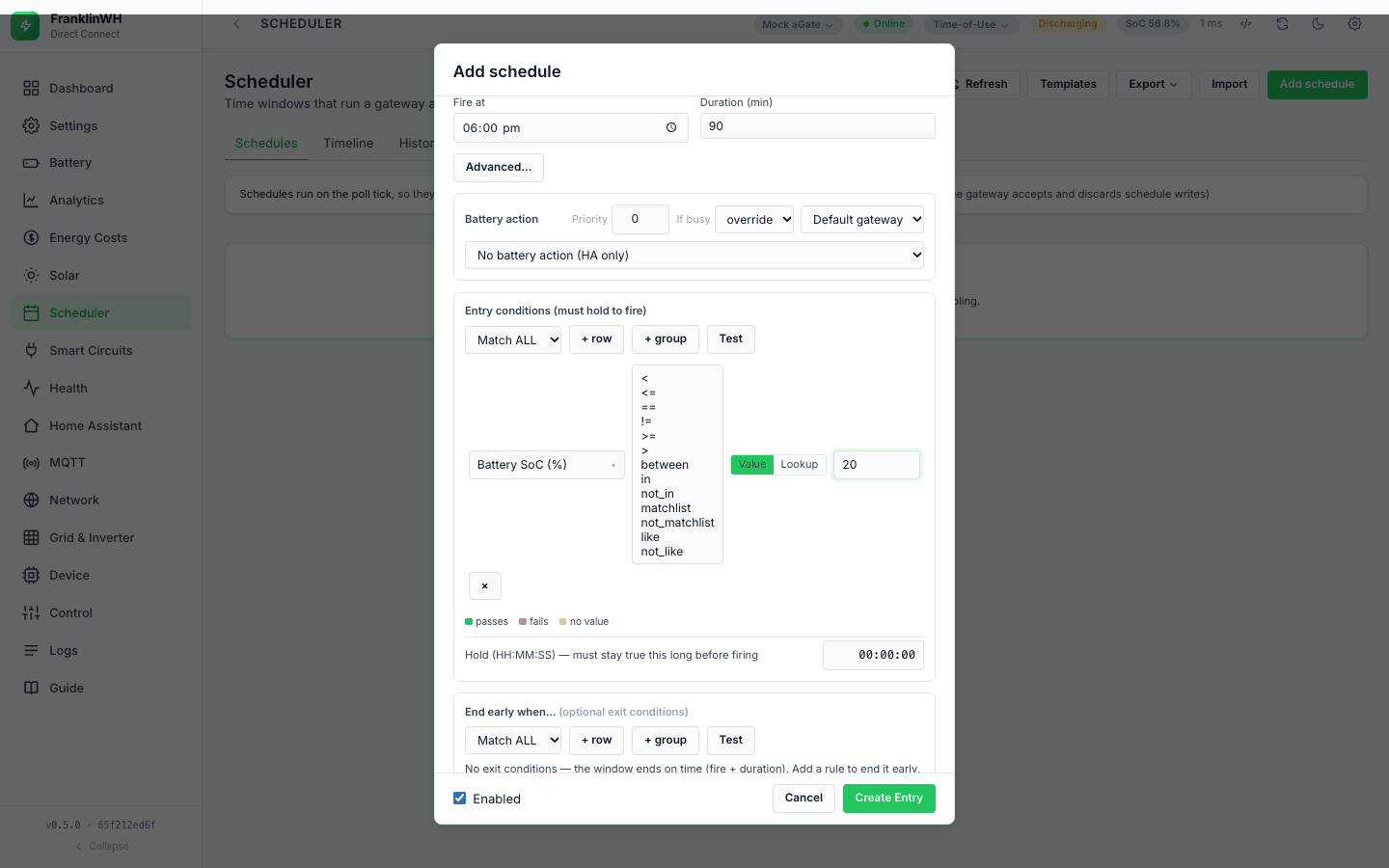
Thirteen operators, the same set and spelling as the Modbus Bridge (ops from
GET /api/schedules):
| Operator | Right-hand side | True when | Example |
|---|---|---|---|
< <= >= > |
a number (or a Lookup) | the numeric comparison holds; text that looks like a number counts | battery.soc_pct < 80 |
== |
a number, text, or a Lookup | equal. Numbers compare as numbers (25 == "25.0"); booleans exactly; anything else as text ignoring case |
mode.name == self-consumption |
!= |
as == |
not equal (still false with no value) | status.programme_id != 9 (but see below) |
between |
two numbers | inclusive; the order of the two numbers does not matter | battery.soc_pct between 20 and 40 |
in |
list of numbers and ranges | the value is one of them or inside a range | battery.soc_pct in 10, 20-30 |
not_in |
as above | not in the list (an empty list is true) | |
matchlist |
list of text values | equals one of them, ignoring case | mode.name matchlist Self-Consumption, Time of Use |
not_matchlist |
as above | equals none of them | |
like |
a pattern | matches, ignoring case | weather.condition like *rain* |
not_like |
a pattern | does not match |
Details:
- Ordering operators (
<,<=,>=,>,between) need numbers on both sides. A boolean is not a number for them. in/not_intake a comma-separated list; semicolons and new lines also work.20-30,30-20,20..30and20–30(en or em dash) are inclusive ranges. Write negative ranges with..:-5000..-1000. A text member is ignored. Brackets are not stripped:(10, 20)drops both members.matchlistcompares whole text values, soSelf-Consumptionstays one name.likewildcards:*or%for any run of characters,?or_for one. A pattern with no wildcard means contains:like consummatches "Self-Consumption". Because_is a wildcard, a pattern cannot match a literal underscore.-
matchlistandlikeon a number compare its text form:25matcheslike 2?. -
status.programme_id:9means VPP, but ordinary programmes use large arbitrary ids. Test== 9; never!= 9to mean "no programme". intests membership, not crossing. A fast-moving value can step over a listed number between polls; use a range.
No unit tests for most operators
between, in/not_in, matchlist, like, case-insensitive == and Lookup have no
unit tests in this bridge. The behaviour above was checked by running the evaluator
directly (2026-10-17) and is listed as untested in the
test plan.
Value and Lookup
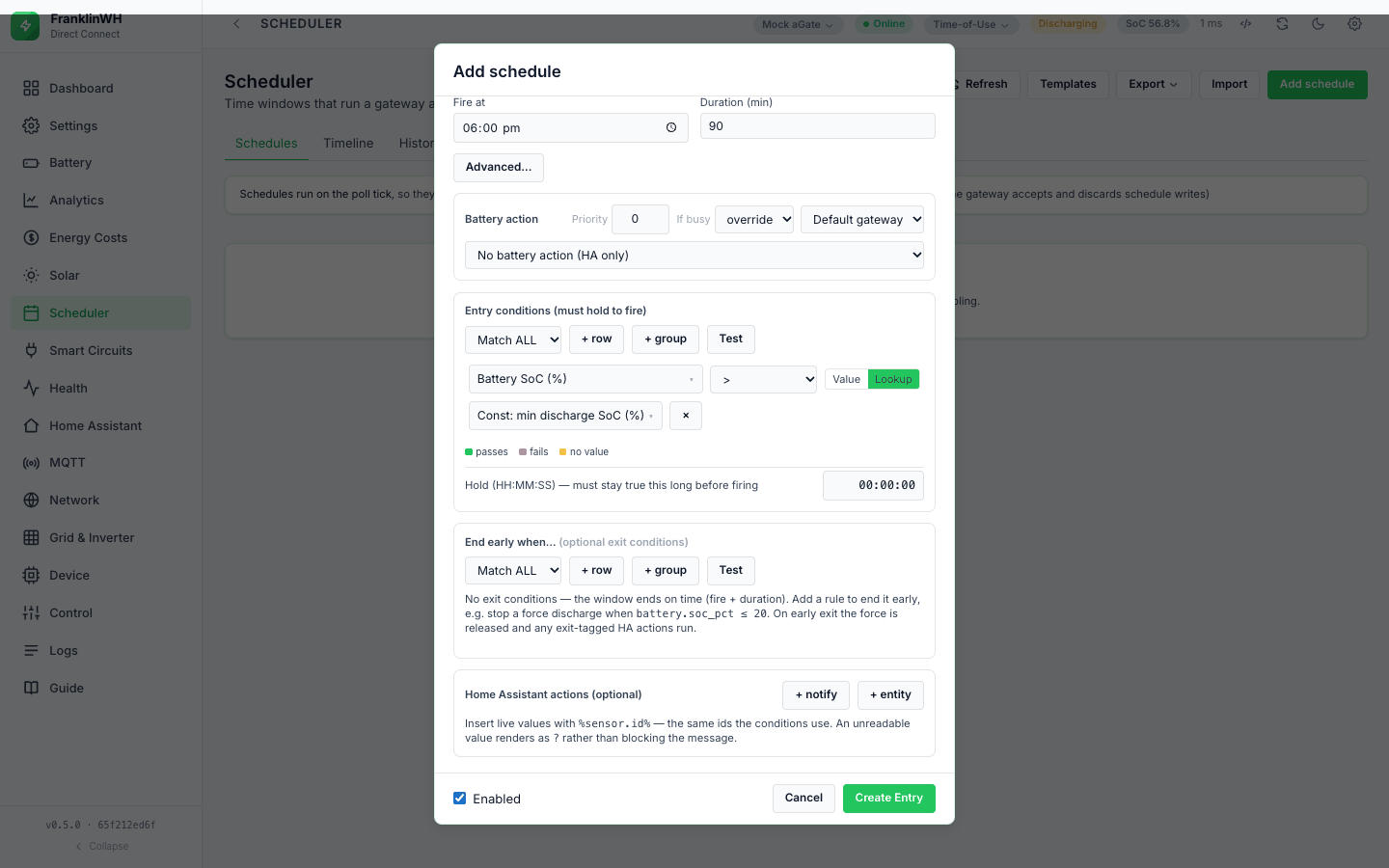
The Value / Lookup switch sits after the operator.
-
Value compares with what you type. The form sends anything that looks like a number as a number; the list and pattern operators send the raw text.
-
Lookup compares with another sensor's live value, for example
battery.soc_pct <= const.min_discharge_soc. If the Lookup sensor has no value the row is false.
The switch is hidden for the list and pattern operators. A Lookup with between compares
with one sensor only (value2 is ignored), so use Value for between.
The card's Explain panel prints a Lookup row with the Lookup sensor's label in quotes
("… is at most "Const: min discharge SoC (%)""). Test against live prints the typed
value only, so a Lookup row shows an empty right-hand side there.
Groups and items: ALL / ANY
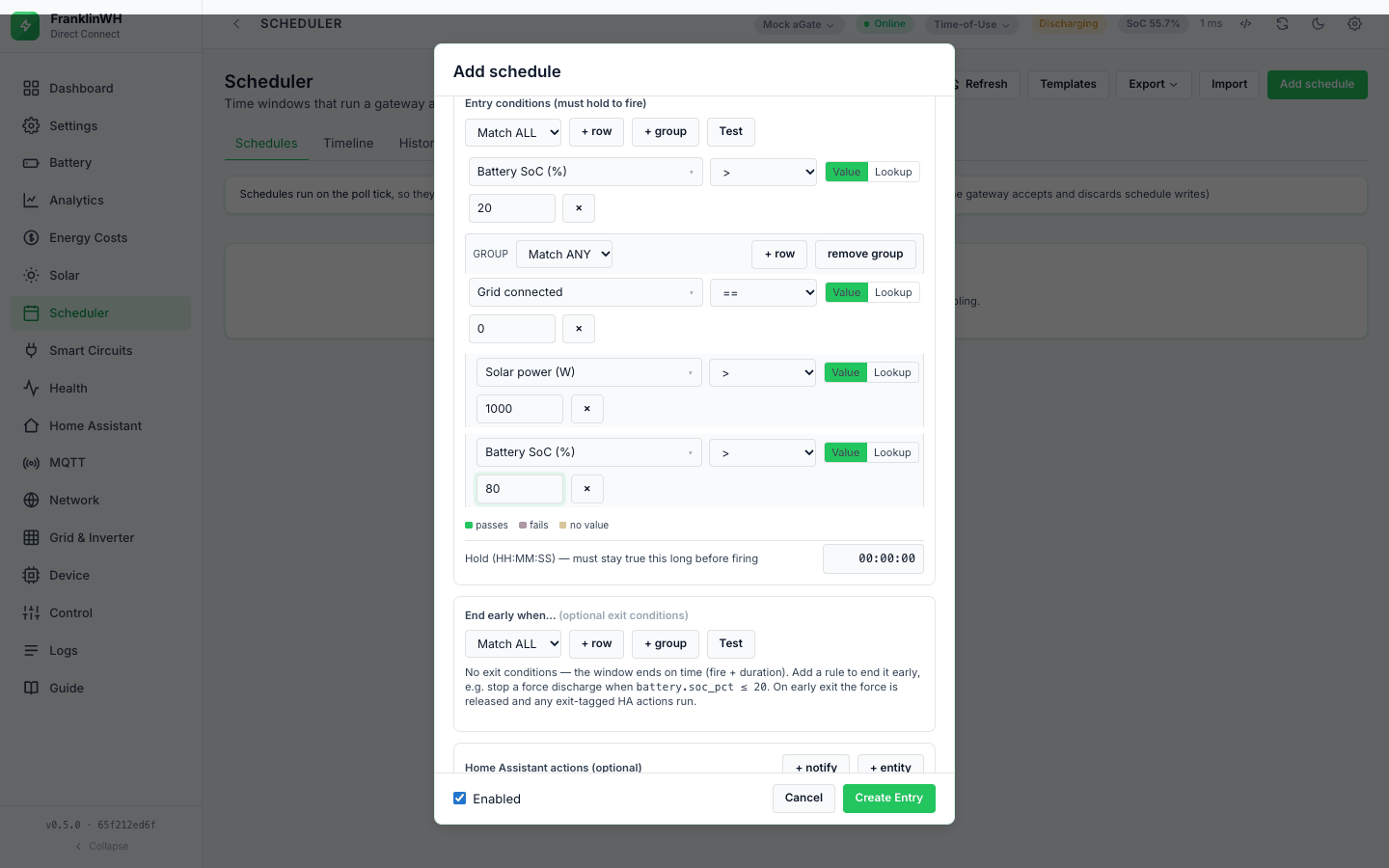
A block is a group: a match mode (Match ALL or Match ANY) and a list of items. An item is a condition row or another group (+ group).
| Group setting | True when | Empty group |
|---|---|---|
| Match ALL | every item is true | true |
| Match ANY | at least one item is true | false |
How the items relate:
-
Order does not matter. Every item is evaluated every time (no short-circuit), so the Test buttons can show each row's live value.
-
A group is one item of the block it sits in.
- The editor nests one level: a block holds rows and groups, a group holds rows. A deeper tree sent through the API is evaluated, but the editor shows only one level.
-
Empty groups are dropped when you save, and a block with no rows is saved as an empty list: no gate, or no exit conditions. "No conditions — it fires on time alone."
-
An empty group sent through the API is not the same as no conditions. An exit block of
[{"match": "all", "conditions": []}]is true, so the schedule never starts ("exit condition already holds"); an emptyanygroup never ends one.
Scope: which gateway's values
Conditions are evaluated per gateway: each gateway's tick builds its own snapshot. A
schedule with gateway scope all is checked against each gateway's own values and can pass
on one while it fails on another (see Targets).
| Sensors | Scope |
|---|---|
battery.*, grid.*, solar.power_w, solar.today_kwh, load.*, generator.*, mode.*, status.*, bridge.* |
the gateway being evaluated |
tariff.* rates and windows, service.*, demand.*, bonus.*, energy.*, tariff.export_charge_*, fixed.* |
the meter that gateway connects to, else the default meter. The running demand, energy and export figures are fed by that gateway's grid power. |
system.* |
that gateway (derived from it where possible, else your Setup values) |
ratings.* (feeds the at-max-rate ETAs) |
that gateway's host, through the Modbus client (this bridge); skipped for a mock |
const.*, weather.*, solar_forecast.*, tariff.spot_price, tariff.feed_in_price (without a dynamic tariff), ha:* |
the same for every gateway |
Hold for (dwell)
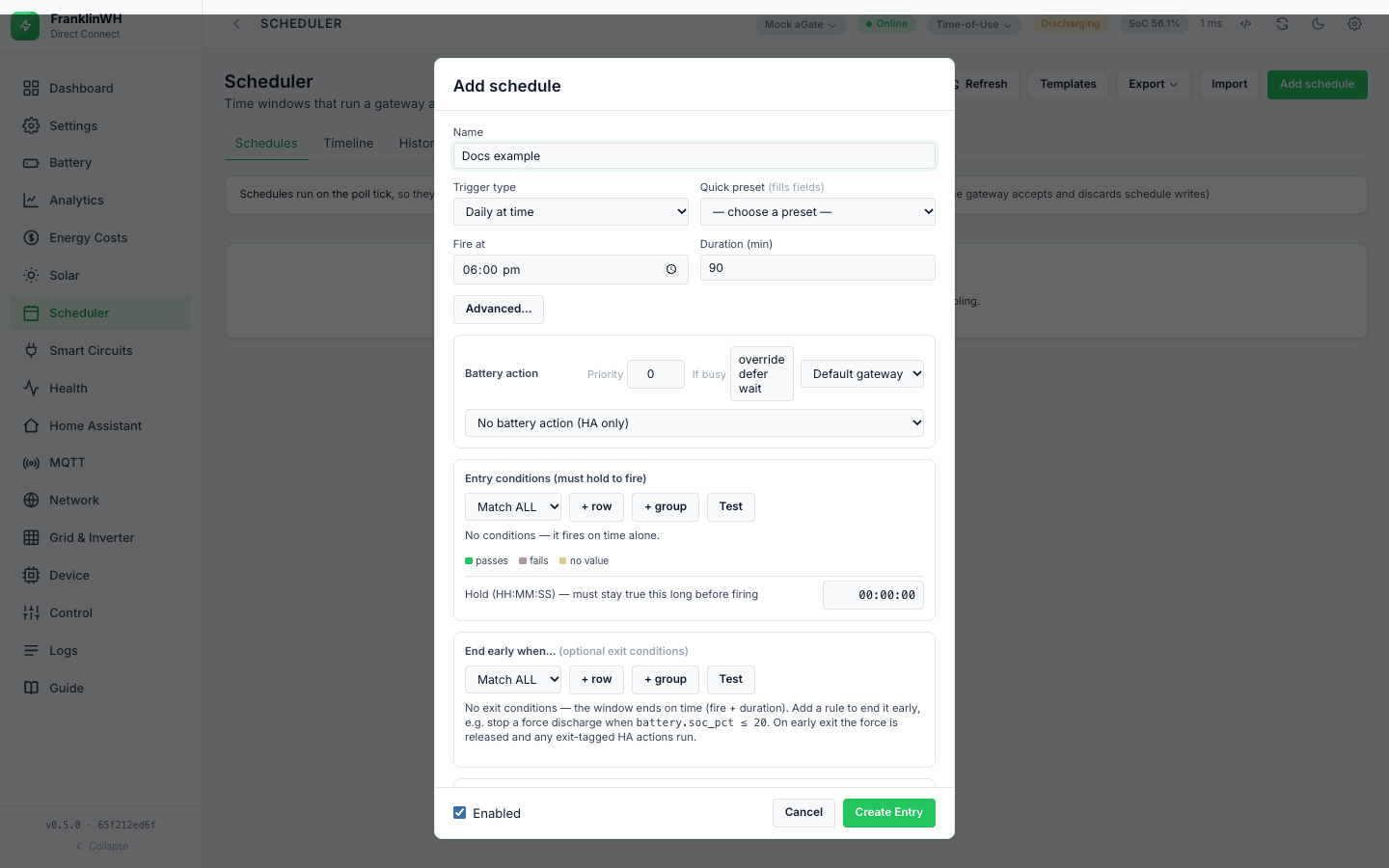
Hold (HH:MM:SS) — must stay true this long before firing sits under the entry conditions
(entry_hold_s in the API):
-
The schedule fires only after it has been due (window open, not yet fired, entry conditions true, exit conditions false) continuously for this long.
-
If it stops being due even once (the gate fails, the window closes), the timer starts again.
-
It is checked on each tick (15 s by default), so the real wait is rounded up to the next tick. 0 = fire on the first due tick. The API sets no maximum.
-
While waiting, History shows waiting — "conditions met — holding 300s before firing" — each time the timer starts.
- The timer lives in memory, per gateway and schedule. After a restart it starts again, so it never fires early.
- A retry after a failed action waits for the whole hold again, and logs waiting again: the timer is cleared when the schedule fires, and starts afresh on the retry.
Use it to ride through a brief price spike or a passing cloud. It applies to every action, including notify-only schedules.
When conditions are evaluated
| What | When |
|---|---|
| Entry conditions | each tick while the window is open and the schedule has not fired this occurrence; for Always they are the window |
| Hold timer | each tick |
| Exit conditions | each tick while the window is open, for every action kind |
| HA action guard | when that HA action is about to run (entry or exit) |
| After you save | at the next tick: saving does not trigger an immediate tick |
| Run now | not at all: Run now ignores the entry conditions (each HA action's guard still applies) |
-
The gate is a gate, not a leash. Once the schedule has fired, the entry conditions are not checked again for that occurrence; a gate that turns false does not stop a running force. Use End early when….
-
A failing gate is logged once per day as gated, per gateway and schedule, with the first two failing rows and their live values, for example
battery.soc_pct > 40 (live=27.0); grid.power_w > 1000 (live=350); +1 more.
The values themselves change only as fast as their source: the gateway's poll, the Open-Meteo cache (about 15 minutes), the AEMO NEM cache (about 4 minutes).
Test Verification
This bridge has two ways to test conditions against live values. Neither fires anything.
| Test (under each block in the form) | Test against live (card ⋮ menu) | |
|---|---|---|
| Endpoint | POST /api/schedules/evaluate |
POST /api/schedules/{id}/test |
| What it checks | the unsaved block as it is in the form | the saved schedule: window, calendar, fired-this-occurrence and entry conditions (due()) |
| Which gateway's values | the gateway selected in the top bar when there are several, else the default gateway — not the schedule's own gateway | always the default gateway's last poll |
| Clock | — | the container's clock, not the site's (#161) |
| Result | each row outlined: green passes, red fails, amber no value, with live <value>; summary conditions currently PASS/FAIL or, for the exit block, exit WOULD end the window now / exit would NOT fire now |
Would fire / Would not fire with the reason and the window state, plus one line per top-level row with its live value |
Test is close to, not the same as, the engine's view
- The engine adds the run variables (
%run.*%,%schedule.*%) and feeds the billing trackers; the tests read them without feeding. - Test against live reads the default gateway even for a schedule bound to another gateway, uses the container clock (#161), and does not check exit conditions, the hold, priority or If busy. A schedule can say Would fire and still not fire.
Home Assistant entities
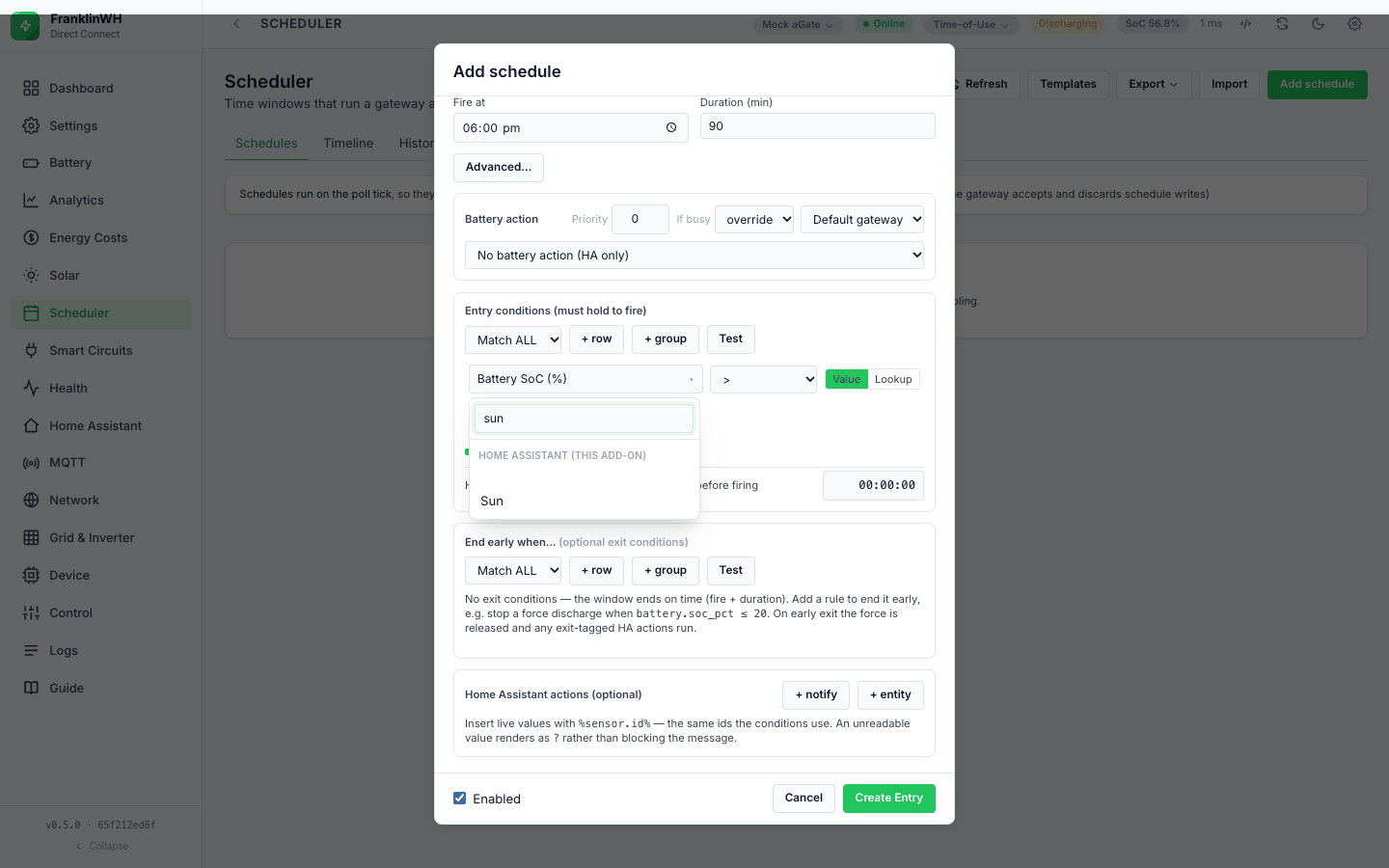
Entities from a Home Assistant instance appear in the picker in a group named after the instance, after the bridge's own groups.
- Needs: a Home Assistant instance, enabled, and the entity exposed on the Home Assistant tab. Only exposed entities are offered and kept.
- Id:
ha:<instance id>:<entity_id>. -
Value: the entity state. Numbers become numbers.
on,true,openandhomebecome1;off,false,closedandawaybecome0.unavailable,unknown,noneand an empty state are no value: the entity is left out of the snapshot, so every condition on it is false. Anything else stays text, so compare it with==(case-insensitive) ormatchlist. -
Refresh: every tick of every gateway, by REST (
GET /api/states, the whole list, then filtered to the exposed ids). There is no WebSocket. If the instance cannot be reached, its entities are absent, so they have no value. -
If the instance is removed or disabled, the condition has no value. Import does not warn about
ha:sensors.
Before 0.5.4 an unavailable entity read 0 (#167, fixed in 0.5.4)
Before 0.5.4 an entity that was unavailable or unknown read 0, not "no value", so
a condition such as price < 10 was true while the entity was down and could fire a
force. Since 0.5.4 it has no value and the condition is false. If you had such a rule,
check its History for runs while Home Assistant had lost the entity.
Direct Connect only. A Home Assistant price entity can feed tariff.spot_price and
tariff.feed_in_price (Settings → Integrations). A $/kWh unit is scaled to c/kWh;
c/kWh, ¢/kWh and a unitless value are taken as they are. A configured entity wins over
the AEMO NEM price for the same sensor.
Every sensor in the picker
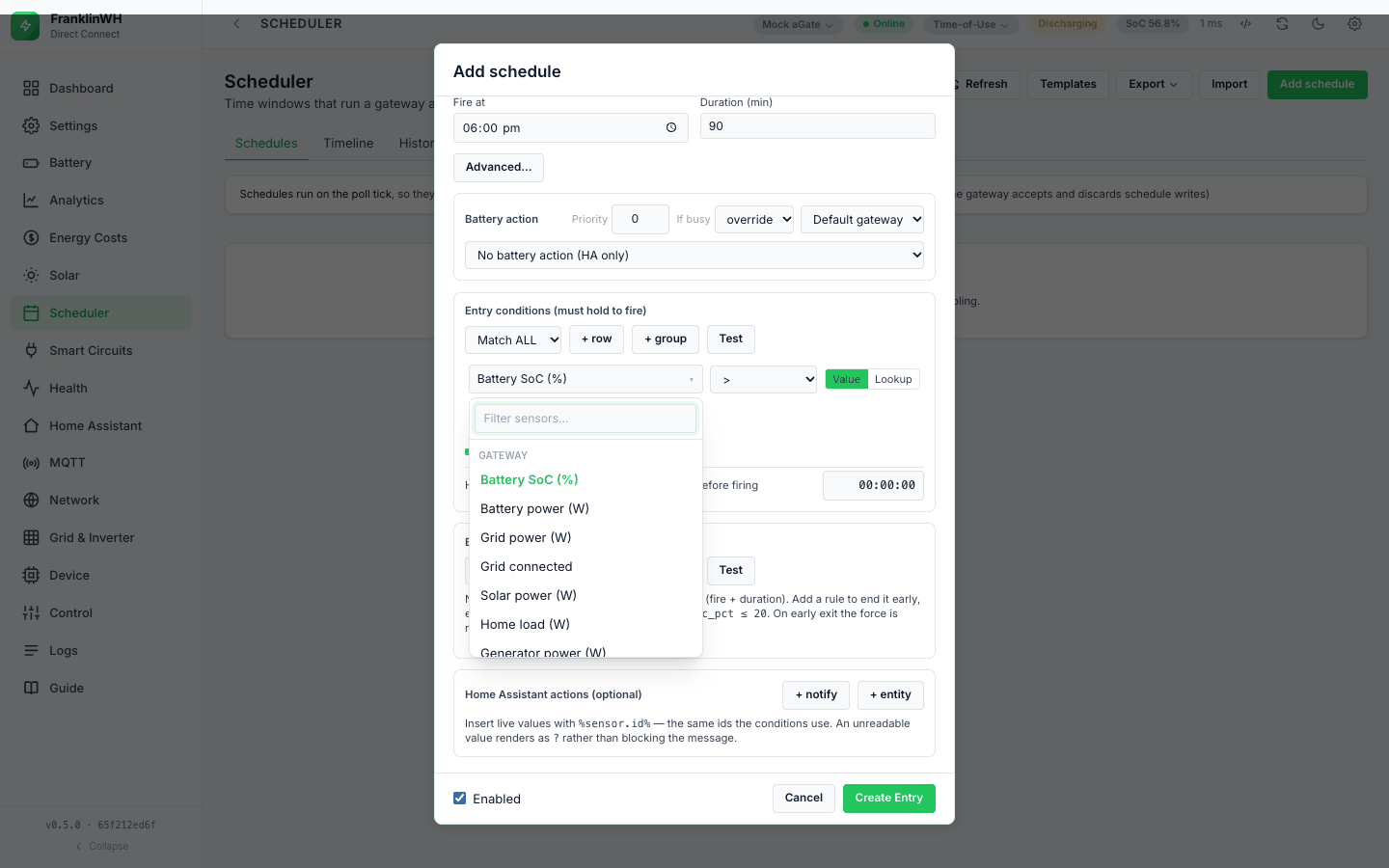
This bridge's picker groups its sensors differently from the Modbus Bridge. The groups, in the order the picker shows them: Gateway first, then the others alphabetically, then one group per Home Assistant instance:
| Group | Count | Where it comes from |
|---|---|---|
| Gateway | 15 | the gateway's last poll |
| Automation Constants | 4 | Settings → Automation → Automation Constants |
| Demand / Tariff | 5 | the gateway's meter tariff, fed each tick |
| Derived Battery | 10 | computed from the poll, the constants and a rate |
| Energy | 5 | the gateway's meter tariff, fed each tick |
| Fixed Charges | 5 | the meter tariff's fixed charges |
| System Setup | 8 | Settings → Setup, derived from the aGate where possible |
| Tariff & Utility | 23 | the meter's utility and tariff, AEMO NEM, a Home Assistant price entity |
| Weather & Solar | 7 | Open-Meteo, from the PV location |
| one per HA instance | your exposed entities | Home Assistant |
Counts are from GET /api/schedules on a test bridge running 0.5.4 (2026-10-17), and match
the lists in the code at 0.5.5. A sensor reads None (no value, so every condition on it
is false) unless what it needs is set up.
Some snapshot values are not in the picker
weather.code, const.battery_capacity_kwh, const.battery_max_power_kw,
ratings.max_charge_w and ratings.max_discharge_w are in the snapshot, so a condition
or placeholder typed through the API can use them, but the picker does not list them.
Battery
Gateway group: battery.soc_pct, battery.power_w (+ discharging, − charging). Derived
Battery group: battery.status, battery.capacity_kwh, battery.stored_kwh,
battery.remaining_kwh and four ETAs. There is no reserve sensor: the local API reserve
is not in the snapshot (the Modbus Bridge's battery.reserve_* are not in this bridge).
Solar / PV
solar.power_w (Gateway), solar.today_kwh (Weather & Solar, the gateway's own counter),
and the solar tracker percentages (Derived Battery). There is no pv.is_generating.
Grid
grid.power_w and grid.connected (Gateway). grid.connected is derived from grid power
being non-zero: it reads 0 whenever the grid power is exactly 0 W, on grid or not. Use
status.off_grid to test for an outage.
Load
load.power_w and generator.power_w (Gateway).
Mode
mode.name (Gateway): the operating mode name the gateway reports. Compare it as text
(== ignores case, or matchlist). The default operating mode constant is
const.default_operating_mode.
Inverter
Not in this bridge. There are no inverter.* sensors. The run status is
status.run_status (number) and status.run_status_desc (text); documented values 0
Standby, 1 Charging, 2 Discharging, 5–7 off-grid, 8 Debug, 9 VPP.
Gateway identity
Not in this bridge as gateway.* sensors. The System Setup group describes the
install (solar type and size, generator input, grid-forming, whole-home backup, load
shedding, non-backup loads, battery label). status.vpp, status.debug and
status.programme_id describe what the gateway is doing.
Constants
Four in the picker: const.min_discharge_soc (default 20 %), const.max_charge_soc
(default 100 %), const.demand_charge_min_soc (default 30 %) and
const.default_operating_mode (default self). Set them at Settings → Automation →
Automation Constants. They always have a value.
Tariff
Tariff & Utility group: rates (tariff.buy_rate, tariff.sell_rate, $/kWh), season,
time period, tier, tariff.import_billable, the four window flags, the export-charge
calculators, and tariff.spot_price / tariff.feed_in_price (c/kWh).
- The rates and windows come from the tariff of the meter this gateway connects to (else the default meter). Tiered pricing uses the first tier in the snapshot.
-
A window that the tariff does not define reads None, so a gate on it fails closed. With no tariff at all, every tariff sensor is None. (The Modbus Bridge reads
False/0here; this bridge does not.) -
tariff.import_billableis 1 or 0 from the rate model, and None when the rate model gives no answer. -
tariff.spot_priceis the AEMO NEM 5-minute price for the configured region, cached about 4 minutes. On a fetch error the last good price is kept, however old; it is not dropped after 30 minutes as on the Modbus Bridge. A Home Assistant price entity wins over NEM. An active dynamic tariff overrides both, and also setstariff.buy_rate/sell_rate.
Demand / Tariff
demand.peak_kw, demand.interval_kw, demand.period_charge, bonus.export_kwh,
bonus.period_credit. They are worked out by the bridge from this gateway's grid power on
each tick, against its meter's tariff. None without a tariff.
Utility Plan
service.* (Tariff & Utility group): export, solar export, battery export, charging and
discharging permissions (1/0), export limit (kW) and plan type, from the meter's utility. A
permission that is not set reads 1 (allowed). There is no service.tz_matches_clock.
Other
Not in this bridge. There are no dispatch.* sensors saying what is driving the battery.
The nearest are status.vpp (programme id 9) and battery.status.
Energy
energy.period_import_kwh, energy.import_cost, energy.export_credit,
energy.unpriced_import_kwh, energy.unpriced_export_kwh: this billing period, per gateway,
from its meter's tariff. There are no lifetime or today/week/month energy totals.
Fixed Charges
fixed.daily_charge, fixed.accrued_period, fixed.period_total, fixed.remaining,
fixed.days_remaining, from the tariff's fixed charges.
Weather
weather.temp_c and weather.condition (Weather & Solar group), the current weather from
Open-Meteo. They need the PV latitude and longitude under Settings → Integrations.
Solar Forecast
solar_forecast.today_kwh, today_peak_kw, remaining_kwh, tomorrow_kwh (Weather &
Solar), and the tracker solar_forecast.day_pct / vs_expected_pct (Derived Battery). The
PV size, tilt and azimuth shape the forecast.
Time
Not in this bridge. There are no time.* sensors. A trigger with calendar restrictions
(days, months, dates) does that job; see Triggers.
Notes on some sensors
Battery, grid, solar, load, mode, status come from the gateway's last poll: the poller's cached state, no extra read.
ETA and headroom. battery.capacity_kwh is the battery capacity constant (the local
API has no capacity register; 0 = unset, so the derived sensors read None).
battery.time_to_charge_min is the best-case minutes to the max-charge SoC constant at the
Modbus client (this bridge)'s Model 702 rating, cached for an hour, or the battery max
power constant (default 5 kW) when that cannot be read. The _now variants use the current
battery power, have no value when the battery is idle or moving the other way, and read 0
when already at or past the target.
status.programme_id and status.vpp: VPP is the programme id 9, not the run status.
Direct Connect only: run and schedule variables. For messages, the engine adds
%schedule.name%, %schedule.id%, %schedule.priority%, %schedule.action%,
%gateway.id%, %run.phase%, %run.occurrence%, %run.attempt%, %run.at% and
%run.resource% to the snapshot of that one schedule. They are not condition sensors in
the picker. See Actions.
This bridge's sensor list
Generated from scheduler.py (SENSORS, DERIVED_SENSORS, SOLAR_SENSORS,
TARIFF_SENSORS, BILLING_WINDOW_SENSORS, EXPORT_CHARGE_SENSORS, DEMAND_SENSORS,
BONUS_SENSORS, ENERGY_SENSORS, FIXED_SENSORS, SYSTEM_SENSORS, CONST_SENSORS) as
grouped by GET /api/schedules. Needs and without it are per group.
| Picker group | Needs | Without it |
|---|---|---|
| Gateway | a fresh poll of that gateway | None |
| Derived Battery | the poll, the battery capacity constant, the SoC constants; at-max-rate ETAs also a rate (Model 702 or the max power constant); the tracker also the solar forecast | None |
| Weather & Solar | PV latitude and longitude (Settings → Integrations); solar.today_kwh the poll |
None |
| Tariff & Utility | a meter with a utility and tariff; spot/feed-in a NEM region, an HA price entity or a dynamic tariff | None |
| Demand / Tariff, Energy, Fixed Charges | a tariff with those charges or windows | None |
| System Setup | nothing (defaults), better with Setup filled in | a default |
| Automation Constants | nothing | the default |
| an HA instance | the instance enabled and the entity exposed | None (also while the entity is unavailable or unknown, since 0.5.4, #167) |
All sensor ids (82 + your Home Assistant entities)
Gateway
| Picker label | Sensor id |
|---|---|
| Battery SoC (%) | battery.soc_pct |
| Battery power (W) | battery.power_w |
| Grid power (W) | grid.power_w |
| Grid connected | grid.connected |
| Solar power (W) | solar.power_w |
| Home load (W) | load.power_w |
| Generator power (W) | generator.power_w |
| Operating mode | mode.name |
| Run status (number: 0 Standby, 1 Charging, 2 Discharging, 5-7 off-grid, 8 Debug, 9 VPP) | status.run_status |
| Run status (text: "Discharging", "Debug Mode", …) | status.run_status_desc |
| Under external control / VPP mode | status.vpp |
| Off-grid (islanded) | status.off_grid |
| Debug Mode — FranklinWH remote support session | status.debug |
| Programme id (9 = VPP; others are arbitrary ids) | status.programme_id |
| Round-trip latency (ms) | bridge.latency_ms |
Derived Battery
| Picker label | Sensor id |
|---|---|
| Battery state (charging / discharging / standby) | battery.status |
| Battery capacity (kWh) | battery.capacity_kwh |
| Battery stored energy (kWh) | battery.stored_kwh |
| Battery headroom to full (kWh) | battery.remaining_kwh |
| ETA to max-charge SoC at current rate (min) | battery.time_to_charge_now_min |
| ETA to min-discharge SoC at current rate (min) | battery.time_to_discharge_now_min |
| ETA to max-charge SoC at max rate (min) | battery.time_to_charge_min |
| ETA to min-discharge SoC at max rate (min) | battery.time_to_discharge_min |
| Solar tracker: % of today's forecast reached | solar_forecast.day_pct |
| Solar tracker: % vs forecast-to-now (>100 ahead, <100 behind) | solar_forecast.vs_expected_pct |
Weather & Solar
| Picker label | Sensor id |
|---|---|
| Weather: temperature (°C) | weather.temp_c |
| Weather: condition | weather.condition |
| Solar forecast: today (kWh) | solar_forecast.today_kwh |
| Solar forecast: today peak (kW) | solar_forecast.today_peak_kw |
| Solar forecast: remaining today (kWh) | solar_forecast.remaining_kwh |
| Solar forecast: tomorrow (kWh) | solar_forecast.tomorrow_kwh |
| Solar generated today, actual (kWh) | solar.today_kwh |
Tariff & Utility
| Picker label | Sensor id |
|---|---|
| Wholesale spot price (AEMO NEM or HA entity, c/kWh) | tariff.spot_price |
| Dynamic feed-in price (HA entity, c/kWh) | tariff.feed_in_price |
| Tariff: import rate ($/kWh) | tariff.buy_rate |
| Tariff: feed-in rate ($/kWh) | tariff.sell_rate |
| Tariff: season | tariff.season |
| Tariff: time period | tariff.time_period |
| Tariff: tier | tariff.tier |
| Tariff: import billable | tariff.import_billable |
| Utility: export allowed | service.export_allowed |
| Utility: solar export allowed | service.solar_export_allowed |
| Utility: battery export allowed | service.battery_export_allowed |
| Utility: charging allowed | service.charging_allowed |
| Utility: discharging allowed | service.discharging_allowed |
| Utility: export limit (kW) | service.export_limit_kw |
| Utility: plan type | service.plan_type |
| Tariff: in peak-demand window | tariff.demand_window_active |
| Tariff: in battery-export-bonus window | tariff.bonus_window_active |
| Tariff: in export-charge window | tariff.export_charge_window_active |
| Tariff: in a declared grid-import window | tariff.import_window_active |
| Tariff: export-charge export this period (kWh) | tariff.export_charge_kwh |
| Tariff: free export allowance remaining (kWh) | tariff.export_charge_free_remaining |
| Tariff: chargeable export above free (kWh) | tariff.export_charge_net_kwh |
| Tariff: export charge this period ($) | tariff.export_charge_cost |
Demand / Tariff
| Picker label | Sensor id |
|---|---|
| Demand: peak this period (kW) | demand.peak_kw |
| Demand: current interval (kW, running) | demand.interval_kw |
| Demand: charge this period ($) | demand.period_charge |
| Bonus: export in the bonus window this period (kWh) | bonus.export_kwh |
| Bonus: battery-export credit this period ($) | bonus.period_credit |
Energy
| Picker label | Sensor id |
|---|---|
| Energy: grid import this period (kWh) | energy.period_import_kwh |
| Energy: grid import cost this period ($) | energy.import_cost |
| Energy: grid export credit this period ($) | energy.export_credit |
| Energy: import the plan priced no rate for (kWh) | energy.unpriced_import_kwh |
| Energy: export the plan priced no rate for (kWh) | energy.unpriced_export_kwh |
Fixed Charges
| Picker label | Sensor id |
|---|---|
| Fixed: charges per day ($) | fixed.daily_charge |
| Fixed: accrued this period ($) | fixed.accrued_period |
| Fixed: projected this period ($) | fixed.period_total |
| Fixed: left to cover this period ($) | fixed.remaining |
| Fixed: days left in billing period | fixed.days_remaining |
System Setup
| Picker label | Sensor id |
|---|---|
| System: solar type (none/ac/dc/remote) | system.solar_type |
| System: solar size (kWp) | system.solar_kwp |
| System: generator input | system.generator_input |
| System: grid-forming | system.grid_forming |
| System: whole-home backup | system.whole_home_backup |
| System: load shedding | system.load_shedding |
| System: non-backup loads panel | system.non_backup_loads |
| System: battery label | system.battery_label |
Automation Constants
| Picker label | Sensor id |
|---|---|
| Const: min discharge SoC (%) | const.min_discharge_soc |
| Const: max charge SoC (%) | const.max_charge_soc |
| Const: demand-charge min SoC (%) | const.demand_charge_min_soc |
| Const: default operating mode | const.default_operating_mode |