Exit and release
Direct Connect Bridge. Mirrors the Modbus Bridge page Exit and release section for section.
How a schedule's window closes, and what the bridge does to the gateway when it does.
Everything here is per gateway: a schedule with gateway scope all closes its window
on each gateway on that gateway's own tick (see Targets).
What happens when two schedules, or you and a schedule, want the same battery is on Priorities and conflicts. Run now, Stop and the History view are on Outcomes and audit.
How a run ends
This bridge has no "run" that the engine owns. It tracks one thing per schedule and gateway: whether the schedule's window was open on the last tick. When the window closes, for any reason, the bridge runs the exit steps once:
- it runs the exit-tagged Home Assistant actions (On exit and Entry & exit), each only if its guard holds;
- if restore on exit is set, it puts the operating mode back (see Release policy);
- if the schedule's battery action is Force charge / discharge / standby, it sends a Release to the gateway;
- it logs an exit row in the History view: "exit condition met" or "window closed", followed by what each step returned.
A force command can also end inside the window, without these steps, when the bridge's own watchdog releases it. The ways a force ends:
| End | How it shows | Fires again… |
|---|---|---|
| Window closes (window end, or fire time + Duration (min)) | exit — "window closed: force release: …" | at the next occurrence |
| Exit conditions become true | exit — "exit condition met: …" | at the next occurrence |
| Duration reached (the watchdog's time limit, taken from Duration (min)) | dispatch-end — "released — duration Ns reached" (under the battery chip) | at the next occurrence |
| Target SoC reached | dispatch-end — "released — target reached (SoC …)" | at the next occurrence |
| Stop on the card | stopped — "dispatch released by user" | at the next occurrence |
| Schedule disabled | exit — "window closed: force release: …", on the next tick | when enabled, at the next occurrence |
| Schedule deleted | nothing: the force is not released (see the warning below) | never |
| Bridge shuts down | application log only | see Bridge shutdown |
"Fires again at the next occurrence" means this: a schedule that ran successfully is marked as fired for the occurrence (the day for daily-family triggers, the window for a second or third time window, the slot for interval and cron). It does not fire again until a new occurrence opens.
Disabling a schedule while its window is open closes the window on the next tick, so the exit steps run and a force is released. Turning it back on inside the same window does not fire it again: the occurrence is already marked fired.
Deleting a running schedule does not release its force
A deleted schedule is no longer loaded, so its window never closes from the engine's point of view and no Release is sent. The force keeps running until the watchdog's duration or target SoC ends it, or you release it from Control or the top bar. If the schedule had no duration, nothing ends it. Disable the schedule first, wait a tick, then delete it. Measured with a mock on 2026-10-17 (probe, no gateway). Issue #195.
A window end releases any force on the gateway, even one this schedule did not start
The exit steps run whenever the window closes, whether or not the schedule fired in it. For a force schedule that means:
- a force schedule that was gated for its whole window still sends a Release when the window closes;
- the Release is not tied to this schedule's own command. It clears whatever force is on the gateway: one from the Battery Control widget, from another schedule that took over (If busy = override), or from another Modbus client of the Modbus TCP Server (aGate :502), such as the Modbus Bridge;
- an Always force schedule sends this Release every time its conditions stop holding, also after it has stopped firing (see Triggers → Always);
- exit-tagged Home Assistant actions also run although the schedule never fired.
Measured with a mock on 2026-10-17: a force schedule gated from 14:00 to 14:30 sent a Release at 14:30. Issue #189.
Exit conditions that flap repeat the exit steps
If exit conditions turn true, then false, then true again inside one window, every closing edge runs the exit steps again: another Release and the exit HA actions again. The schedule does not fire again in between, because the occurrence is already marked fired. From a code read; not tested.
Duration (min) also limits the force (#160)
The force's watchdog time limit is the schedule's Duration (min), in every trigger
type. A Recurring windows schedule hides that field, and a new schedule starts with
90. So a force in a three-hour recurring window stops after 90 minutes. Measured with a
mock on 2026-10-17: a 17:00–20:00 window armed the watchdog with 5400 s. For force
actions, use Daily at time or Weekly at time, or set duration_min through the
API. #160
The watchdog checks every 5 seconds. It releases when the duration is reached, and, when a Target SoC is set, when a charge reaches SoC ≥ target or a discharge reaches SoC ≤ target. The SoC comes from the gateway's last poll.
A restart forgets which windows were open
Whether a window was open is kept in memory. After a restart the first tick sees no open window, so a window that closes while the bridge is down, or the first close after a restart mid-window, may not run the exit steps. A force interrupted by a restart is handled by the interrupted-dispatch policy instead: see Restarts and the clock.
Exit conditions
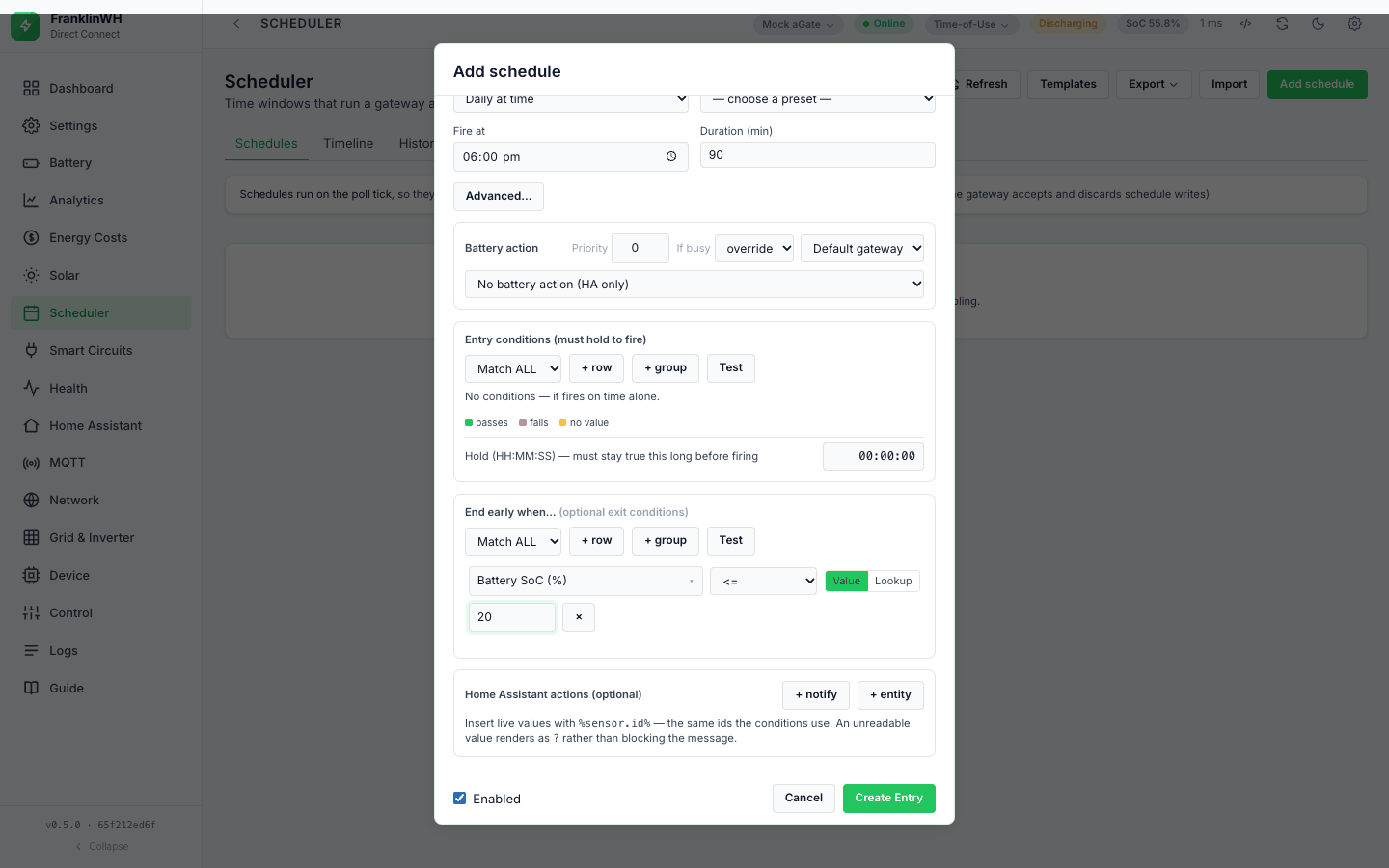
"End early when…" holds the exit conditions. They use the same sensors, operators, ALL/ANY and groups as the entry conditions (Conditions), and the block has its own Test button.
-
They are checked on every tick while the window is open, for every kind of battery action and for HA-only schedules, whether or not the schedule has fired. A true exit condition closes the window at once and runs the exit steps above.
-
If they already hold when the window opens, the schedule does not start. Test against live then says "exit condition already holds".
-
When they become true after the schedule fired, the force is released, the exit row says "exit condition met", and the schedule does not fire again in that occurrence.
-
Nested ALL/ANY groups work in exit conditions too.
The exit row's detail is "exit condition met" plus what each exit step returned. It does not list which condition rows were true or false.
Not in this bridge: exit conditions tied to a running command. The Modbus Bridge checks exit conditions only while its entry owns a force command, and not for one-shot or HA-only entries. Here they apply to every schedule, as a second way to close its window.
Typical exits: battery.soc_pct <= const.min_discharge_soc (with Lookup) for a
discharge, battery.soc_pct >= const.max_charge_soc for a charge.
Release policy
Not in this bridge. There is no release policy (release → native,
restore_prior_mode, set_operating_mode:
Restore on exit (Direct Connect only)
Direct Connect only. restore_on_exit (API only, default off) puts back what the
schedule overrode when its window closes. Today it covers one thing: the operating mode
of a Set operating mode schedule.
-
Before the first attempt of a run, the bridge records the mode the gateway is in, from the live snapshot. A retry does not record it again, so it never "restores" the value the schedule itself set. If the old mode cannot be read, nothing is recorded and nothing is restored.
-
At the window's close (time, exit conditions or disabling), the bridge sends Set operating mode with the recorded mode, unless the gateway is already in it, and adds "restored mode.name -> …" to the exit row.
-
Stop does not restore. Neither does a force: it releases instead.
- The form has no control for it, and since 0.5.2 saving from the form keeps it (#157). Before 0.5.2 the form turned it off.
The restore sends the mode name as the poller read it
The recorded value is mode.name from the snapshot (a display name such as
"Self-Consumption", or a tariff name). It is sent to the gateway as the mode. Whether the
gateway accepts every such name is unverified; and a rejected mode write is not
reported as a failure (see Outcomes).
What a release does on the gateway
A Release goes through the Modbus client (this bridge) to the Modbus TCP Server
(aGate :502). The bridge calls the library's reset_control_state(), forgets the force it
was holding in memory, and logs dispatch-end if it was holding one. It does not read the
setpoint back: it reports "released" without checking
(#174). With the
Modbus client (this bridge) switched off, a Release is refused.
Hold instead of release (API only)
Not in this bridge. There is no hold option: at the window's end a force is released, never switched to Force Standby. To hold the battery between windows, add a schedule with Force standby (hold) for that time.
Bridge shutdown
On a graceful shutdown the bridge stops the scheduler, then releases the force it is holding in memory, if any, and logs "battery force: releasing … on shutdown" in the application log. No History row is written, and exit HA actions do not run.
On a multi-gateway site the shutdown release goes to the first gateway
The shutdown release is sent to FWH_MODBUS_HOST or to the first registered
gateway's host, not to the gateway the force was sent to. A force on a second gateway is
not released. From a code read; not tested. Issue #192.
A crash or power loss releases nothing. What happens to an interrupted force at the next start depends on the interrupted-dispatch policy: see Restarts and the clock and After a bridge restart mid-dispatch.