Targets
Direct Connect Bridge. Mirrors the Modbus Bridge page Targets section for section.
The target says which gateway a schedule acts on. Here a schedule is bound to one gateway, left on the default gateway, or (API only) set to run on every gateway. See also Multi-gateway and sites.
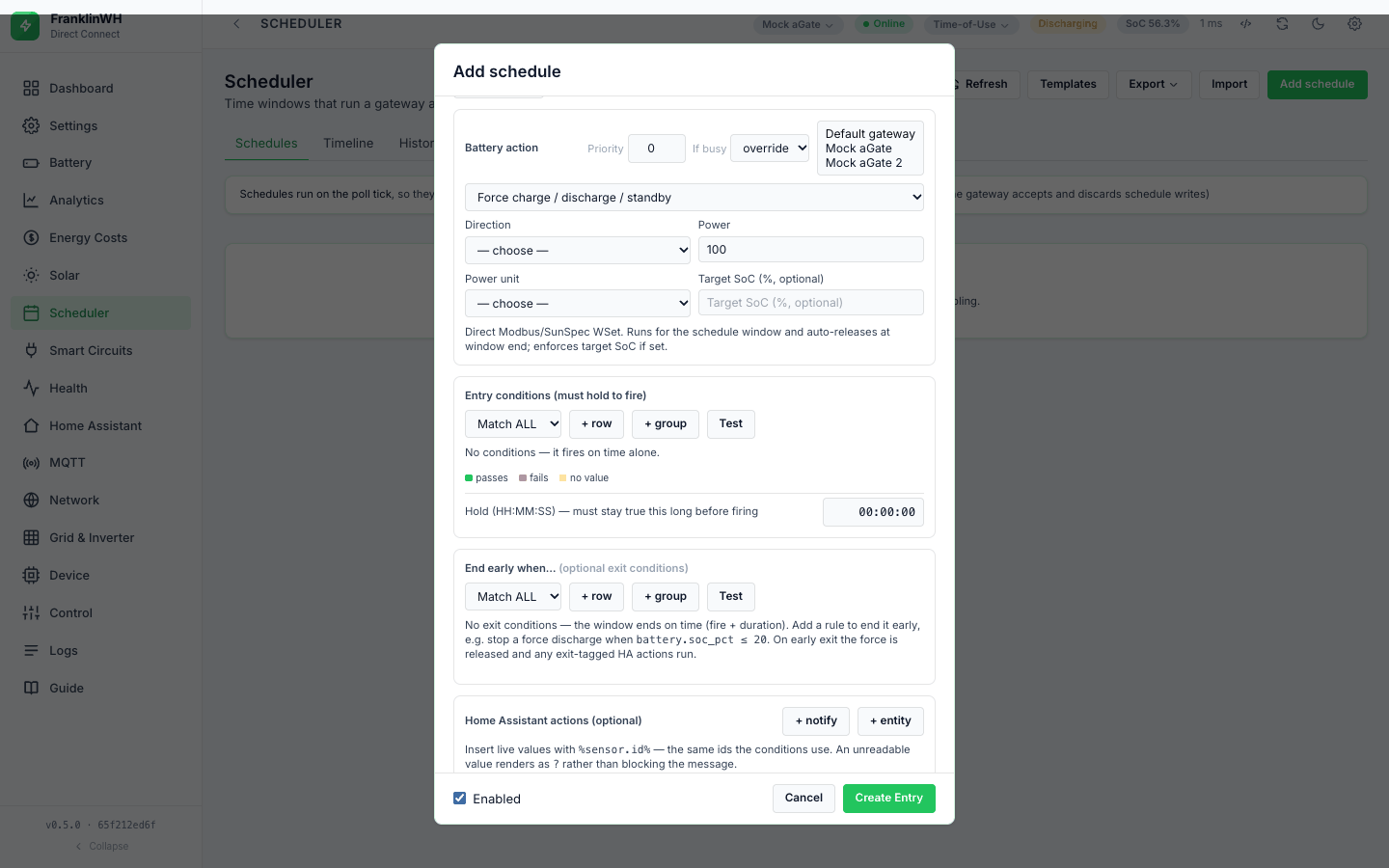
Pick a target
- In Add schedule or Edit, find the gateway list next to Priority and If busy in the Battery action box. It is shown only when the bridge has more than one gateway.
- Pick a gateway, or leave Default gateway.
| Target | API | Acts on |
|---|---|---|
| a gateway | gateway_id: the gateway id |
that gateway only, on its own tick |
| Default gateway | gateway_id: "" |
the default gateway (below) |
| every gateway (API only) | gateway_scope: "all" |
each gateway on its own tick |
A schedule bound to a gateway is evaluated only on that gateway's tick, so its action goes to that aGate. A gateway's schedules are evaluated only while that gateway is enabled and its last poll is fresh (three poll intervals, at least 90 s). A bound gateway that is offline or stale is skipped with a debug log line only; nothing is sent and History shows nothing.
A schedule bound to a gateway id that does not exist (deleted, renamed) never runs, and nothing says so.
Not in this bridge: Site and Service targets. There is no utility-service target and no "Site (all gateways)" choice in the form (#162). The closest is gateway scope all.
Gateway scope "all" (API only). With "gateway_scope": "all" the schedule is
evaluated by every gateway on its own tick. The form has no control for it. Since 0.5.2
(#157) saving from the form keeps it; before 0.5.2 the form turned it off. Any value other
than exactly all means one gateway.
How a fan-out works
For gateway scope all, each gateway is handled on its own:
| Per gateway | Detail |
|---|---|
| Conditions | that gateway's own snapshot (see Conditions → Scope) |
| Run | one run (occurrence) per gateway, with its own status and retries |
| Priority | one resource claim per gateway (<gateway>/battery), so gateways do not compete |
| Window end | each gateway's tick sends its own release when the window closes |
| History | one row per gateway, but the row does not name the gateway |
Two gateways cannot run a force at the same time safely
The Modbus client (this bridge) supervises one force for the whole bridge. When a second gateway starts a force, the first gateway's time limit and target SoC stop being enforced; only its window-end release remains. See Actions → What is written. From a code read; unverified on hardware.
Stop, Pause and shutdown release the default gateway
Stop and the Pause API release through FWH_MODBUS_HOST or the default gateway's
host, not the host of the gateway the force runs on. On a site with several gateways,
Stop on a schedule bound to the second gateway releases the first one. A graceful
shutdown and the start-up check for an interrupted dispatch also look only at the first
gateway. From a code read. Issue #192.
A gateway that leaves (disabled, or its poll goes stale) while its force runs is no longer evaluated, so its window-end release is not sent. The force keeps running until the watchdog's time limit or target SoC ends it (if that gateway still holds the watchdog), or until you release it.
Run now runs once, on one gateway, even for scope all (see below).
Entries with no target id
A schedule left on Default gateway (gateway_id empty) runs on the default gateway's
tick only, so it does not run once per gateway. The default gateway is the
first-registered gateway in the bridge's memory. Nothing is stored or shown; deleting or
re-ordering gateways moves it (#182).
In the same tick an unbound schedule claims that gateway's id, so it competes on priority with
schedules bound to that gateway.
A disabled first gateway stops every unbound schedule
The default is the first-registered gateway whether or not it is enabled. A disabled gateway is not evaluated, and every other gateway refuses unbound schedules, so they run nowhere and History shows nothing. Bind them to a gateway (#182).
In the form
- The gateway list shows the gateway's label (else its serial or id).
- Not in this bridge: a mock warning. The form does not warn when the picked gateway is a mock. For a mock, the scheduler skips the ratings read through the Modbus client (this bridge). Whether a force to a mock reaches anything depends on the mock's address answering SunSpec (unverified).
- Test under a condition block evaluates against the gateway selected in the top bar (or the default gateway in site view or with one gateway). ⋮ → Test against live on a card always uses the default gateway's values, whatever gateway the schedule is bound to (see Conditions → Test Verification).
- Import points an entry whose gateway does not exist here at Default gateway, warns
"gateway '…' not found — will use the default gateway", and creates it disabled. A Modbus
Bridge entry with target
defaultmaps to Default gateway.
Run now uses the gateway selected in the top bar
With more than one gateway and one picked in the top bar, ⋮ → Run now sends that gateway's id, and the bridge uses it instead of the schedule's own gateway. The action goes to the top-bar gateway. In site view, or with one gateway, it uses the schedule's gateway, else the default. From a code read. Issue #193.
On the timeline
The Timeline view draws every enabled schedule's planned windows, for all gateways, in one list. It does not split by gateway, and the fire markers come from every gateway's History. The tab asks for the timeline without a gateway, so the mode band and SoC line are the default gateway's.
Related pages: Multi-gateway and sites, Priorities and conflicts, Actions.