Actions
Direct Connect Bridge. Mirrors the Modbus Bridge page Actions section for section.
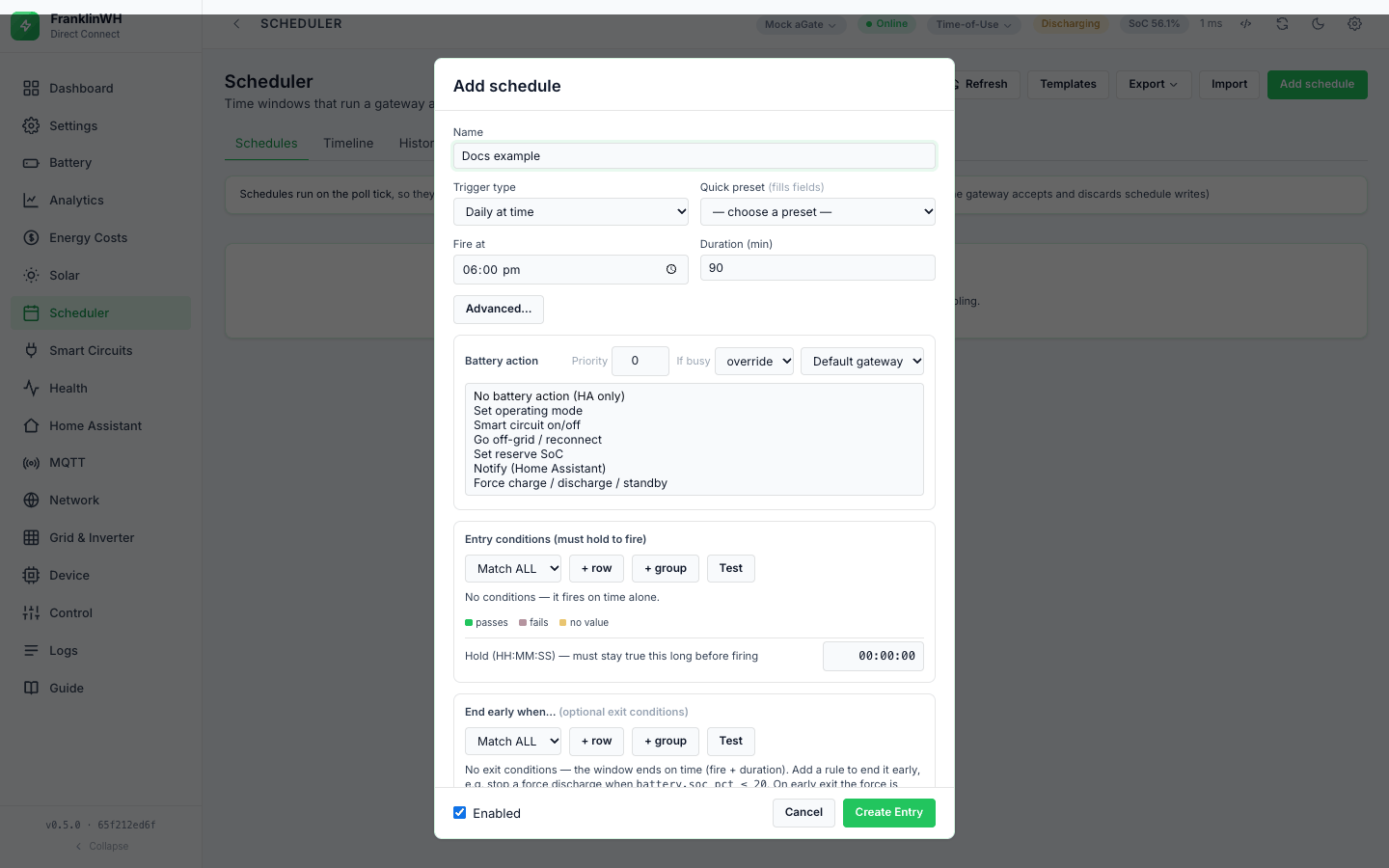
The action is what a schedule does when it fires. Each schedule has one Battery action (or No battery action (HA only)) plus any number of Home Assistant actions.
Summary
The Battery action list comes from the bridge (GET /api/schedules → actions). Each
action shows a note from the code under the list.
| Battery action (UI) | API action.kind |
Parameters | What the bridge sends |
|---|---|---|---|
| Set operating mode | set_mode |
mode: tou, self or backup |
an operating-mode change (Direct Connect 1727) |
| Smart circuit on/off | smart_circuit |
circuit (1–3), on |
a smart-circuit write (1409, read back) — Direct Connect only |
| Go off-grid / reconnect | offgrid |
on, soc |
an off-grid switch (1723) — Direct Connect only |
| Set reserve SoC | reserve_soc |
mode, soc |
nothing: always skipped (see below, #129) |
| Notify (Home Assistant) | notify |
device_id, title, message |
a notification to one saved device — Direct Connect only |
| Force charge / discharge / standby | force |
direction, power, unit, target_soc |
a WSet power setpoint through the Modbus client (this bridge) to the Modbus TCP Server (aGate :502) |
| No battery action (HA only) | "" (empty) |
— | nothing; only the Home Assistant actions run |
Every action except a force is a one-shot: it is sent once per occurrence (one opening of the window) and is not sent again until the next occurrence. Nothing a one-shot changed is undone when the window closes, unless restore on exit is set (see Exit and release). A force is held for the run and released at the end of the window.
The API does not check the action when you save. action is stored as sent: an unknown
kind, a set_mode with no mode or a force with no direction is accepted. It fails or is
skipped only when it runs.
An unknown kind sends nothing and is logged fired with the text "unknown action '…'".
Not available here. One action is listed as unavailable, with its reason, rather than
hidden: smart_circuit_schedule — "the gateway accepts and discards schedule writes". The
Scheduler tab names it in its note at the top, and import refuses an entry that uses it.
Battery actions: Force Charge and Force Discharge
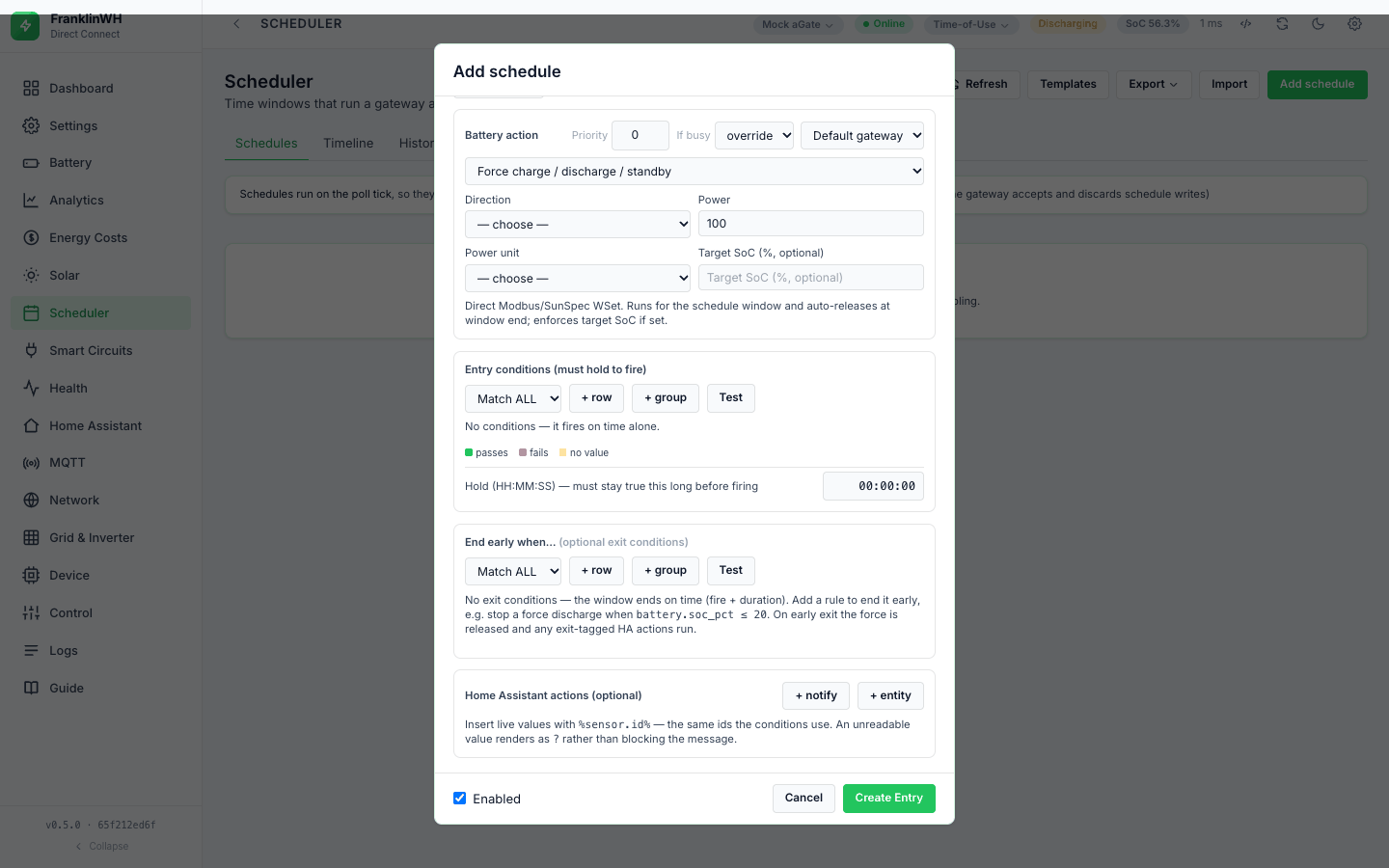
One action, Force charge / discharge / standby, with a Direction: Force charge, Force discharge or Force standby (hold). It goes through the Modbus client (this bridge) — the same path as the Battery Control widget on the Control tab — to the Modbus TCP Server (aGate :502). It is independent of the FranklinWH Modbus Bridge.
Direct Connect only: the action needs a ready Modbus client. In the form the action is
listed as "— unavailable" and cannot be picked while force_available is false; the form
then shows "Modbus unavailable:
Power and sizing
| Power unit | Where | Result |
|---|---|---|
% of inverter power (pct) |
form (default) and API | that share of the gateway's rated power for the direction |
kW (kw) |
form and API | that power, converted to watts |
W (w) |
API only | that power in watts |
- Percent is sized against the gateway's SunSpec model 702 ratings (max charge and max discharge), read through the Modbus client (this bridge) at send time. If the ratings cannot be read, 5000 W is assumed for each direction.
- kW and W are sent as given. The bridge does not cap them at the rating. Whether the
franklinwh-modbuslibrary or the aGate limits them is unverified. - When you first pick the force action, the form fills in Force discharge, % of inverter
power and
100, so a new force is never 0 W by accident. - Empty power through the API is 0.
powermissing or empty reads as 0, which is a 0 W (standby) setpoint in the charge or discharge direction.
Not in this bridge: a trusted battery rating. The Modbus Bridge refuses a force until the rating is calibrated or confirmed by a measured peak. This bridge has no such check: it trusts the 702 rating (or 5000 W). There is no overshoot guard either (see Outcomes and audit).
A refused force is logged as fired
When the Modbus client (this bridge) is off, unreachable or SunSpec does not answer, the reason comes back as text such as "force charge: This bridge's Modbus client is off …". The scheduler decides success by looking for the words failed, error or not confirmed. This text has none of them, so the run is recorded fired and is not retried. Check the History detail, not just the status. Issue #191.
What is written
- The bridge connects to the Modbus TCP Server (aGate :502) through the Modbus client (this bridge), unit id 2, and reads the 702 ratings.
- It sends one
BatteryCommandwith the signed power (charge positive, discharge negative, standby 0) through thefranklinwh-modbuslibrary, which writes the WSet setpoint (SunSpec model 704). Which registers the library writes is the library's; it is not re-checked here. - On success it starts its own watchdog (below), logs dispatch-start under the
battery filter in History, and records the dispatch in the
dispatchestable so a restart can find it.
The bridge reads nothing back after the send: success is what send_command returns.
- The bridge does the releasing. It does not give the library a duration. Its watchdog thread checks every 5 seconds and releases at the time limit or the target SoC. The module notes that the aGate's hardware revert timer is cosmetic on this firmware, so a running bridge is the only thing that ends a force (a claim from the code's comment, unverified here).
One force at a time, for the whole bridge
The Modbus client (this bridge) keeps one active dispatch in memory, for all gateways. A second force (another gateway, for example with gateway scope all) replaces the first one's watchdog. The first gateway's time limit and target SoC are then no longer enforced; only its window-end release is left. The SoC reader is shared the same way. From a code read; not verified on hardware. Issue #194.
Retries inside one send. A force that reports failed is retried by the shared resilience layer up to 5 times in the same tick, with waits of about 5, 10, 20 and 40 s, bounded by the window end. The tick waits for it, so every gateway's schedules wait too. Mode, circuit and off-grid writes get 2 attempts. Then the run is failed and the scheduler retries it on later ticks (see Outcomes and audit).
The window end is the retry deadline
The deadline is the window's close. For an Always entry and a zero-duration window there is no close, so the fallback (fire time + duration on today's date) is now or in the past and the deadline becomes 1 second: one attempt only.
An unknown outcome cannot happen here today
The resilience layer can return unknown (the write may have landed) and the scheduler
would settle such a run without retrying. But the action body never raises, and a failed
result is turned into a ConnectionError, which counts as "never arrived". So scheduler
actions end ok, failed or skipped, never unknown. The unknown path is only
exercised by tests that mock it.
Parameters you can set only through the API
| Param | In the form | Effect |
|---|---|---|
target_soc |
yes: Target SoC (%, optional) | Charge stops at SoC ≥ target, discharge at SoC ≤ target. Checked every 5 s against the gateway's last poll. Empty or 0 = no target. Ignored for standby. |
| time limit | no field | Always the schedule's Duration (min) × 60. 0 = no time limit. |
unit: "w" |
no | power in watts |
The time limit comes from Duration (min), not from the window.
A force in a Recurring windows schedule stops after the hidden Duration (min)
Recurring windows hides Duration (min), but the schedule still has one, and a new schedule starts with 90. A force in a 17:00 → 20:00 window therefore releases after 90 minutes. Use Daily at time or Weekly at time for a force, with the duration you want (#160).
Saving from the form keeps whatever else the action object holds: the form edits a copy of the stored action and sends it back whole.
Battery actions: Force Standby
Force standby (hold) sends 0 W: the battery neither charges nor discharges. It needs the same ready Modbus client (this bridge) as charge and discharge.
Battery actions: Release
Not in this bridge. There is no schedule action that only releases (#162). A force is released at the end of its window, by its exit conditions, by Stop, by its own time limit or target SoC, or by the Release control on the Control tab.
Non-battery actions: Reserve and Operating Mode
| Param | Values |
|---|---|
Operating mode (mode) |
a picker of the gateway's three modes, stored as tou, self or backup |
| Param | Values |
|---|---|
mode, SoC (%) (soc) |
shown in the form, but never written |
The mode picker lists the gateway's own mode names, stored by work mode (1 → tou,
2 → self, 3 → backup); with no gateway data it offers Time-of-Use, Self-Consumption and
Emergency Backup.
A set_mode with no mode (API) fails when it runs and is retried.
A mode or off-grid write that the aGate rejects is logged fired
set_mode returns ok only when the aGate answers result 0. But a rejection is written as
"mode -> tou: {'ok': False, 'result': 3}", which has none of the words the scheduler
looks for (failed, error, not confirmed). So it is recorded fired and not
retried. Off-grid behaves the same. A smart-circuit write is checked properly: NOT
confirmed counts as a failure. Issue #191.
Set reserve SoC never writes. It is always skipped with "reserve_soc skipped: no local
write path exists … needs a cloud provider", even when cloud credentials are set up and
POST /api/cloud/reserve works. A skip counts as success, so it is logged fired (#129).
Not in this bridge: mode-write-locked. The Modbus Bridge marks a gateway whose mode writes are ignored. This bridge does not.
If busy applies to force actions only: a mode change is sent even while another schedule's force is running. In the same tick, though, a mode schedule and a force schedule on one gateway compete for the same resource and only the higher priority runs (see Priorities and conflicts).
No battery action (HA only)
Choose No battery action (HA only). The schedule sends nothing to the gateway and only its Home Assistant actions run. It claims no resource, so it never competes with other schedules. With no HA actions either, it still fires and logs fired — nothing to do.
Exit conditions still apply to such a schedule: they close its window early and run its exit-time actions (see Exit and release).
Run now on such a schedule runs its On entry and Entry & exit HA actions (guards honoured) and logs manual.
Home Assistant actions
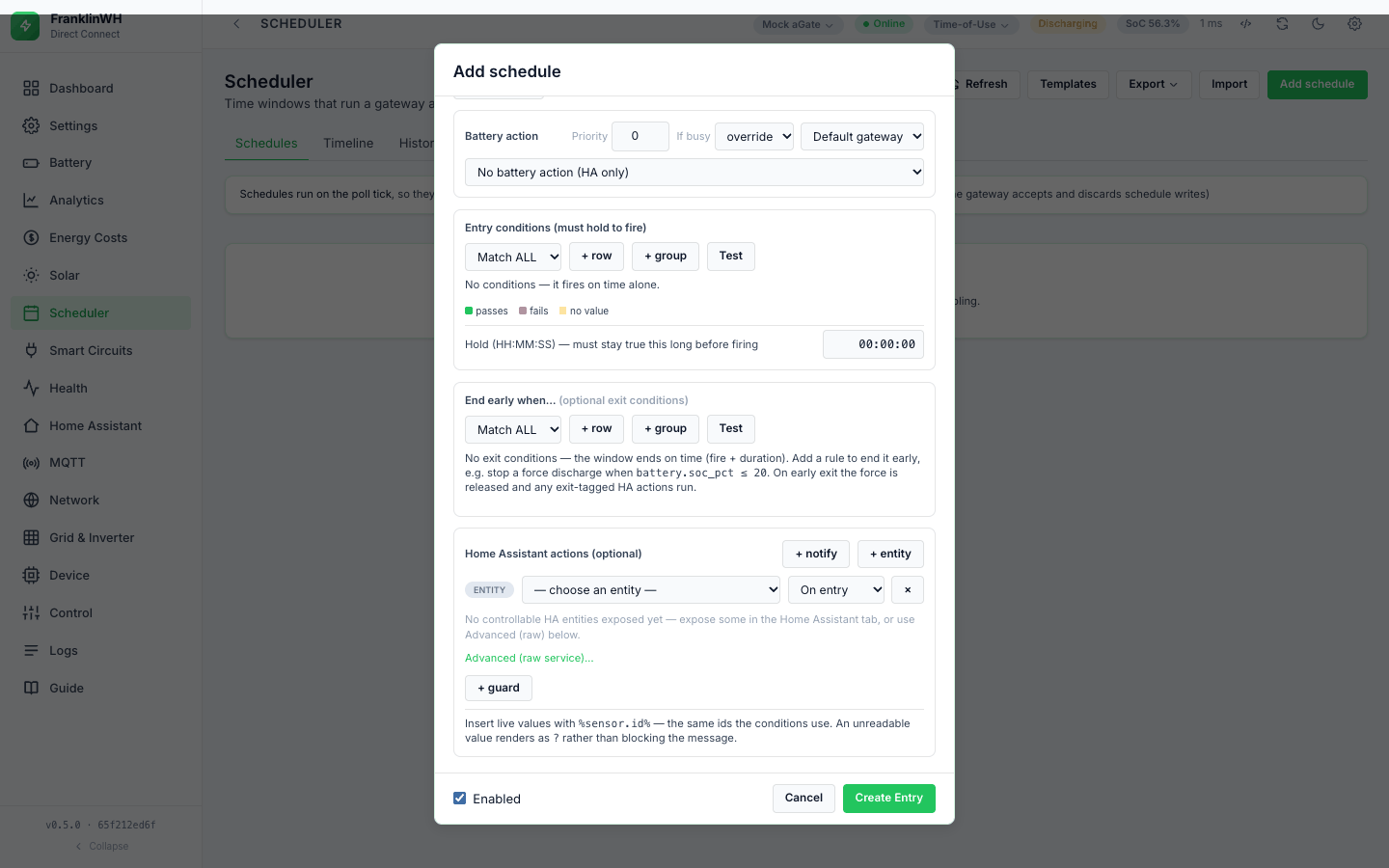
Under Home Assistant actions (optional):
- + notify adds a message to a saved notification device. It is disabled until you add one.
- + entity adds a service call. It is disabled until a Home Assistant instance exists. The guided picker lists the controllable entities you exposed on the Home Assistant tab (switch, input_boolean, light, select, input_select, number, input_number, button, scene, script) and offers the control for the domain: Turn On / Turn Off / Toggle, an option, a value, press, or run. Advanced (raw service)… takes any domain, service, entity and a JSON data payload.
| Field | Values | Notes |
|---|---|---|
| Kind | NOTIFY, ENTITY (guided), SERVICE (raw) | |
| Notify device | a saved device | Settings notification devices |
| Title, Message (notify) | text | no length limit, no required field |
| When | On entry, On exit, Entry & exit | |
| Guard (+ guard) | sensor, operator, Value or Lookup | runs the action only if it holds at that moment |
The API and the form do not check HA actions. An incomplete row is saved as it is. When it runs it is skipped with the reason: "service skipped: no HA instance selected", "…domain and service are required", "notify skipped: device no longer exists", or "…is switched off".
A raw service whose data is not valid JSON is skipped: "service skipped: data is not valid
JSON".
A guided entity action calls /api/services/<domain>/<service> with the entity and its data.
Direct Connect only: the Notify battery action. Notify (Home Assistant) can also be chosen as the Battery action. Its device is a free-text device id, not a picker. It behaves like a notify HA action that runs at fire time and claims nothing.
When they run
| When | Runs |
|---|---|
| On entry | each time the schedule fires, after the battery action |
| On exit | at each closing edge of the window: the time ends, or the exit conditions become true |
| Entry & exit | both |
-
On-entry actions do not run while the entry conditions fail or the hold is counting.
-
They run once per successful occurrence.
- Stop does not run the exit actions; Run now runs the on-entry actions.
On-entry actions run even when the battery action failed, and again on each retry
The bridge runs the on-entry HA actions right after the battery action, whatever its result. If the action failed, the run is retried later in the window (30 s, then doubling), and the HA actions run again each time. A "Discharge started" notification can therefore arrive several times for a discharge that never started. Issue #203.
On-exit actions can run when the schedule never fired
Exit-time actions run at the closing edge of the window, not at the end of a run. A schedule whose entry conditions failed for the whole window still sends its On exit message. Exit conditions that turn true, false and true again run the exit actions each time. Issue #189.
Guards
+ guard adds one condition to an HA action, checked against the live values at the moment
the action is due. The API also takes a {match, conditions} tree. False, or no value: the
action is skipped silently, with no History row.
Placeholders in notifications
Title and message can quote live values with %sensor.id%, the same ids as the conditions:
-
A sensor with no value, or an unknown id, prints
?. The message is still sent. -
Numbers print as stored (no rounding).
- Ids with more than one dot work;
ha:ids do not, because the colon is not matched, so%ha:…%is left as typed (#169). - Direct Connect only: placeholders also work in a service call. They are filled in the entity id and in every text value of the data.
-
Direct Connect only: run variables.
%schedule.name%,%schedule.id%,%schedule.priority%,%schedule.action%,%gateway.id%,%run.phase%(fire or exit),%run.occurrence%,%run.attempt%,%run.at%and%run.resource%describe the run that sends the message. They are not set for Run now, where they print?. -
Run now builds its values from the gateway's last poll and Home Assistant only, so tariff, weather and constant placeholders print
?there.
Failure alerts
Not in this bridge. A failed scheduled action sends no notification: the resilience layer could, but the scheduler calls it without a notifier, so failures reach History and the log only (#172). The notification triggers under Settings (aGate offline, off-grid, dispatch, SoC) are a separate engine; the dispatch trigger has its own gaps (#173), and the push master switch does not stop every notification (#171).
What is logged
There are no per-action rows. The result of each HA action is part of the schedule's row:
fired (the on-entry results after the battery result, joined with ;), exit (the exit
results) or manual (Run now). A skipped guard leaves no trace.
A failed HA call does not usually fail the run: only a result containing failed or NOT
confirmed does, and the HA helpers report errors as HTTP 500 or token rejected.
Dependencies by action
| Action | Needs |
|---|---|
| Set operating mode | the gateway reachable over Direct Connect |
| Smart circuit on/off | the gateway reachable over Direct Connect, and the circuit installed |
| Go off-grid / reconnect | the gateway reachable over Direct Connect |
| Set reserve SoC | nothing works today (#129) |
| Notify (Home Assistant) | a notification device and its Home Assistant instance |
| Force charge / discharge / standby | the Modbus client (this bridge) switched on (Control → Modbus client), and the Modbus TCP Server (aGate :502) answering SunSpec |
| HA action: notify | a notification device |
| HA action: entity | a Home Assistant instance, and the entity exposed (guided) |
| No battery action | nothing |
The scheduler does not use MQTT for actions.
Smart circuits, off-grid and notify (Direct Connect only)
Smart circuit on/off writes the circuit's state with a full-block read-modify-write and reads it back. The result says confirmed or NOT confirmed; NOT confirmed counts as a failure and is retried. Two schedules on different circuits do not compete.
Go off-grid / reconnect sends the off-grid switch with a SoC (default 5). Its code note says: "consequential; confirm before enabling a schedule that uses it." A scheduled write does not ask for the confirmation that the Control tab asks for.
On/Off is read strictly (since 0.5.5). true, on, yes, 1 mean on and false,
off, no, 0 mean off, as text or not; anything else is refused and nothing is written to
the gateway (the run is logged as an error). Saving a schedule stores a real true/false, and
saving one with an unreadable value through the API is refused with 422. Import stores a real
true/false when it can read the value, and otherwise leaves it for the engine to refuse.
Before 0.5.5, Off in the form turned a circuit on (#188, fixed in 0.5.5)
Before 0.5.5 the form stored Off as the text "false", which the engine read as on: a
schedule set to turn a smart circuit Off turned it on, and one set to reconnect
went off-grid. If you had such a schedule, check what it did in History, and open
and save it once so it is stored as a real true/false.
Related pages: Exit and release, Outcomes and audit, Targets, Dependencies and troubleshooting.